









A healthcare technical SEO audit needs to check five things without delay: crawlability, PHI-safe analytics, page speed and mobile Core Web Vitals, structured medical schema, and accessibility. Start with three checks in the first 48 hours: Search Console coverage errors, robots.txt rules, and whether any tracking scripts are running on authenticated patient pages. Everything else, from schema to site architecture, follows once those are confirmed clean.
TL;DR:
- Conduct an initial crawlability check within 48 hours, focusing on search console errors, robots.txt rules, and tracking scripts on authenticated pages.
- Ensure only patient-facing pages are indexed by verifying canonical tags, URL parameters, and fixing any stray noindex tags from staging environments.
- Improve mobile page speed and Core Web Vitals by optimizing images, deferring scripts, and leveraging caching, with performance confirmed through PageSpeed Insights.
- Audit tracking scripts on authenticated pages to prevent PHI leakage, establishing BAAs with vendors or moving to server-side event collection where necessary.
- Maintain site architecture and local signals by verifying location page indexation, NAP consistency, and schema implementation to maximize local visibility.
Table of Contents
- How to scope and run this audit
- Technical diagnostics: crawlability, robots.txt, sitemaps, and crawl logs
- Indexation and canonicalization: getting the right pages indexed
- Page speed and Core Web Vitals for the mobile patient journey
- Security and PHI leakage risks in analytics and tracking scripts
- Structured data and schema for medical entities and services
- Mobile-first checks and WCAG accessibility priorities
- Local visibility signals for clinics and multi-location practices
- Tools and metrics to monitor after the audit
- Common issues and how to prioritize the fixes
- A practical rollout plan and how to verify each fix
- How AdJet approaches healthcare technical SEO audits
- Compliance beyond HIPAA: GDPR and other data handling rules
- Content accuracy and trust signals for medical pages
- Auditing patient forms and appointment booking systems
- Site architecture and navigation for healthcare visitors
- Why compliance has to lead, not follow
- How AdJet helps put audit findings into action
- Sources
- FAQ
How to scope and run this audit
Before you touch a single page, gather the right access and the right people. A rushed audit misses the exact problems that create legal exposure or tank rankings.
You will need:
- Search Console and Analytics access (or server-side equivalents), plus CMS admin and server log access.
- Google Business Profile login for every location, and staging/dev credentials if the site was recently migrated.
- Stakeholders in the room: the marketing manager, a dev or IT lead, a compliance or privacy officer, and whoever owns the content.
- A three-phase plan: quick wins you can ship this week, diagnostics that need data over a few days, and remediation sprints for larger fixes.
Skipping the compliance officer is the most common shortcut we see, and it is the one that causes the most rework later. A technical fix that touches patient data needs sign-off before it ships, not after.
Technical diagnostics: crawlability, robots.txt, sitemaps, and crawl logs
Crawl problems are usually invisible until you look at logs, not just Search Console — this website audit checklist: actionable steps to boost SEO provides practical guidance and tooling recommendations for thorough audit workflows. Run these checks in order:
- Pull robots.txt and check for leftover staging rules. A common failure mode after a site migration is a
Disallow: /rule that was never removed, or a rule blocking/providers/or/locations/folders by accident. - Cross-reference crawl logs with Search Console’s Coverage report to find pages returning 4xx or 5xx errors, or pages marked “Excluded” that should be indexed.
- Check for redirect chains, where one URL redirects three or four times before landing on the final page, and consolidate them into a single hop.
- Verify the sitemap lists every patient-facing page and excludes anything that should stay private.
Pro Tip: When you see a mass exclusion in Search Console, check the crawl date against your last deployment or migration first. Most mass exclusions trace back to a single rule change, not dozens of separate problems.
Indexation and canonicalization: getting the right pages indexed
The goal here is simple to state and easy to get wrong: only patient-facing pages should be indexed, and nothing private or duplicate should compete for rankings.
- Use the URL Inspection tool on your most important pages (homepage, service pages, provider bios) to confirm Google sees the version you intend.
- Check for canonical tags pointing to the wrong page, a frequent issue when a provider bio template accidentally canonicalizes to a generic “our team” page instead of itself.
- Handle URL parameters from booking widgets or filters with parameter rules or canonical tags, so you are not creating dozens of near-duplicate indexed pages.
- Fix stray noindex tags, often left over from a staging environment and never removed after launch.
Provider bio pages are worth a second pass on their own. They tend to inherit template issues that get missed because nobody audits them individually.
Page speed and Core Web Vitals for the mobile patient journey
Most patients searching for a clinic, especially with an urgent need, are on a phone. Speed problems here cost you both rankings and appointments.
Target recommended Core Web Vitals thresholds on mobile for good user experience, such as keeping Largest Contentful Paint (LCP) fast and Cumulative Layout Shift (CLS) minimal to prevent jumps in UI elements like booking buttons and forms. Interaction responsiveness (INP) should also be kept within an acceptable range, especially on appointment forms.
Common fixes, roughly in order of impact: convert images to modern formats like WebP with responsive srcset, defer non-critical JavaScript (often third-party marketing tags), enable caching and a CDN, and tune server response times for dynamic pages like booking flows.
Google’s PageSpeed Insights combines lab data (Lighthouse) with real-world field data (CrUX), so you can compare how a page performs in a controlled test against how actual patients experience it, and confirm a fix actually moved the needle after deployment.

Security and PHI leakage risks in analytics and tracking scripts
This is the section most general SEO audits skip entirely, and it is the one with the most legal weight in healthcare.
The federal guidance is direct: HHS/OCR guidance on tracking technologies states that tracking technologies on user-authenticated webpages, like patient portals, can create HIPAA obligations because they may collect protected health information such as IP addresses, medical record numbers, appointment dates, and other identifying details. If a marketing pixel or analytics script captures that data and sends it to a vendor without a Business Associate Agreement in place, that is a compliance gap, not a technical footnote.
To audit this properly:
- Identify every script running on authenticated pages, not just the homepage or marketing pages.
- Inspect the actual event payloads being sent, not just which tools are installed. A script can look harmless and still be passing appointment dates or email addresses in the background.
- Map every vendor that receives this data and confirm whether a BAA is in place.
Pro Tip: Do not assume a tag manager audit is enough. Open the network tab in your browser’s developer tools on a live patient portal page and watch what actually gets sent before you decide anything is safe.
Remediation usually means one of three paths: remove trackers from authenticated pages entirely, move to server-side event aggregation that strips identifiers before transmission, or formalize BAAs with vendors and encrypt the data in transit. Whichever path you choose, document it in a risk register, because “we didn’t think it applied to us” is not a defense.
Structured data and schema for medical entities and services
Structured data does not fix a technical problem, but it does help search engines and AI tools understand who you are, what you treat, and where you practice, and that clarity increasingly determines whether you show up in AI-generated answers at all.
Priority schema types for a healthcare site:
- MedicalBusiness or MedicalOrganization for the practice itself.
- Physician or Person schema for provider bios, tied to correct credentials.
- Service schema for individual treatments or specialties.
- FAQ schema on pages that genuinely answer patient questions.
- LocalBusiness properties on every location page for multi-site practices.
Schema markup helps healthcare organizations provide machine-readable data about physicians, services, and conditions, which improves the odds of rich results and clearer entity recognition. Reference Schema for exact property definitions, and avoid adding properties that overstate a clinical claim your practice cannot substantiate. Test every implementation with Google’s Rich Results Test and monitor the “Enhancements” section of Search Console for errors after each deployment.
Mobile-first checks and WCAG accessibility priorities
Mobile and accessibility issues overlap more than most teams expect, and both carry legal weight beyond rankings.
- Test on real devices, not just emulators, especially for forms, click-to-call buttons, and embedded maps, since these are where conversions happen or fail.
- Prioritize accessibility fixes that block both users and bots: semantic heading structure, descriptive alt text, properly labeled form fields, full keyboard navigation, and link text that describes the destination instead of “click here.”
- Treat WCAG 2.1 Level AA as your working baseline. DOJ rulemaking on ADA web accessibility references WCAG 2.1 Level AA as the technical standard for public entities and has extended some compliance deadlines, which signals where enforcement attention is heading even for private practices.
Sequence these fixes by risk and resources: form labeling and keyboard access first, since they block conversions and violate the clearest WCAG success criteria, then visual and structural fixes as a longer project.
Local visibility signals for clinics and multi-location practices
A technically clean site can still underperform in the local pack if directory signals are inconsistent.
- Audit your Google Business Profile settings to confirm service-area versus physical-location configuration matches how patients actually visit you.
- Check NAP consistency, meaning name, address, and phone number match exactly across your site and major citation sources.
- Confirm each location page is indexable and canonicalized to itself, not folded into a single generic “locations” page, and that it carries LocalBusiness or Place schema.
When a well-reviewed clinic still underperforms locally, the cause is often a blocked location page or missing structured data, not a reviews’ problem. Our guide to local SEO for clinics goes deeper on the Google Business Profile side of this.
Tools and metrics to monitor after the audit
You need a small, consistent toolset rather than a dozen overlapping dashboards.
- Google Search Console for coverage, indexing, and enhancement errors.
- PageSpeed Insights and CrUX for lab and field performance data, alongside Lighthouse for one-off audits.
- A crawl-log analyzer to catch bot behavior that Search Console alone will not show.
- RUM (real user monitoring) tools and a basic security scanner for ongoing checks.
Track coverage errors, indexed page counts, LCP/INP/CLS trends, 4xx and 5xx rates, sitemap submission status, and organic referral trends weekly for the first month after fixes ship, then move to a monthly cadence with alerts set for sudden coverage drops or Core Web Vitals regressions.
Common issues and how to prioritize the fixes
Most healthcare audits turn up a similar pattern of problems. Here is how to triage them:
- Quick wins (days, not weeks): remove incorrect noindex tags, stop PHI-related tracking on authenticated pages, compress oversized images, and fix broken redirect chains.
- Medium projects (weeks to a couple of months): rebuild thin or duplicate service pages, implement missing schema, and clean up parameter handling.
- Longer projects (months): full WCAG remediation, site architecture redesign, server consolidation, and RUM implementation.
Weigh each finding by impact versus effort. A noindex error on a high-traffic page is high impact and low effort, so it goes first. A full accessibility overhaul is high impact but high effort, so it gets scheduled, not rushed.
A practical rollout plan and how to verify each fix
A realistic schedule keeps PHI-sensitive changes from getting rushed past compliance review.
- Weeks 0 to 2: critical fixes, tracking removal, noindex corrections, and redirect cleanup.
- Weeks 2 to 8: performance work and schema implementation.
- Months 2 to 6: accessibility remediation and structural changes to navigation or site architecture.
Verify each phase before moving to the next: check Search Console coverage counts, compare lab and field Core Web Vitals before and after deployment, and QA new templates on at least two device types.
Pro Tip: Any change that touches a patient-facing form or portal should go through change control with compliance sign-off, a confirmed BAA if a new vendor is involved, and a documented rollback plan before it goes live.
How AdJet approaches healthcare technical SEO audits
Our workflow follows a consistent pattern: discovery and access setup, diagnostics across crawlability, speed, and tracking, a prioritized remediation plan, then QA and measurement once fixes ship.
Across clinics we work with, three issues show up more than any others: PHI leakage from marketing pixels on portal pages, stale staging robots rules that quietly block provider pages after a redesign, and missing medical schema that leaves AI tools with no clear picture of what the practice actually offers. Many clinics come to us after a previous audit missed the tracking issue entirely, because it required watching network traffic rather than just reading a checklist. Remediation timelines vary by scope, but tracking and indexation fixes typically move fastest, while schema and accessibility work take longer to implement properly. Whether that work makes sense in-house or with an agency usually comes down to whether your team has someone who can read crawl logs and translate compliance guidance into a deployment plan.
Compliance beyond HIPAA: GDPR and other data handling rules
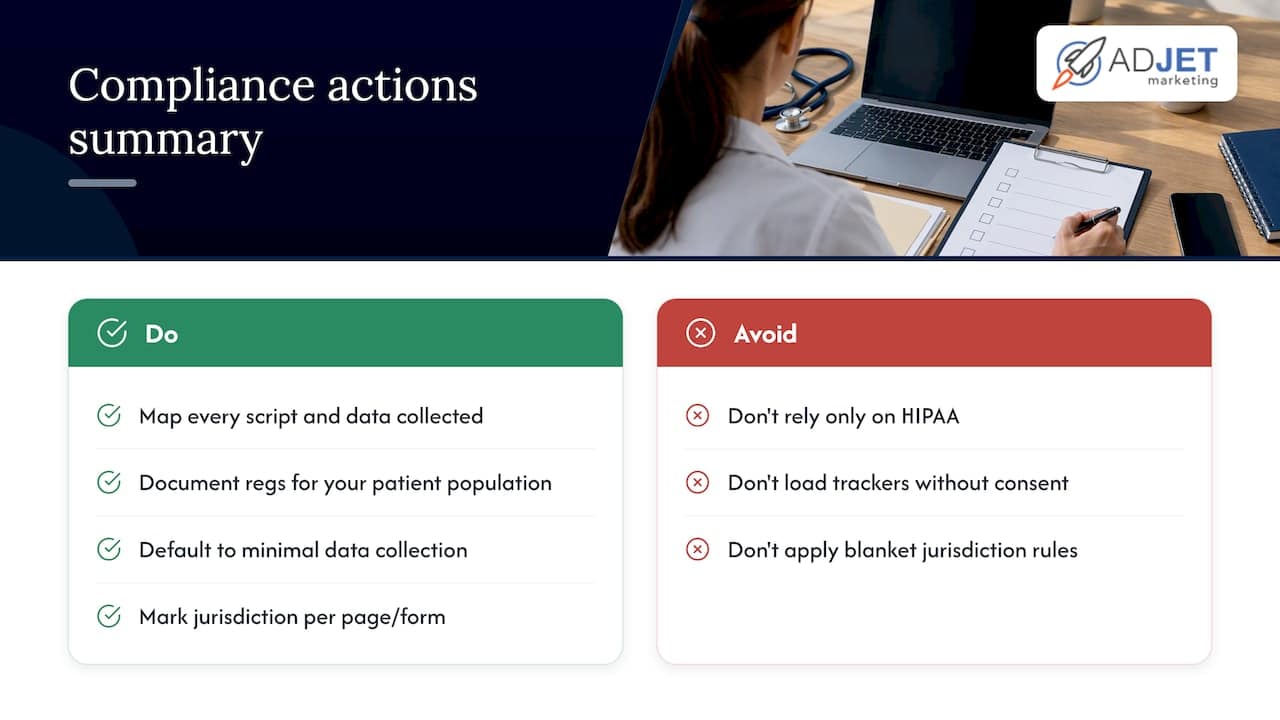
HIPAA is the primary framework for protected health information, but it is not the only regulation that touches a healthcare site’s SEO and data handling. If your practice serves patients located in the European Union or European Economic Area, forms and tracking scripts that collect personal data from those visitors can fall under GDPR, which has its own consent and data-processing requirements separate from HIPAA. This matters for technical SEO because consent banners, cookie behavior, and third-party script loading all affect page speed and crawlability, not just legal exposure.
Several states have also passed their own health data privacy laws that extend protections beyond what HIPAA covers, particularly for data collected outside a formal patient relationship, such as a symptom checker or a general contact form. The technical fix mirrors the HIPAA approach: know what every script on your site actually collects, know which regulation applies to which visitor and which page, and default to minimal data collection rather than trying to sort out jurisdiction after the fact. Document which regulations apply to your specific practice and patient population, and treat that documentation as part of the audit deliverable, not an afterthought. When a rule’s applicability depends on where a patient is located or what kind of data a form collects, note that condition explicitly rather than applying a blanket policy that may not hold everywhere.
Content accuracy and trust signals for medical pages
Search engines and AI systems weigh trust signals heavily on medical content, and a technical audit should check whether your site is set up to display them correctly. Provider bio pages need accurate credentials, and any clinical claim on a service page should be attributable to a named author or reviewer where your practice supports that structure.
From a technical standpoint, this means checking that author and reviewer information is marked up consistently, that dates of publication or medical review are visible and not buried in code, and that outbound citations to medical sources use proper linking rather than plain text that search engines cannot parse as a reference. Broken citation links or missing author markup on clinical content are the kind of finding that a general SEO audit misses but a healthcare-focused one should catch every time. If your CMS allows it, confirm that author bio pages link back to the content they wrote or reviewed, since that connection reinforces the expertise signal search engines look for on medical topics.
Auditing patient forms and appointment booking systems
Booking widgets and patient intake forms are often the most technically fragile part of a healthcare site, and they carry both an SEO and a security dimension.
On the SEO side, check whether the booking widget loads in a way that blocks the page’s main content from rendering quickly, since third-party booking scripts are a common cause of poor LCP scores. Confirm the form itself is crawlable in the sense that matters: it should not be embedded in a way that hides the surrounding page content from search engines, and it should not create duplicate URLs for every calendar view.
On the security side, treat every patient form as a potential PHI exposure point. Confirm the form submits over an encrypted connection, check whether any analytics script fires on the confirmation page after a patient submits identifying information, and verify that the booking vendor has a signed BAA if it stores or transmits health information. A form that looks fine visually can still be sending appointment details to an analytics tool in the background, which ties directly back to the tracking audit covered earlier in this piece.
Site architecture and navigation for healthcare visitors
A patient visiting a clinic site is usually trying to do one of a few things fast: find a provider, check if you treat their condition, or book an appointment. Site architecture should make each of those a short, obvious path.
Check how many clicks it takes to get from the homepage to a booking action, and flag anything beyond two or three. Review your main navigation for consistency across service and location pages, since a fragmented structure, where each location page has different menu items, confuses both patients and crawlers about what the site actually offers. Confirm that service pages link to relevant provider bios and that provider bios link back to their services, creating a clear internal structure rather than isolated pages competing for the same keywords. Our guide on medical SEO strategy covers how architecture decisions affect patient acquisition beyond the technical layer.
Why compliance has to lead, not follow
The instinct in most SEO work is to chase rankings first and clean up compliance later. In healthcare, that order creates real risk: a tracking script that boosts remarketing performance for a few weeks can create a HIPAA exposure that outlasts any ranking gain. Limiting tracking scope and rolling out changes in stages protects patients and your practice at the same time.
Set KPIs that account for both sides: track conversion lift alongside a running log of what data each script actually touches, and keep both under one measurement cadence.
— Felix
How AdJet helps put audit findings into action
Once you know what needs fixing, the work is executing it correctly, and that is where most in-house teams run out of time or specialized expertise. AdJet handles the pieces that map directly to what this audit uncovers: technical and on-page SEO work to resolve crawlability and schema gaps, landing page design built to load fast and convert without compliance shortcuts, and full website design for practices that need structural or accessibility rebuilds.
Engagements typically start with a discovery call covering your current site setup, then scope into a plan, whether that is a single landing page, an ongoing SEO retainer, or a broader rebuild. If you want a second set of eyes on what your audit turned up, talk to our team about your SEO needs.
Sources
For deeper reference: HHS/OCR tracking technology guidance and HHS telehealth privacy resources cover HIPAA obligations, the DOJ ADA rulemaking covers WCAG standards, and PageSpeed Insights covers Core Web Vitals measurement.
This article is general information, not a substitute for advice from a qualified doctor. Consult a qualified healthcare professional about your own circumstances before acting on anything here.
- Hhs
- Extension of Compliance Dates for Nondiscrimination on the Basis of Disability; Accessibility of Web Information and Services of State and Local Government Entities
- PageSpeed Insights | Google Developers
FAQ
What is a technical SEO audit for a healthcare website?
It is a structured review of a site’s crawlability, speed, security, and structured data, with healthcare audits adding a layer most general audits skip: checking for PHI leakage in tracking scripts and confirming WCAG accessibility compliance. The goal is to fix what blocks both search visibility and legal compliance at the same time.
How often should a clinic run a technical SEO audit?
Most practices benefit from a full audit at least once a year, with lighter monitoring checks monthly using tools like Search Console and PageSpeed Insights. A new audit is also worth running immediately after any site migration, redesign, or new booking vendor integration.
Can Google Analytics create HIPAA compliance risk?
Yes, if it or any similar tracking tool runs on an authenticated patient page and captures identifying information. HHS/OCR guidance states that tracking technologies collecting protected health information on those pages can trigger HIPAA obligations, including the need for a Business Associate Agreement with the vendor.
What Core Web Vitals scores should a healthcare site target?
Aim for a fast Largest Contentful Paint and minimal Cumulative Layout Shift, measured primarily on mobile since most patient searches happen there. Google’s PageSpeed Insights provides both lab and real-world field data to check these scores before and after fixes.
Does AdJet handle HIPAA-compliant technical SEO fixes?
AdJet’s positioning includes HIPAA-aware processes as part of its healthcare marketing work, alongside SEO, landing page design, and website builds for medical and aesthetic practices. Specific pricing and scope depend on the plan, and details are available through a direct discovery conversation.