









Technical SEO for a medical website means making sure Google can reach, read and trust your pages, and that patients can use them quickly without their data being exposed. Content and reviews matter, but none of it ranks if a page is blocked, slow, broken on a phone or loaded with tracking scripts that create HIPAA risk. This guide walks through what to check, in what order, and how to confirm each fix worked.
Many clinics come to us after months of publishing service pages that never appear in search. The cause is usually not the writing. It is a noindex tag left on from the site build, a booking page that takes too long to load, or a plugin that quietly blocks a folder.
TL;DR
- Start with crawling and indexing: if Google cannot fetch and index a page, nothing else about it matters.
- Fix speed and mobile behavior on the pages that book appointments first: service pages, location pages and the booking form.
- Add structured data that matches your practice type, using the most specific schema.org type available.
- Treat tracking scripts as a compliance decision, not just a marketing one. HIPAA applies to some pages and vendors.
- Verify every fix in Google Search Console, and expect results to take weeks, not days.
Table of Contents
- What technical SEO covers on a medical website
- Step 1: Confirm Google can crawl and index your key pages
- Step 2: Fix site architecture and internal links
- Step 3: Speed and mobile usability
- Step 4: Add structured data that fits your practice
- Step 5: Security and HIPAA-aware tracking
- Step 6: Audit, fix and verify
- What to expect: timelines and budgets
- Our perspective
- Getting technical SEO handled for your practice
- FAQ
- Sources
What technical SEO covers on a medical website
Technical SEO is everything that sits underneath the content. For a clinic it breaks into six areas:
- Crawlability and indexing: can Google reach your pages and store them?
- Site architecture: are services, providers and locations organized so both patients and crawlers find them in a few clicks?
- Speed and mobile usability: does the page load and respond quickly on a phone?
- Structured data: have you told Google, in its own vocabulary, what your practice is, where it is and what it offers?
- Security and privacy: is the site served over HTTPS, and are tracking tools configured with HIPAA in mind?
- Monitoring: are you watching Search Console so a regression is caught in days, not quarters?
Healthcare adds one layer most industries do not have. Your analytics, ad pixels and chat widgets can touch protected health information, so a technical audit has to cover privacy as well as rankings. We cover that in its own section below, and in more depth in our guide to HIPAA aware technical SEO checks.
Step 1: Confirm Google can crawl and index your key pages
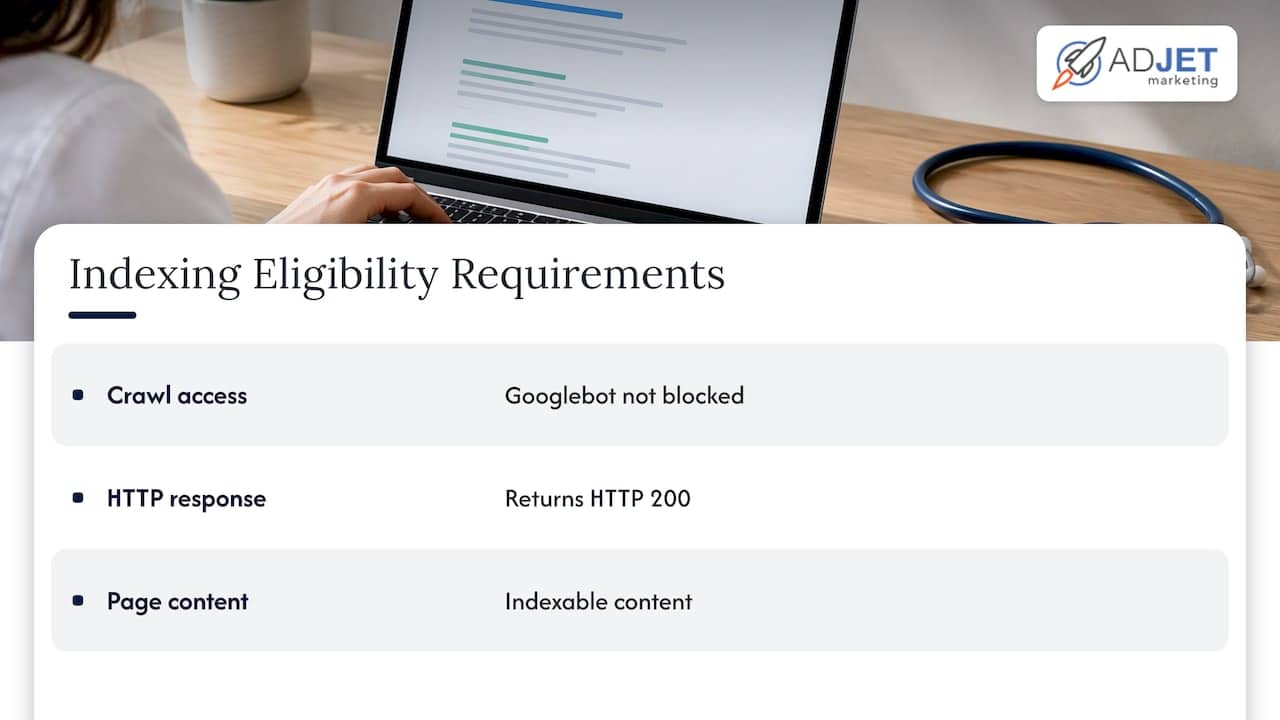
Google’s documentation lists three minimum technical requirements for a page to be eligible for indexing: Googlebot is not blocked, the page works and returns an HTTP 200 status, and the page has indexable content. Meeting them does not guarantee indexing, but missing any one guarantees the page will not appear.
Check a single page
Open Google Search Console and paste the URL into the URL Inspection tool. It shows whether crawling is allowed, whether the page fetch succeeded and whether indexing is allowed. Google’s help page explains that you can use the Test live URL option to check the page as it stands now, which is the right choice right after you change something.
Do this for your most valuable pages first: each service page, each provider page, each location page and the contact or booking page.
Check the whole site
The Page indexing report shows how many URLs Google has crawled and indexed. Your goal is to have the canonical version of every important page indexed. The “Why pages aren’t indexed” table groups excluded URLs by reason, so you can see at a glance whether the problem is a noindex tag, a redirect, a duplicate or a crawl error.
A quick sanity check is the site: operator. Google’s top tasks guide recommends searching site:yourdomain.com to see which pages are indexed. If your cardiology page is missing, you have found your first job.
The mistakes we see most often on clinic sites
- A leftover noindex tag. Staging sites are often set to discourage indexing, and the setting survives launch.
- Robots.txt used as a privacy tool. Google states that robots.txt is not a mechanism for keeping a page out of Google. If a page should not appear, use noindex or password protection. Also note that a noindex tag only works if Google is allowed to crawl the URL, so do not block it in robots.txt at the same time.
- Duplicate service pages. Separate pages for the same treatment at slightly different URLs split signals and confuse which version should rank.
- Soft errors. A page that looks fine to a patient but returns an error status to Googlebot.
- Thin location pages. Ten near-identical city pages with only the city name changed rarely get indexed or rank.
If you want the wider context for how these fixes fit a ranking strategy, our guide to effective healthcare SEO covers it.
Step 2: Fix site architecture and internal links
Patients search by condition, treatment and location. Your structure should mirror that. A workable pattern for most practices:
- A top-level page for each service line.
- A page for each specific treatment or condition beneath it.
- A page for each provider, linked from the services they perform.
- A page for each physical location, with its own address, hours and phone number.
Every important page should be reachable through normal links from the main navigation or from a related page. Pages that exist only in a sitemap, with no links pointing to them, tend to be crawled less and treated as less important.
Use short, readable URLs, keep one canonical URL per page, and avoid chains of redirects after a redesign. When you rebuild a site, map each old URL to its closest new equivalent. Losing the old URLs without redirects is one of the fastest ways to lose rankings a clinic has built over years.
On-page elements such as titles, headings and internal anchor text sit right on the border of technical and content work. Our on-page SEO in healthcare guide covers them in detail.
Step 3: Speed and mobile usability
Most patients look up a clinic on a phone, often while deciding whether to book. A slow or awkward mobile page costs you the appointment even if it ranks.
Google retired its standalone Mobile-Friendly Test and Mobile Usability report in December 2023, so you now evaluate mobile behavior with PageSpeed Insights, Lighthouse, Chrome DevTools and real devices. Test on an actual phone, not only a desktop browser resized to look small.
What to fix first
Do not try to perfect the whole site. Prioritize by the path a patient takes:
- The booking or contact page. If the form or scheduler loads late, jumps around or is hard to tap, fix that before anything else.
- Top service pages. These carry the most search traffic and the most intent.
- Location pages. These are what people open from a map listing.
- Everything else. The blog and archive pages can wait.
Common causes of slow clinic sites
- Oversized hero images and before-and-after galleries that are not compressed or lazy loaded.
- Third-party scripts: chat widgets, review badges, scheduling embeds, multiple analytics tags and ad pixels.
- Heavy page builders and plugins that load code on every page whether it is needed or not.
- Slow hosting that cannot handle traffic from an ad campaign.
- Video autoplay in page headers.
The third item matters twice. Every script you remove makes the page faster and also reduces the number of vendors that can see visitor data. We go deeper on the booking path in healthcare website speed for clinics.
A practical expectation: speed fixes are among the most measurable technical changes. You can see the difference in lab tools immediately. Field data in Search Console reflects real visitors over time, so it moves more slowly.
Step 4: Add structured data that fits your practice
Structured data is code that labels the facts on your page so search engines can read them without guessing: name, address, phone, hours, services, providers.
Google recommends using the most specific schema.org subtype of Organization that matches your organization. For a local business, that means the most specific LocalBusiness subtype, with the required and recommended fields for local business filled in. The documentation notes there are no required properties for Organization, but adding as many relevant properties as possible improves result quality.
In practice for a clinic:
- Use the most specific type that fits your practice rather than a generic one.
- Keep name, address and phone identical to your Google Business Profile and everywhere else you are listed.
- Add opening hours for each location, on that location’s own page.
- Mark up provider pages so each clinician is connected to the practice.
- Mark up FAQs only where the questions and answers are visible on the page.
Structured data describes what is on the page. It should never claim anything that patients cannot see, and it should never contain patient information. Validate the markup after each change and watch the enhancement reports in Search Console for errors.
Step 5: Security and HIPAA-aware tracking
This is where medical technical SEO differs most from other industries. Rankings depend on measurement, and measurement depends on scripts. In healthcare, scripts can create legal exposure.
Start with the basics
Serve every page over HTTPS, keep your CMS, theme and plugins updated, and limit admin access. Forms that collect anything about a patient’s condition should go to a system built for that purpose, not an ordinary contact form emailing a shared inbox.
Understand what HHS has said about tracking
The U.S. Department of Health and Human Services published guidance on online tracking technologies for HIPAA covered entities and business associates. Its main points:
- Tracking technologies on user-authenticated pages, such as patient portals, generally have access to protected health information (PHI).
- Regulated entities must configure those pages so tracking technologies use and disclose PHI in line with the HIPAA Privacy Rule, and protect electronic PHI under the Security Rule.
- A tracking vendor that creates, receives, maintains or transmits PHI on your behalf may be a business associate, which means a business associate agreement (BAA) is required.
- A privacy policy notice or cookie banner alone does not authorize disclosure of PHI.
The guidance has since been narrowed. In June 2024, a federal court vacated it to the extent it treated an IP address connected to a visit to an unauthenticated page about a health condition or provider as enough, by itself, to trigger HIPAA obligations. Public pages are therefore treated differently from portals and logged-in areas, but that is no reason to be casual. Pages where a visitor enters information, books or logs in deserve the most care. Confirm your own setup with your compliance officer or healthcare attorney.
A practical tracking review
- List every script on the site: analytics, tag managers, ad pixels, heatmaps, chat, scheduling.
- Mark which ones load on portal, booking, intake or form-confirmation pages.
- Remove anything that does not earn its place.
- For vendors that remain on sensitive pages, confirm whether a BAA is available and in place.
- Document the decision so the next person who edits the site does not undo it.
Ad platform pixels are the most common problem. Our article on the Meta Pixel and HIPAA explains the risks in plain terms. This is also why we build HIPAA-aware processes into the technical work we do for clinics rather than adding them afterward.
Step 6: Audit, fix and verify
An audit is only useful if it ends in confirmed fixes. Use this loop.
Run the audit
Combine three views: Search Console for what Google itself reports, a crawler for site-wide issues such as broken links, redirect chains and missing titles, and a speed tool for page-level performance. Search Console is the authority on whether Google indexed a page. Third-party tools estimate and are useful for finding problems, not for confirming outcomes.
Rank the findings
Sort issues by the effect on patient acquisition, not by the count a tool reports. A single noindex tag on your main service page matters more than two hundred missing image descriptions. A rough order:
- Anything blocking indexing on revenue pages.
- Privacy and tracking issues on sensitive pages.
- Booking path speed and mobile defects.
- Duplicate and canonical problems.
- Structured data errors.
- Cosmetic and low-impact warnings.
Validate each fix
When Search Console flags an issue and you fix it, use its Validate Fix feature. Google recrawls the affected pages and marks the issue Passed or Failed. According to SiteChecker’s explanation of Validate Fix, the process can take anywhere from a few days to a few weeks. For a single page, re-inspect the URL and request indexing.
Keep a change log with the date, the page and the change. When rankings move, you will know why.
What to expect: timelines and budgets
Technical fixes remove obstacles. They do not create demand. A clinic that clears a major indexing problem can see pages appear within days to weeks, but ranking gains from content and authority build over months. Speed and mobile improvements usually help conversion rates sooner than they help rankings.
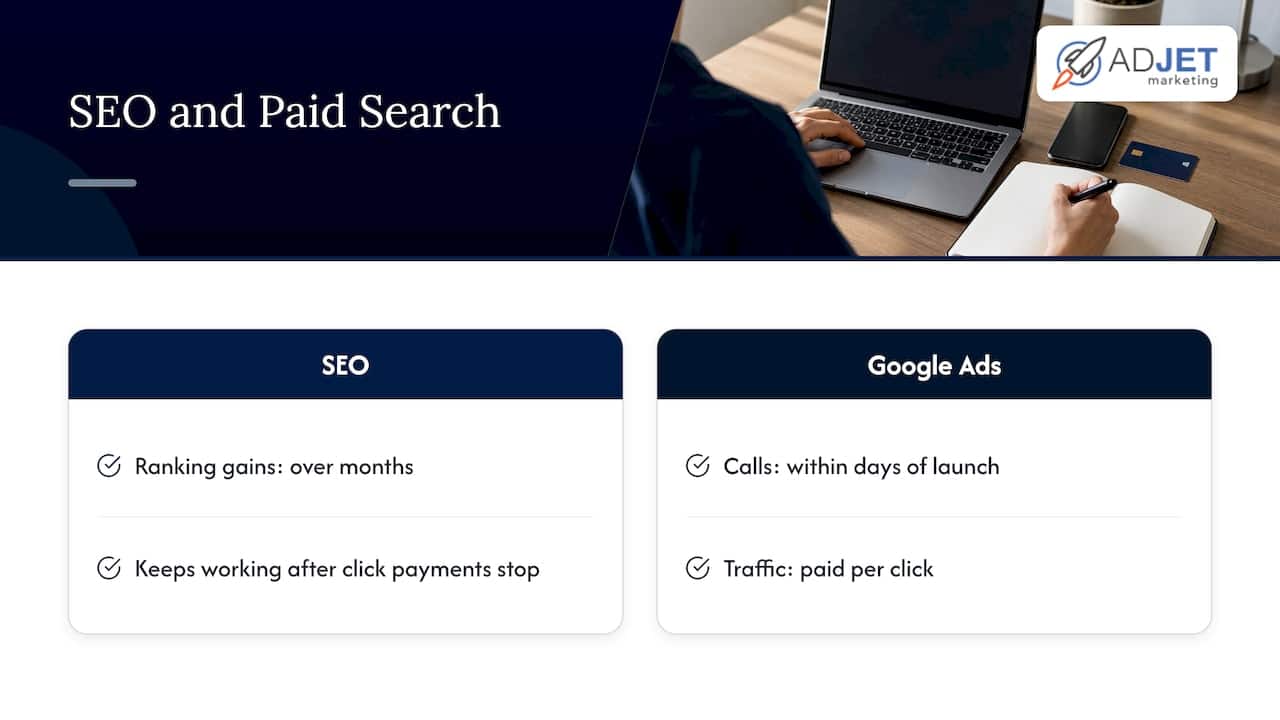
Compare this with paid search. Google Ads can produce calls within days of launch, while SEO compounds more slowly and keeps working after you stop paying for each click. Most practices do best running both, with the website technically sound first so paid traffic lands on pages that load fast and convert. No honest agency can promise a specific ranking or lead count, and you should be wary of anyone who does.
Our perspective
Most technical SEO problems we find on clinic sites are not exotic. They are ordinary oversights that sat unnoticed because nobody owned the site after launch: a noindex tag, a plugin conflict, a scheduler that slows every page, a pixel that should not be on the intake form.
The healthcare-specific part is that marketing and compliance cannot be separate projects. A site that ranks but leaks visitor data is a liability, and a site that is perfectly locked down but invisible does not bring in patients. We work as a Google Partner agency, and our processes are built to be HIPAA-compliant, so the audit covers both questions together.
Our advice is to fix in the order a patient experiences the site: can they find you, can the page load, can they book, and is their information handled properly. Report on it plainly, with data you can verify in Search Console yourself.
Felix
Getting technical SEO handled for your practice
If your team does not have time to run this checklist every quarter, we can take it on. AdJet Marketing provides search engine optimization and technical SEO audits for medical clinics, aesthetic practices and other healthcare providers, along with web design on WordPress. SEO pricing is scoped to the practice and is not published. If you are weighing site changes, our medical SEO overview explains how technical work connects to patient leads.
FAQ
How often should a medical website get a technical SEO audit?
A full audit once or twice a year is a sensible baseline, with a lighter Search Console review monthly. Run an extra audit after any redesign, migration, plugin overhaul or change in tracking tools, since those are when new problems appear.
Can robots.txt keep a patient page out of Google?
No. Google says robots.txt manages crawler traffic and is not a way to keep a page out of search results. Use a noindex tag, and let Google crawl the URL so it can see the tag, or put the page behind a login.
Does HIPAA apply to my website’s analytics?
It can. HHS guidance says tracking technologies on authenticated pages such as patient portals generally have access to PHI, and vendors handling PHI for you may need a BAA. A 2024 court ruling narrowed the guidance for public pages, so have your compliance lead or healthcare attorney review your setup.
What should I fix first on a slow clinic website?
Start with the booking or contact page, then your highest-traffic service pages and location pages. Compress images, remove unneeded third-party scripts and test on a real phone. Check results in PageSpeed Insights and Search Console.
How long until technical fixes show up in search?
Indexing fixes can show within days to a few weeks once Google recrawls the pages. Ranking and lead improvements generally take longer and depend on competition, content and authority.
Sources
- Google Search Technical Requirements
- Check if a URL is available to Google
- Page indexing report, Search Console Help
- Top tasks for Search Console users
- Introduction to robots.txt, Google Search Central
- Organization structured data, Google Search Central
- HHS: Use of Online Tracking Technologies by HIPAA Covered Entities
- What is Validate Fix in Google Search Console