









Medical website security means protecting every place your site touches patient information: forms, portals, hosting, plugins, analytics and tracking tags. For most practices the biggest exposure is not a dramatic hack. It is an intake form, a pixel or a plugin that quietly sends patient data somewhere it should not go. At AdJet Marketing we build and manage WordPress sites and landing pages for clinics, and we treat HIPAA-compliant processes as part of the build, not an add-on after launch.
This guide is for med spas, plastic surgeons, therapists, pain and psychiatry clinics, imaging centers and other practices that run a website to bring in patients. It covers what to protect, what the rules say, and the order to work in.
TL;DR
- Web applications are the top attack vector in healthcare incidents, so your site is part of your security perimeter, not just your marketing.
- Any form, scheduler or login page that collects health details can involve protected health information (PHI), and every vendor that handles it may need a Business Associate Agreement (BAA).
- Tracking tags on logged-in pages are the clearest HIPAA risk. Cookie banners do not fix it.
- Start with a documented risk analysis, then encrypt, limit access, back up and train staff.
- If something goes wrong, the law presumes a breach until you show otherwise, so keep records from day one.
Table of Contents
- What medical website security actually covers
- Where patient data meets your website
- HIPAA and your website: when it applies
- How the Security Rule works for a small practice
- A practical order of work
- Security for practices that are not clinics
- If you think your site was compromised
- Our perspective
- How we can help
- FAQ
- Sources
What medical website security actually covers
Think of your website as four layers: the code and hosting that run it, the forms and portals that collect data, the third-party tools attached to it (analytics, chat, ad tags, scheduling), and the people who log in to manage it.
The threats are the same ones facing the rest of healthcare. The HHS Health Industry Cybersecurity Practices program lists the top five health-sector threats as social engineering, ransomware, loss or theft of equipment or data, insider or accidental data loss, and attacks on network-connected medical devices. Several of those reach your website through email and staff logins rather than through the site itself.
The site is also a direct target. An HHS Health Sector Cybersecurity Coordination Center white paper summarizing Verizon’s analysis of 849 healthcare incidents in 2021 found that web applications were the number-one attack vector. The basic attacks it names include cross-site scripting, SQL injection, path traversal, denial of service and cross-site request forgery. You do not need to master those terms. You need a site that is patched, limits who can log in and does not run abandoned plugins.
Where patient data meets your website
Not every page is equally sensitive. The Office for Civil Rights (OCR), the HHS office that enforces HIPAA, gives a useful map in its guidance on online tracking technologies:
- Logged-in pages (patient portals, account dashboards): tracking technology there generally has access to PHI.
- Appointment scheduling and symptom-checker tools on public pages: these may involve PHI when they collect something like an email address or a reason for seeking care.
- Login and registration pages: these may collect individually identifiable health information.
- Vendors: any vendor that creates, receives, maintains or transmits PHI for a covered function may be a business associate that needs a BAA.
A BAA is a written contract in which the vendor agrees to safeguard the PHI it handles for you. It is the document HIPAA expects between you and your form builder, scheduler, email tool or hosting provider when they touch patient data.
For a med spa or therapy practice, the practical checklist looks like this:
| Website component | Why it matters | What to do |
|---|---|---|
| Contact and intake forms | Free-text fields often capture symptoms, treatments or medications | Collect the minimum, encrypt submissions, use a form tool covered by a BAA |
| Online booking | Reason for visit plus contact details can be PHI | Route it through a scheduler under a BAA |
| Patient portal login | Authenticated pages give trackers access to PHI | No ad or analytics tags without a BAA and a documented review |
| Analytics and ad pixels | Can send page and event data to third parties | Limit what they fire on; see our guide to the Meta Pixel and HIPAA |
| Plugins and themes | Outdated code is a common way in | Keep updated, remove unused ones |
| Admin accounts | Shared or weak logins expose everything | Unique logins, role-based access, multi-factor authentication |
HIPAA and your website: when it applies
HIPAA applies to your website when the information collected through it, or passed to a vendor, includes PHI. OCR’s guidance states that the rules apply when tracking technologies collect or disclose PHI, and that electronic PHI must be protected under the Security Rule.
Two points from that same guidance save clinics from false comfort:
- A privacy policy, notice or terms-of-use statement does not by itself permit you to disclose PHI to a tracking vendor.
- A cookie accept/reject banner is not a valid HIPAA authorization.
If a vendor will not sign a BAA, OCR describes two routes: send the data through a BAA-covered customer data platform that de-identifies it, or obtain individual HIPAA authorizations.
What changed in 2024
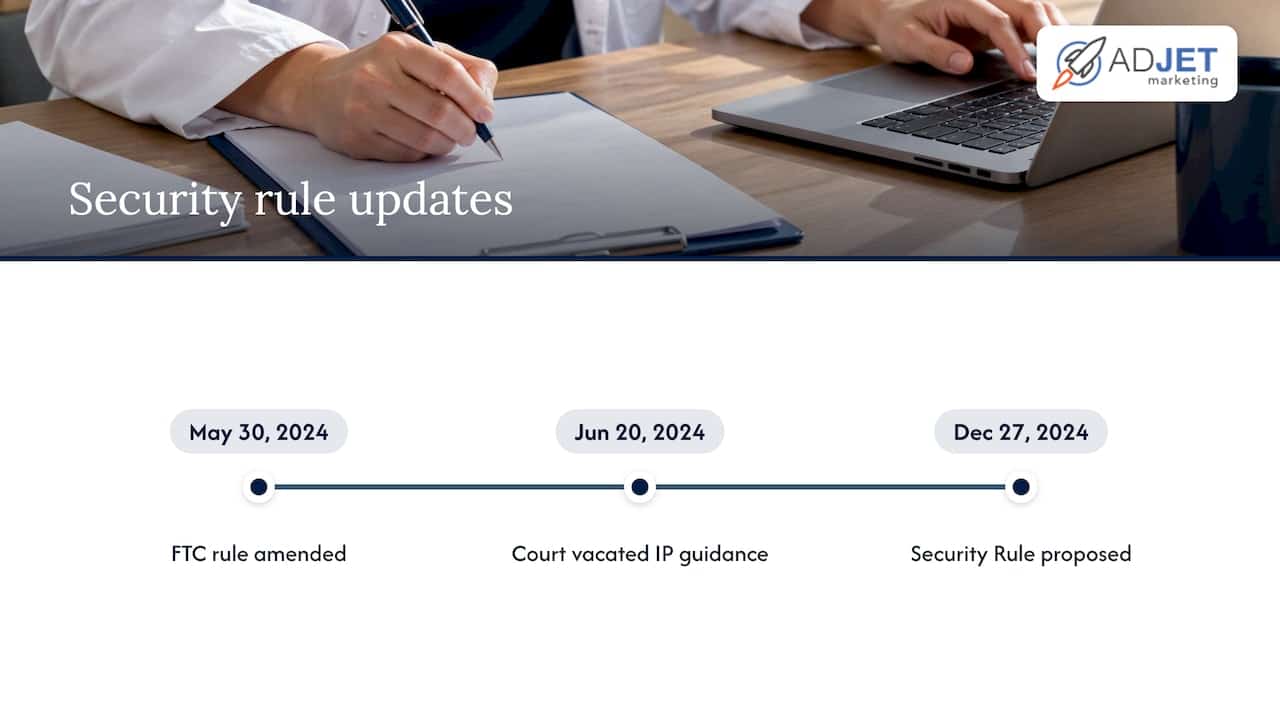
On June 20, 2024, a federal court in the Northern District of Texas vacated part of that guidance: the portion saying an IP address tied to a visit to an unauthenticated public page about specific conditions or providers triggers HIPAA. The rest of the guidance on authenticated pages and PHI collected through forms and schedulers remains. HHS has said it is evaluating next steps, so check the OCR page for updates.
There is also a second regime for some businesses. The FTC’s Health Breach Notification Rule, amended May 30, 2024, covers vendors of personal health records and related entities that are not HIPAA-covered. They must notify individuals, the FTC and, for 500 or more residents of a state, the media within 60 calendar days of discovering a breach.
OCR also proposed changes to the Security Rule itself. Its December 27, 2024 notice of proposed rulemaking would require encryption of ePHI at rest and in transit and multi-factor authentication, with limited exceptions. It is a proposal, not final law, but it points to where expectations are heading. Building those controls in now costs less than retrofitting them later.
How the Security Rule works for a small practice
The Security Rule asks covered entities and business associates to protect the confidentiality, integrity and availability of all ePHI they handle, and to guard against reasonably anticipated threats. NIST’s SP 800-66r2 adds that the rule is flexible: controls should fit your size, complexity and technical setup. A three-provider clinic need not copy a hospital, but it must document why it chose what it chose.
A Congressional Research Service report explains the structure: “required” specifications must be adopted, while “addressable” ones must be assessed for reasonableness, with documented reasons and an equivalent alternative if you do not implement them. Risk analysis and risk management are the foundation.
HHS’s small-practice security guide sorts safeguards into three groups:
- Administrative: training, written procedures, assigned responsibility.
- Physical: facility and device controls.
- Technical: access controls, encryption, auditing, backups.
It recommends a benefit-versus-cost analysis when choosing, and monitoring whether the safeguards work. Sometimes a new staff procedure can stand in for an expensive tool. Sometimes a tool is worth buying to automate a burdensome procedure.
A practical order of work
Here is the sequence we use when a clinic asks us to look at its site.
1. Run and document a risk analysis
The HHS and ONC Guide to Privacy and Security of Health Information calls a risk analysis the first compliance step under the Security Rule. List every place the website collects or transmits patient information, every vendor behind it and every person with admin access. Write down what could go wrong with each. Include ransomware, which OCR recommends adding to risk analyses.
2. Inventory every tag, plugin and vendor
Open your site’s tag manager and plugin list. For each item, answer: does it see patient information, who receives it, and is there a BAA? This is where most clinics find surprises: an old ad pixel, a chat widget, a form plugin installed years ago. Our four-step audit for healthcare remarketing PHI leaks walks through this for advertising tags.
3. Fix your forms
The American Dental Association notes that encryption protects information submitted through website forms, and that properly encrypted patient information is not subject to breach notification as long as the decryption key or password was not compromised. That is a strong reason to get this right. Our guides to HIPAA-compliant forms and to what makes an intake form HIPAA-safe cover builders, fields and BAAs in detail.
Two rules of thumb: ask only for what you need before the first visit, and keep clinical detail out of general contact forms.
4. Lock down access
Give every person a unique username and password, set role-based access so a front-desk user cannot edit site code or export all submissions, and turn on multi-factor authentication for the admin area and email. The HHS and ONC guide recommends unique credentials and role-based access, and the Dec 2024 proposal points toward multi-factor authentication.

5. Encrypt and back up
Use HTTPS across the entire site, encrypt stored submissions, and keep tested backups stored separately from the site. Backups are what turn a ransomware event from a crisis into an inconvenience. Contingency planning is also part of OCR’s ransomware recommendations, alongside anti-malware procedures, limiting access to ePHI and training users to spot and report malicious software.
6. Protect email and train staff
HHS’s HICP program says the two most common phishing methods, credential theft and malware droppers, both arrive by email, so small organizations should concentrate extra controls on email systems. The American Medical Association adds that ransomware actors increasingly threaten to sell or leak patient records if the ransom is not paid. A short, regular staff training on suspicious links and attachments is among the cheapest controls you can add.
6a. Review on a schedule
Plugins update, vendors change terms, staff turn over. Put a quarterly review on the calendar: tags, plugins, admin users, backups. HHS advises monitoring the effectiveness of safeguards and reassessing your IT environment regularly, and a dated checklist is how you show you did.
Security for practices that are not clinics
Real estate agents, private schools and cannabis retailers are not usually HIPAA-covered entities, but the website basics still apply: patched software, limited admin access, encrypted forms, backups and a vetted list of third-party scripts. Lead forms hold names, phone numbers and financial intent, and a compromised site damages trust the same way. If you handle health information in any form, such as an ADA therapy practice or a wellness program, treat it under the clinic rules above.
If you think your site was compromised
Act quickly and keep notes. Under the HIPAA Breach Notification Rule (45 CFR 164.400-414), an impermissible use or disclosure of PHI is presumed a breach unless a risk assessment shows a low probability of compromise. The Washington State Health Care Authority’s privacy toolkit summarizes the four factors: the nature and extent of the PHI, the unauthorized person involved, whether the PHI was actually acquired or viewed, and how much the risk has been mitigated.
For serious cyber incidents, the HICP main document recommends contacting your FBI Field Office Cyber Task Force, reporting to US-CERT and the FBI’s IC3, and contacting HHS’s Health Sector Cybersecurity Coordination Center. Your attorney should be involved early, since notification deadlines and state laws may apply. Your risk analysis, tag inventory and BAA files are what make that conversation shorter.
Our perspective
Many clinics come to us after a bad experience with lead quality or after a compliance scare, and the two are connected more often than owners expect. A site built only to rank and convert, with every tag switched on, often leaks the very information that regulators care about.
We build the other way around. Security and compliance decisions come first: which forms collect what, which vendors sit behind them, which pages are allowed to run which tags. Then we design for conversion inside those limits. A site you can defend is a site you can safely advertise.
Be realistic about timelines. Locking down forms, access and tags can be done in weeks. SEO and paid campaigns take longer to show results, and neither works well if the site underneath is a liability. That is why we treat the website, the ads and the reporting as one system.
Felix
How we can help
If your site needs to be rebuilt or tightened, our web design team builds and manages WordPress websites for clinics with HIPAA-compliant processes. Our published pricing for landing page work includes a Starter Plan at $299 per month, a Premium Plan at $1,500 per month and a single landing page at $2,000 one-off, listed on our landing page design page. For a full-site rebuild, our guide to medical website cost shows what U.S. practices typically pay, and our healthcare website redesign plan lays out the steps.
FAQ
Does HIPAA apply to my practice website?
It applies when the site collects, transmits or discloses PHI, for example through intake forms, schedulers, portals or tracking tags that capture identifiable health details. A static page with general information generally does not. OCR’s guidance describes how this plays out for authenticated and unauthenticated pages.
Is an SSL certificate enough to make my site secure?
No. HTTPS protects data in transit, which matters, but you also need encryption of stored submissions, access controls, patched software, backups and vendor agreements. The Security Rule asks for a documented risk analysis, not a single tool.
Do I need a BAA with my website vendors?
Yes, with any vendor that creates, receives, maintains or transmits PHI for you. That can include form builders, schedulers, email and hosting providers. A cookie banner or a privacy policy does not replace one.
Do small practices have to meet the same standards as hospitals?
The Security Rule is flexible and scalable, so controls should fit your size and complexity. You still need a risk analysis and documented decisions. NIST’s guidance says small clinics need not mirror hospital controls.
What is the first thing to do after a suspected breach?
Preserve logs and records, contain the problem, and run the four-factor risk assessment. Involve your attorney, and report serious cyber incidents to the FBI and HHS contacts listed in the HICP guidance.
Sources
- HHS Cyber Gateway: Health Industry Cybersecurity Practices
- HHS HC3: Web Application Attacks in Healthcare
- American Medical Association: Physician cybersecurity
- HHS OCR: Use of Online Tracking Technologies by HIPAA Covered Entities and Business Associates
- HHS: HIPAA Security Rule NPRM Fact Sheet
- eCFR: 16 CFR Part 318, Health Breach Notification Rule
- NIST SP 800-66r2: Implementing the HIPAA Security Rule
- Congress.gov CRS R43991: HIPAA Privacy, Security, Enforcement, and Breach Notification
- HHS: Electronic Health Information Security for small practices
- HHS and ONC: Guide to Privacy and Security of Health Information
- American Dental Association: Safeguarding Patient Information, Website Security
- Washington Health Care Authority: Health Care Privacy Toolkit
- HHS HICP Main Document
Recommended
- Ensuring Compliance With HIPAA Standards: A Key Priority For Medical Spas In 2023
- Fix HIPAA Gaps: BAA And EHR Checklist For U.S. Clinics’ Compliant Forms
- How To Comply With HIPAA Regulations In My Med Spa: HIPAA Hiccups? How To Stay Compliant And Confident
- 4 Step Audit For U.S. Clinics: Fix Healthcare Remarketing PHI Leaks