









Compliant website design is not optional. Under the Americans with Disabilities Act (ADA), websites serving the public are treated as places of public accommodation, which means inaccessible design exposes your organization to real legal liability. The practical standard courts and the Department of Justice reference is WCAG 2.1 Level AA, the technical benchmark published by the W3C. ADA-related website lawsuits remain a significant risk, consistently exceeding 4,000 filings annually in the United States as of 2026, with small businesses frequently targeted.
Two things you can do right now: run a 15-minute self-audit by tabbing through your site without a mouse, spot-checking images for alt text, and testing any embedded video for captions. Then publish or update an accessibility statement that names your WCAG target, acknowledges any known gaps, and provides a direct contact channel for users who need help.
Table of Contents
- ## 1. Why compliant website design matters: legal, ethical, and business reasons
- ## 2. What “compliant website design” actually looks like in practice
- ## 3. Legal risk and enforcement: what U.S. businesses face in 2026
- ## 4. Business benefits: how accessible design improves SEO, conversions, and trust
- ## 5. How to check whether your site is compliant: self-audit and full audit workflow
- ## 6. Practical implementation checklist for designers and developers
- ## 7. Costs and timeline: building accessibility in versus retrofitting
- ## 8. Governance and ongoing accessibility maintenance
- ## 9. Research and agency insight: litigation trends and the ROI of building accessibility early
- ## 10. Three practical next steps you can implement this month
- Key Takeaways
- Why most businesses get accessibility wrong (and what it actually costs them)
- How Adjetmarketing builds compliant, high-converting websites for healthcare and service businesses
- Useful sources and further reading
## 1. Why compliant website design matters: legal, ethical, and business reasons
The case for accessible design rests on three distinct pillars, and none of them is optional.
Legal exposure is the most immediate pressure. Title III of the ADA covers businesses open to the public, and courts have consistently ruled that this includes websites. Private plaintiffs file the vast majority of ADA web accessibility lawsuits, often targeting businesses with no prior warning beyond a demand letter. Small and mid-size businesses are disproportionately targeted because plaintiffs’ attorneys calculate that settlement is cheaper than defense.
Ethical and user impact is the second pillar. Roughly 1 in 4 U.S. adults lives with some form of disability. When a site lacks keyboard navigation, screen reader support, or adequate color contrast, it doesn’t just create friction. It cuts off access to services entirely for a significant portion of the population. For healthcare practices and service businesses, that exclusion has direct consequences for the people you are trying to serve.
Market and business upside rounds out the case. Accessible sites reach a larger audience, reduce bounce rates, and tend to perform better in search. A study cited by Section508.gov found that accessible web design reduces site abandonment and can generate meaningful additional annual revenue. The benefits of accessible design compound over time because they improve the experience for every visitor, not just those using assistive technology.
- Legal risk: ADA Title III applies to public-facing websites; private lawsuits are the primary enforcement mechanism.
- Ethical reach: 1 in 4 U.S. adults has a disability; inaccessible sites block real access to real services.
- Business value: lower abandonment, broader audience, stronger SEO, and reduced litigation exposure.
- Reputation: visible accessibility commitment builds trust with patients, clients, and partners.
Statistic: 71% of web users with a disability will simply leave a website that is not accessible, according to a UK study cited by Section508.gov.
## 2. What “compliant website design” actually looks like in practice
The phrase “compliant website design” refers to building or updating a site to meet recognized technical standards, primarily the Web Content Accessibility Guidelines (WCAG) published by the World Wide Web Consortium (W3C). Courts and the DOJ treat WCAG 2.1 Level AA as the de facto benchmark for private-sector websites under Title III of the ADA. WCAG 2.2 is the current published version and adds refinements, but WCAG 2.1 AA remains the practical legal target for most businesses.

WCAG is organized around four principles, known as POUR:
Perceivable means users can receive all information through at least one sense. Practically: every image needs descriptive alt text, videos need captions and transcripts, and content must not rely on color alone to convey meaning.
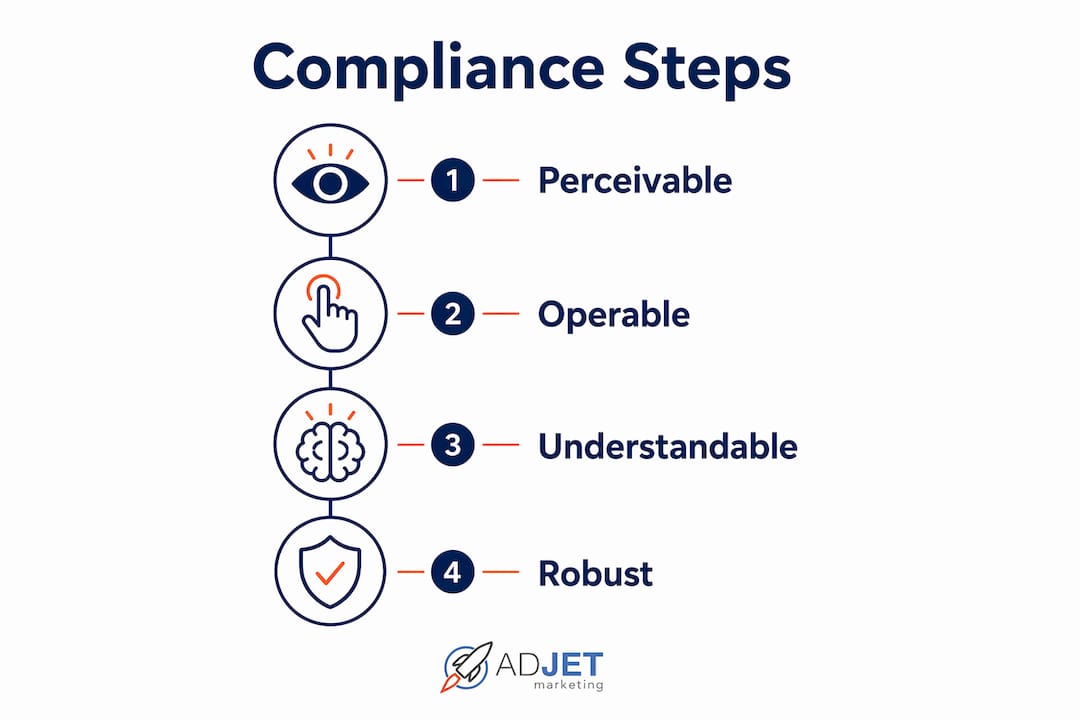
Operable means users can interact with every function. Practically: all functionality must be reachable by keyboard alone, focus order must be logical, and no content should trap keyboard focus or flash at rates that trigger seizures.
Understandable means content and interface behavior are predictable. Practically: form fields need visible labels and clear error messages, page language must be declared in the HTML, and navigation must behave consistently across pages.
Robust means content works reliably across assistive technologies. Practically: use semantic HTML elements correctly, apply ARIA attributes only where native HTML falls short, and validate markup so screen readers parse it accurately.
WCAG conformance comes in three levels: A (minimum), AA (standard business target), and AAA (enhanced, often impractical to achieve site-wide). Level AA is what the DOJ references in settlements and what most accessibility audits evaluate against.
Concrete checklist items that define compliant design:
- Descriptive alt text on all meaningful images; empty alt on decorative images.
- Logical heading hierarchy (H1 through H6) using semantic HTML.
- Color contrast ratio of at least 4.5:1 for normal text (3:1 for large text).
- Full keyboard navigation with visible focus indicators.
- Accessible form labels, error identification, and error suggestions.
- Captions on all pre-recorded video; transcripts for audio-only content.
- ARIA landmarks and roles used correctly, not as a substitute for semantic HTML.
- Skip navigation links so keyboard users can bypass repeated menus.
- Logical, predictable focus order throughout interactive components.
## 3. Legal risk and enforcement: what U.S. businesses face in 2026
ADA web accessibility litigation poses a real risk, with filings consistently exceeding 4,000 lawsuits annually in the United States as of 2026, and that figure does not include the far larger volume of pre-litigation demand letters that never reach a court docket. Small businesses are frequently targeted because plaintiffs’ law firms treat them as likely to settle quickly rather than incur defense costs.
The most common triggers in demand letters and complaints are predictable: missing alt text on images, forms that cannot be completed by keyboard, insufficient color contrast, inaccessible PDFs, video content without captions, and the complete absence of an accessibility statement or remediation contact. These are not edge cases. They are the default state of most sites built without accessibility in mind.

Courts have increasingly treated WCAG 2.1 AA as the applicable standard, and the DOJ has reinforced this in settlement agreements and guidance. Publishing an accessibility statement that names your conformance target and provides a reporting channel is treated by courts as evidence of good-faith effort, which matters in both settlement negotiations and litigation defense.
| Risk Factor | Typical Range / Detail |
|---|---|
| Annual ADA web lawsuits (U.S.) | Consistently exceed 4,000 filings annually as of 2026 |
| Demand letter settlements commonly fall into the range of several thousand dollars, plus remediation costs and legal fees. | |
| Common triggers | Missing alt text, inaccessible forms, poor contrast, no captions |
| DOJ benchmark | WCAG 2.1 Level AA for private-sector sites |
| Good-faith signal | Published accessibility statement with contact channel |
Statistic: Small business demand letter settlements commonly fall between $5,000 and $25,000 before defense costs are added.
## 4. Business benefits: how accessible design improves SEO, conversions, and trust
Accessibility work and SEO share a significant amount of technical ground. Semantic headings, descriptive alt text, clean markup, and descriptive link text all improve how search engines crawl and index your site. These are not separate workstreams. They are the same underlying decisions. For healthcare practices and service businesses, on-page SEO improvements that come from accessibility remediation can directly increase organic visibility and qualified traffic.
Conversion rates improve for similar reasons. Accessible forms with clear labels and error messages reduce abandonment. Logical navigation reduces confusion. Consistent focus management keeps users on task. These improvements benefit every visitor, not just those using assistive technology.
Brand trust is harder to quantify but equally real. Patients and clients notice when a site is difficult to use. A visible accessibility commitment, including a published statement and a clear contact path, signals that your organization takes its obligations seriously. For healthcare providers in particular, that signal matters.
Key business benefits of accessible design:
- SEO: Semantic HTML, alt text, and descriptive links improve crawlability and ranking signals. See how this connects to healthcare SEO strategy.
- Conversions: Accessible forms and clear navigation reduce friction and increase completion rates.
- Audience reach: Accessible sites serve the roughly 1 in 4 U.S. adults with a disability, plus users on mobile, slow connections, and older devices.
- Reduced legal exposure: Proactive compliance reduces the likelihood of demand letters and litigation.
- Reputation: Accessibility commitment builds goodwill with patients, partners, and regulators.
Statistic: Accessible technology can make website navigation possible or easier for 57% of all computer users, according to Section508.gov.
## 5. How to check whether your site is compliant: self-audit and full audit workflow
A 15-minute self-audit covers the highest-risk issues. Open your site and press Tab to navigate without touching the mouse. Can you reach every link, button, and form field? Is the focus indicator visible at all times? Open a few key pages and right-click to inspect images. Do they have alt attributes? Play any embedded video without sound. Are captions present? Try increasing browser zoom to 200%. Does the layout hold? These checks will surface the most common triggers before you run any automated tool.
A full audit follows a structured workflow:
- Scope the audit. Identify the pages and user flows that matter most: homepage, service pages, contact forms, appointment booking, and any gated content.
- Run automated scans. Use multiple tools because each catches different issues.
- Manual testing. Keyboard-only navigation, screen reader testing (NVDA or VoiceOver), and cognitive review of forms and error messages.
- User testing. Where possible, include people who use assistive technology. Automated and manual testing together still miss real-world interaction patterns.
- Report and prioritize. Document issues by WCAG criterion, severity, and page. Prioritize by user impact and fix complexity.
Testing tools and what they’re good for:
- WebAIM WAVE: Browser extension that overlays visual indicators directly on the page. Good for quick page-level checks and explaining issues to non-technical stakeholders.
- Google Lighthouse: Built into Chrome DevTools. Runs an automated accessibility audit alongside performance and SEO checks. Useful for CI integration and developer workflows.
- Deque Axe (Axe DevTools): Browser extension and API with one of the lowest false-positive rates among automated tools. Strong for developer-integrated testing and catching ARIA misuse.
Pro Tip: Automated tools typically catch only a portion of WCAG issues. ADA.gov recommends pairing automated checks with manual keyboard testing, screen reader passes, and real user feedback. Never treat a passing Lighthouse score as a compliance certification.
## 6. Practical implementation checklist for designers and developers
Accessibility built into the design and development process costs a fraction of what remediation costs later. The Section508.gov guidance is explicit: incorporating accessibility at the start of a project is significantly easier and less expensive than retrofitting an existing site.
Prioritize high-impact fixes first:
- Keyboard navigation: test and fix all interactive elements so they are reachable and operable by Tab and Enter/Space alone.
- Alt text: add descriptive alt to all meaningful images; set alt=“” on decorative ones.
- Form labels: every input must have a programmatically associated label; error messages must identify the field and suggest a correction.
- Color contrast: verify 4.5:1 for body text and 3:1 for large text using a contrast checker.
Design-phase rules:
- Define accessible color tokens and contrast ratios in your design system (Figma or equivalent) before any component is built.
- Include focus styles in every interactive component spec. Focus indicators must be visible and meet contrast requirements.
- Add skip navigation links to page templates.
- Establish a captions policy for any video content before production begins.
Development-phase rules:
- Use semantic HTML elements (nav, main, header, footer, h1–h6, button, label) as the first choice. Apply ARIA only where native HTML cannot express the role or state.
- Manage focus explicitly in single-page app (SPA) route changes and modal dialogs.
- Avoid keyboard traps. Users must be able to Tab into and out of every component.
- Accessible forms require visible labels, autocomplete attributes where appropriate, and inline error messages tied to the relevant field by aria-describedby.
QA-phase rules:
- Add automated accessibility checks to your CI pipeline using Axe or a similar API.
- Include keyboard and screen reader acceptance criteria in every ticket that touches UI.
- Run regression tests when new content types or components are introduced.
Pro Tip: Bake accessibility into your website design checklist from day one. Define accessible UI patterns in your component library, require alt text fields in your CMS, and test keyboard paths on staging before visual sign-off. This prevents the same issues from recurring with every content update.
## 7. Costs and timeline: building accessibility in versus retrofitting
The cost difference between building accessible from the start and retrofitting later is substantial. Industry guidance from Section508.gov consistently shows that retrofitting accessibility into an existing site costs significantly more than building it in during initial development, because remediation requires revisiting design decisions, markup, and content that were already finalized.
| Scenario | Typical Timeline | Cost Drivers |
|---|---|---|
| New build with accessibility from start | Adds 10% to design/dev time | Accessible component library, contrast tokens, QA criteria |
| Retrofit: small site (under 10 pages) | 2–6 weeks | Markup fixes, alt text, contrast, form labels |
| Retrofit: medium site (— pages) | 6 weeks | Template changes, CMS workflow updates, video captions |
| Retrofit: large/complex site | 3–6+ months | Custom code, third-party integrations, content audit |
| ADA demand letter settlement | $5,000–$25,000+ | Legal fees, remediation, monitoring |
Statistic: Designing for accessibility during initial development is substantially more cost-effective than retrofitting later, per Section508.gov and industry data.
A practical decision rule: when your estimated remediation cost approaches or exceeds 40–50% of a full rebuild, plan the rebuild instead. A rebuild lets you implement an accessible design system, modern semantic templates, and CMS workflows that prevent recurring issues. Retrofitting a poorly structured site often means paying twice: once to patch issues and again when the patches fail to hold.
For healthcare practices, this calculation matters more than most. Inaccessible appointment booking or patient intake forms are both a legal risk and a direct conversion problem. The role of website design in lead generation for clinics makes accessibility a revenue issue, not just a compliance checkbox.
## 8. Governance and ongoing accessibility maintenance
Accessibility is not a one-time project. Content changes, plugin updates, theme revisions, and new page templates all introduce new issues. Without governance, a site that passes an audit in January can accumulate significant failures by March.
Assign clear ownership:
- Designate a technical owner (developer or agency contact) responsible for code-level accessibility and scheduled retesting.
- Designate an editorial owner responsible for alt text, captions, and heading structure in new content.
- Set a retest cadence: automated scans monthly, manual keyboard and screen reader passes quarterly.
Change-control practices:
- Require accessibility review before any new page template, plugin, or theme update goes live.
- Add an accessibility acceptance criterion to your content publishing checklist: does this post/page have alt text, a logical heading structure, and accessible links?
- Review third-party scripts and embeds (chat widgets, booking tools, video players) for keyboard and screen reader compatibility before deploying.
Governance checklist (copy into your SOP):
- Monthly automated scan with Axe or Lighthouse; log and triage new issues.
- Quarterly manual keyboard and screen reader pass on top-traffic pages.
- Annual full audit against WCAG 2.1 AA (or current version).
- Accessibility statement reviewed and updated after each audit cycle.
- New content reviewed for alt text, captions, and heading structure before publication.
- Plugin and theme updates tested for accessibility regressions before deployment.
- User feedback channel monitored; reported issues logged and triaged within 5 business days.
For healthcare organizations, this governance layer also intersects with broader compliance obligations. Long-term care operators and senior living providers, for example, face overlapping digital accessibility and HIPAA compliance requirements that make structured governance even more critical.
## 9. Research and agency insight: litigation trends and the ROI of building accessibility early
The data on systemic compliance failure is striking. The vast majority of top homepages currently fail WCAG accessibility standards, with many accessibility errors present on average. That figure means the overwhelming majority of websites are currently exposed to ADA litigation risk, and most of them don’t know it.
From an agency perspective, the pattern we see repeatedly is this: a clinic or service business builds a site without accessibility in mind, runs it for two or three years, then receives a demand letter. At that point, they face simultaneous pressure to settle, remediate, and maintain the site going forward. The cost of that scenario, legal fees plus remediation plus ongoing monitoring, almost always exceeds what a properly scoped accessible build would have cost.
The multiplier effect of building accessibility into a design system is real. When contrast tokens, focus styles, semantic templates, and CMS alt text requirements are defined at the component level, every new page inherits compliance by default. Developers stop making the same mistakes repeatedly. Content editors stop publishing images without alt text. QA stops catching the same issues in every sprint. The front-loaded investment pays back across the entire lifecycle of the site.
Statistic: 94.8% of the top 1 million homepages failed WCAG standards in February 2025, averaging at least 50 accessibility errors per homepage.
## 10. Three practical next steps you can implement this month
Step 1: Run the 15-minute self-audit and fix quick wins.
Tab through your homepage, a service page, and your contact form. Check for visible focus indicators, alt text on images, captions on any video, and form labels. Fix anything you can address in your CMS immediately: missing alt text, unlabeled buttons, and missing page titles are often 15-minute fixes with high legal and UX impact.
Step 2: Publish or update your accessibility statement.
Your statement should name your WCAG conformance target (WCAG 2.1 AA is the standard), acknowledge any known limitations, and provide a direct contact method for users who encounter barriers. Courts treat a published statement as evidence of good-faith effort. If you don’t have one, draft and publish it this week.
Step 3: Schedule a full audit and remediation plan.
A full audit scopes your site, runs automated tools (Lighthouse, WAVE, Axe), performs manual keyboard and screen reader testing, and produces a prioritized issue list with remediation estimates. Budget 2–6 weeks for a small site, longer for complex or large sites. The audit output becomes your remediation roadmap.
What success looks like:
- 30 days: Quick wins fixed, accessibility statement live, audit scoped and underway.
- 90 days: High-priority issues remediated, governance checklist in place, automated scans running.
- 180 days: Full WCAG 2.1 AA conformance on core user flows, content team trained, quarterly retest cadence established.
If your audit reveals that remediation costs approach a full rebuild, use that finding to plan the rebuild with accessibility built in from the start. A compliant new build will outperform a patched legacy site on every dimension: legal risk, SEO, conversions, and long-term maintenance cost.
Key Takeaways
ADA-compliant website design reduces legal exposure, expands your addressable audience, and improves SEO and conversions simultaneously, making it one of the highest-ROI investments a website owner can make.
| Point | Details |
|---|---|
| Legal risk is concrete | ADA web lawsuits total thousands filed annually; demand letter settlements commonly run $5,000–$25,000. |
| WCAG 2.1 AA is the target | Courts and the DOJ treat WCAG 2.1 Level AA as the benchmark for private-sector websites. |
| Systemic failure is the norm | 94.8% of top homepages failed WCAG standards in February 2025, averaging 50+ errors each. |
| Build in, don’t bolt on | Accessibility built into the design system from the start costs far less than retrofitting later. |
| Adjetmarketing can help | Adjetmarketing provides accessibility audits, remediation, and compliant website builds for healthcare and service businesses. |
Why most businesses get accessibility wrong (and what it actually costs them)
The conventional wisdom treats accessibility as a compliance checkbox: run a plugin, get a score, move on. That framing is wrong, and it’s the reason so many sites remain exposed despite their owners believing they’ve addressed the issue.
Accessibility overlays and automated scanners create a false sense of security. They catch a portion of detectable issues, but they miss structural problems, focus management failures, and content-level gaps that only surface during real keyboard and screen reader testing. A site can pass an automated scan and still be completely unusable for a screen reader user navigating a multi-step form.
What we see at Adjetmarketing, particularly with healthcare practices, is that the sites most at risk are not the ones that ignored accessibility entirely. They’re the ones that installed a widget and assumed the problem was solved. When a demand letter arrives, the widget doesn’t provide a legal defense. What does provide a defense is documented good-faith effort: a published accessibility statement, a remediation log, and evidence of ongoing testing.
The business case is equally misunderstood. Accessibility work is often framed as a cost center. In practice, the same changes that improve screen reader compatibility also improve SEO performance, reduce form abandonment, and make the site faster and easier to use for everyone. For clinics and service businesses where website design directly drives patient leads, that overlap is not incidental. It’s the point.
How Adjetmarketing builds compliant, high-converting websites for healthcare and service businesses
If your site has never had a formal accessibility audit, or if you’ve relied on an overlay and aren’t sure of your actual exposure, Adjetmarketing can help you get a clear picture and a concrete plan.
We work with medical clinics, aesthetic practices, mental health providers, and service businesses to build and remediate WordPress websites that meet WCAG 2.1 AA standards and convert traffic into booked appointments. Our process covers automated and manual testing, a prioritized remediation report, and, where needed, a full accessible rebuild with governance built in from day one.
What you can expect from an audit engagement:
- A scoped audit covering your core user flows against WCAG 2.1 AA.
- A prioritized issue list with fix complexity and business impact ratings.
- Remediation support or a rebuild recommendation with timeline and cost guidance.
The outcome: reduced legal exposure, better organic search performance, and a site that works for every patient or client who visits it. To get started, request a consultation and we’ll scope the right approach for your site.
Useful sources and further reading
Standards and legal guidance:
- ADA.gov Web Accessibility Guidance — official DOJ guidance on ADA obligations for websites, including testing methodology recommendations.
- ADA.gov: 2024 Web Rule Fact Sheet — details on the Title II rule requiring WCAG 2.1 AA for state and local government websites.
- Section508.gov: Benefits of Accessible Design — federal resource on the business and user benefits of accessibility.
- Section508.gov: Guide to Accessible Web Design and Development — practical developer and designer reference for WCAG requirements.
Testing tools:
- WebAIM WAVE — browser-based accessibility evaluation tool with visual overlays.
- Google Lighthouse — built into Chrome DevTools; run via the Audits panel or CLI.
- Deque Axe DevTools — browser extension and API for developer-integrated accessibility testing.
Internal resources at Adjetmarketing:
- Choosing a medical website design company — guidance on selecting a vendor for compliant healthcare websites.
- How to create compliant landing pages that convert — practical guide combining compliance and conversion optimization.
- SEO best practices for 2026 — covers the overlap between semantic HTML, alt text, and search performance.
Recommended
- Website Design Checklist 2026: What Businesses Must Know
- How To Create Compliant Landing Pages That Convert
- Website Optimization Guide For Marketing Pros In 2026
- Designing For Success: Creating User-Friendly Cannabis Websites – AdJet Digital Marketing & Google Partner Agency | SEO Development Google Ads Social