









Step by step website design is a structured process that moves your site from a blank page to a high-converting online presence without costly missteps or wasted revisions. For clinic owners, therapists, and service professionals, a poorly planned website does not just look bad. It loses patients before they ever call. The process covered here follows industry-standard UX principles, performance benchmarks like Time to First Byte under 150ms, and proven design systems used by professional agencies. Follow each phase in order, and you will build a site that works as hard as you do.
What are the essential planning and sitemap steps in website design?
Every effective website starts with a clear goal, not a color palette. Before you touch a design tool, you need to define what your site must accomplish: book appointments, generate phone calls, build trust with new patients, or all three. Skipping this step is the most common mistake in web design projects, and it leads directly to disorganized, slow-loading sites that are expensive to fix later.
Follow these steps to build your planning foundation:
- Define your primary goal. Write one sentence describing what a successful site visit looks like. For a pain clinic, that might be: “A visitor finds our services, reads a patient review, and books a consultation.”
- Identify your audience. List the top three questions your ideal patient or client asks before choosing your practice. Your site must answer all three within the first scroll.
- Map your core pages. Most professional service sites need a homepage, services page, about page, contact page, and a privacy policy. Healthcare practices often need condition-specific or treatment-specific pages too. You can see a detailed breakdown of clinic page structure to guide your planning.
- Group pages into parent and child categories. For example, “Services” becomes the parent, with “Botox,” “Laser Treatments,” and “IV Therapy” as child pages. This structure improves both navigation and SEO.
- Map user flows. Trace the path a visitor takes from landing on your homepage to completing a booking. Every dead end in that path costs you a conversion.
Pro Tip: AI site planning tools can generate a complete sitemap and initial wireframe for a business website in under 20 minutes. Use one to draft your structure, then refine it based on your specific practice and patient needs.
A well-built sitemap is not just an organizational chart. It is the foundation your SEO, navigation, and content strategy all depend on. Getting it right at this stage saves weeks of rework later.
How does wireframing and a global design system improve website design?
Wireframing is the schematic blueprint of your website. It shows where each element lives on the page without any color, fonts, or images getting in the way. Think of it as the floor plan before construction begins.

The business case for wireframing is clear. Wireframing before visual design can reduce design revisions by up to 43%, saving significant time and budget. That number matters for small practices where every dollar and every week counts.
A strong wireframe covers:
- Page hierarchy: What does the visitor see first, second, and third?
- Call-to-action placement: Where are your “Book Now” or “Call Us” buttons, and do they appear before the visitor has to scroll?
- Content blocks: Where do testimonials, service descriptions, and trust signals sit relative to each other?
- Navigation structure: Is the menu simple enough that a first-time visitor finds what they need in two clicks?
Once your wireframes are approved, build a global design system before writing a single line of code. A global design system is the single source of truth for your brand: your color palette, typography scale, button styles, spacing rules, and reusable components. Every page pulls from this system, which means updates take minutes instead of days.
Pro Tip: Define your design system in a shared document or design file before building any page. If you change your primary button color later, you update it once and it applies everywhere automatically.
For healthcare and professional service sites, a consistent design system also builds trust. Patients notice when a site feels disjointed. Consistency signals that your practice is organized and professional.
Which platform and technology should you choose for your website?
Platform choice shapes everything: your site’s speed, your ability to update content, and your long-term SEO performance. The right platform depends on your goals, your technical comfort level, and how complex your site needs to be.
Consider these factors when evaluating platforms:
- Performance benchmarks: Professional sites target a Time to First Byte under 150ms. A slow platform undermines every other design decision you make.
- Mobile-first capability: Mobile-first design is the standard in 2026. Your platform must build for small screens first, then scale up to desktop. This approach forces you to prioritize the content that matters most.
- Ease of updates: You will need to add blog posts, update service pages, and change office hours. Choose a platform where non-technical staff can make basic edits without a developer.
- SEO control: You need full control over meta titles, descriptions, URL structures, and schema markup. Platforms that restrict these settings will limit your search visibility.
- Budget fit: Entry-level website builders work for simple informational sites. Practices with multiple locations, complex service menus, or patient portal integrations need a more capable content management system.
WordPress powers a large share of professional healthcare websites because it meets all five criteria when configured correctly. Adjetmarketing builds and manages WordPress sites specifically for clinics and practices, using lightweight, performance-tuned setups that hit the speed benchmarks patients and search engines expect.
What are the step-by-step site build phases from homepage to supporting pages?
With your plan, wireframes, design system, and platform in place, you are ready to build. Work in this order to avoid rework:
- Build the hero section first. The hero is the top of your homepage: a headline, a subheadline, and a primary call-to-action button. Your headline must state what you do and who you serve. “Pain Management for Chicago Residents” beats “Welcome to Our Clinic” every time.
- Add social proof above the fold. Place star ratings, patient counts, or a recognizable certification logo directly below the hero. Visitors decide within seconds whether to stay or leave. Trust signals keep them reading.
- Build the problem-solution block. List the top three problems your patients face, then show how your practice solves each one. A benefit grid with icons works well here. This section connects emotionally before it sells clinically.
- Include a testimonials section. Written reviews with patient names and photos outperform generic star ratings. Video testimonials perform even better. Place this section before you ask visitors to take any action.
- Add a terminal call-to-action before the footer. This is your last chance to convert a visitor who scrolled the entire page. Make it direct: “Ready to book? Call us or request an appointment online.”
- Build supporting pages. Your about page, individual service pages, contact page, and privacy policy each serve a specific function. Service pages need their own SEO focus, clear descriptions, and a booking call-to-action. The pages every clinic website needs follow a proven conversion structure that applies across specialties.
Consistent messaging across all pages matters as much as design. If your homepage promises “compassionate, same-week care,” every service page and about page should reinforce that same promise.
How to perform final technical checks and launch preparation?
A site that looks great but loads slowly or ranks poorly on Google fails its primary job. The final phase before launch is about validation, not decoration.
Work through this pre-launch checklist:
- Mobile responsiveness: Test every page on at least three screen sizes. Buttons must be tappable, text must be readable without zooming, and images must not overflow their containers.
- Page speed: Run your site through Google PageSpeed Insights. Target a TTFB under 150ms and a Largest Contentful Paint under 2.5 seconds. Compress images, remove unused plugins, and enable caching before launch.
- SEO essentials: Every page needs a unique meta title and description. Your sitemap must be submitted to Google Search Console. Internal links should connect related pages logically.
- Accessibility: Use sufficient color contrast, add alt text to all images, and confirm that forms are keyboard-navigable. Accessibility is both a legal consideration and a ranking factor.
- Contact and booking forms: Submit every form on your site and confirm that submissions arrive in your inbox. A broken contact form on launch day is a serious problem.
Pro Tip: Setting up a Google Business Profile takes about 10 minutes initially, but full optimization requires ongoing effort. Do this on launch day so local search visibility starts building immediately.
Smaller business sites built on a structured process can go from planning to launch in a few weeks. That timeline holds when you complete each phase before moving to the next. Skipping steps always adds time, not saves it.
Key takeaways
A well-designed website requires structured planning, wireframing, a consistent design system, and rigorous pre-launch testing to convert visitors into booked appointments.
| Point | Details |
|---|---|
| Plan before you design | Define your goal and sitemap before touching any design tool to avoid costly rework. |
| Wireframe every page | Wireframing reduces design revisions by up to 43%, saving time and budget. |
| Build a global design system | A single source of truth for colors, fonts, and components keeps every page consistent. |
| Choose a performance-ready platform | Target TTFB under 150ms and confirm mobile-first capability before committing to any platform. |
| Test thoroughly before launch | Check mobile responsiveness, page speed, SEO tags, forms, and accessibility before going live. |
What I have learned from watching clinics skip the planning phase
The pattern repeats more than I would like. A clinic owner comes to us with a site that was built in a rush, no sitemap, no wireframes, no design system. The pages look different from each other. The homepage talks about the practice’s history while the patient just wants to know if the clinic accepts their insurance. The contact form goes to an email address nobody checks.
The fix always costs more than doing it right the first time would have. Not just in money, but in months of lost patient inquiries while the site sits broken.
What I have found is that business owners underestimate how much the planning phase protects them. Wireframes are not a luxury for big agencies. They are the document that stops a client from saying “can we move that section?” after the developer has already built it. A global design system is not overengineering. It is the reason you can update your brand colors in an afternoon instead of a week.
The other thing I see consistently: practices that invest in a proper medical website design process get more from their SEO and Google Ads spend because the site actually converts. Traffic without conversion is just an expensive vanity metric. Build the foundation correctly, and every marketing dollar you spend afterward works harder.
— Felix
How Adjetmarketing supports your website and marketing goals
Adjetmarketing works with medical clinics, aesthetic practices, mental health therapists, and service professionals who need websites that do more than look good. We build WordPress sites designed to convert visitors into booked appointments, with performance tuning, SEO structure, and compliance built in from the start. If you want to understand how a strong web presence connects to patient growth, the guide on why marketing matters in healthcare is a practical starting point. For practices ready to pair their new site with search visibility, our clinic SEO strategies show exactly how we approach lead generation from search. Reach out to Adjetmarketing to discuss your practice’s goals.
FAQ
What is step by step website design?
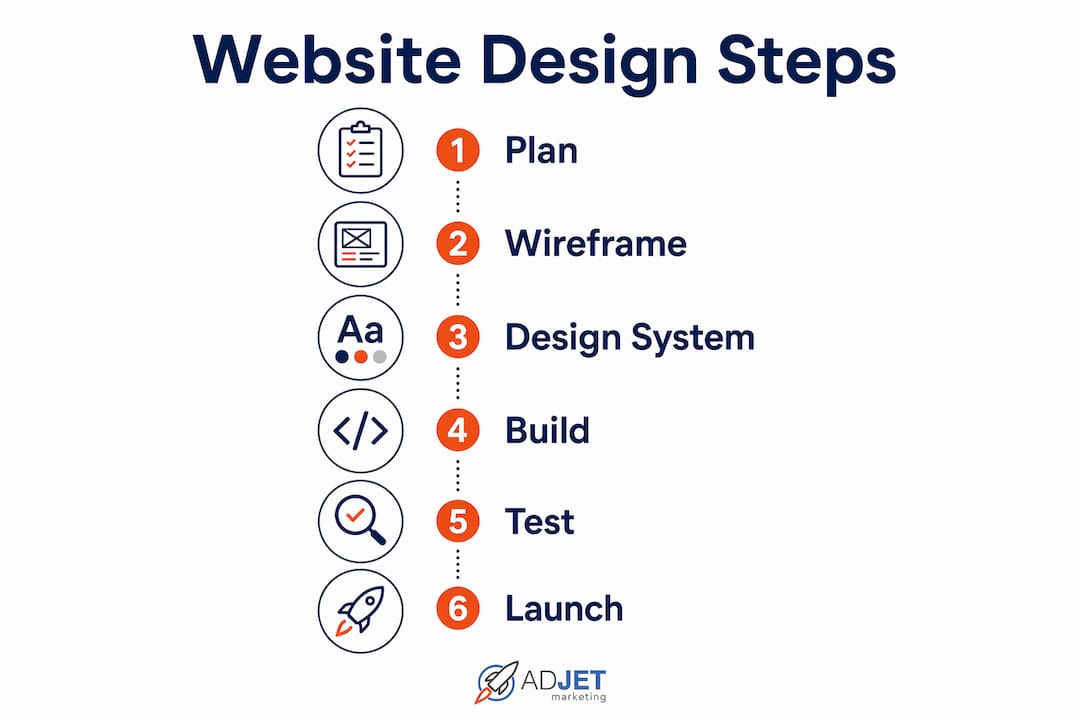
Step by step website design is a structured process that moves through planning, wireframing, design system creation, platform setup, page building, and pre-launch testing in sequence. Each phase builds on the previous one to reduce errors and rework.
How long does it take to design a business website?
Smaller business sites built on a structured process can be completed in a few weeks. Larger sites with multiple service pages, patient portals, or custom features take longer depending on complexity.
Why does wireframing matter before visual design?
Wireframing before visual design reduces revisions by up to 43%. It locks in page structure and call-to-action placement before any visual work begins, which saves time and budget.
What is a global design system and do I need one?
A global design system is a shared set of rules for colors, fonts, buttons, and components used across every page of your site. It keeps your brand consistent and makes future updates faster and less expensive.
What performance benchmark should my website hit?
Professional websites target a Time to First Byte under 150ms. Hitting this benchmark supports faster load times, better user experience, and stronger search engine rankings.
Recommended
- Real Estate Website Design That Actually Converts Buyers
- Choosing A Medical Website Design Company: Expert Guide
- 18-Step Guide To Boosting Your Cannabis Business Online – AdJet Digital Marketing & Google Partner Agency | SEO Development Google Ads Social
- Elevate Your Online Presence: Essential Website Design Tips For Therapists – AdJet Digital Marketing & Google Partner Agency | SEO Development Google Ads Social