









Phone call conversion tracking is the process of connecting a phone call back to the ad, keyword, or webpage that generated it, so you can measure which marketing actually produces booked appointments instead of just clicks. The right starting point for most advertisers is Google Ads native tracking. Set up call assets and dynamic number insertion first, then layer in CRM-verified offline imports once you can confirm which calls turned into paying customers. Everything below walks through that path in order.
TL;DR:
- Most businesses should start with Google’s native call tracking methods, focusing on calls from ads and website numbers before integrating offline conversions.
- Accurate setup involves verifying call durations, implementing DNI correctly, and testing end-to-end tracking through real calls and tag firing validation.
- Auditing real call logs helps determine appropriate minimum call length thresholds and sales cycle windows for better attribution accuracy.
- Importing CRM-verified call outcomes into Google Ads is essential for linking calls to revenue and improving bidding precision.
- Relying solely on native tracking leads to overestimating call volume unless combined with disciplined CRM imports and ongoing data validation.
Table of Contents
- What Are the Four Ways to Track Phone Calls?
- How Do You Set Up Calls From Ads in Google Ads?
- How Do You Track Calls to Website Numbers With DNI and GTM?
- How Do You Import Offline Call Conversions Into Google Ads?
- How Do You Test and Validate Call Tracking?
- How Do You Choose Call Thresholds and Attribution Windows?
- What Privacy and Account Rules Apply to Call Recording?
- What Do Agencies See When Setting Up Call Tracking?
- Should You Use a Third-Party Call Tracking Platform Instead of Google?
- How Does Call Tracking Change Your Attribution Model?
- Should You DIY Call Tracking or Hire an Agency?
- How AdJet Can Help With Call Tracking Setup
- Sources
- FAQ
- A Practitioner’s Take on Call Tracking Priorities
What Are the Four Ways to Track Phone Calls?
Before touching any settings, decide which type of call you’re actually trying to measure. Google Ads supports four distinct methods, and each answers a different question about your phone call conversion tracking setup.
- Calls from ads: This tracks calls placed directly from a call asset or call-only ad, without the person ever visiting your site. It’s the fastest signal to set up and works well for service businesses where people call straight from the search results page.
- Calls to website numbers (DNI): Dynamic number insertion swaps the phone number on your site with a trackable Google forwarding number, so a call placed after a visit gets attributed to the ad click that brought the visitor there.
- Click-to-call tracking: This measures when someone taps a phone number link on a mobile device. It tells you a click happened, not whether the call led anywhere, which is its main limitation.
- Imported call conversions: You capture the call in your CRM, confirm it turned into a real lead or sale, then upload that outcome back into Google Ads. This is the only method that ties call data to actual revenue.
Most clinics and local service businesses we work with start with the first two and add imports once their CRM data is clean enough to trust. Running all four at once before you’ve validated any of them tends to create duplicate or conflicting conversion counts, so sequence matters more than coverage.
How Do You Set Up Calls From Ads in Google Ads?
Setting up “calls from ads” tracking takes about fifteen minutes inside Google Ads, and it’s the fastest way to start seeing which campaigns actually drive phone activity.
- Go to Tools and Settings > Conversions > New Conversion Action, choose Phone Calls, then select Calls from ads.
- Pick a conversion category. Phone call lead is the right choice for most businesses using calls as their primary lead source, since it tells Smart Bidding this is a top-of-funnel action.
- Turn on call reporting. Google can analyze call recordings with AI to help flag which calls looked like genuine leads. When recording isn’t available or permitted, Google falls back to counting a call as a conversion once it passes your minimum duration.
- Set a minimum call length. This is the setting most advertisers get wrong by guessing instead of checking real call logs, which the next section covers.
- Decide on a conversion value and window, then confirm your call assets or call-only ads are live and eligible to serve.
Pro Tip: Don’t set the minimum call duration on day one. Let calls run with no threshold for a week, pull the call length report, and set your threshold based on where real leads actually cluster.
One detail that trips people up: Google forwarding numbers and AI call analysis are only available in certain countries, so confirm your business phone number falls in an eligible market before you assume the recording features will work as expected.
How Do You Track Calls to Website Numbers With DNI and GTM?
Dynamic number insertion (DNI) replaces the phone number displayed on your site with a Google forwarding number, letting you connect a call back to the specific ad click that brought the visitor to your page. This matters because a huge share of service-business calls happen after someone lands on the website, not directly from the ad.
Implementation runs through Google Tag Manager or a phone snippet placed directly in your site code:
- Confirm Google’s global site tag is installed on every page where your phone number appears.
- In GTM, create a new tag using the Google Ads Calls from Website Conversion tag type.
- Enter your conversion ID and conversion label from the conversion action you created.
- Set the trigger to fire on page views for pages showing your phone number, since DNI needs to swap the number as the page loads, not on click.
- Publish the container and confirm the number updates by loading the page in an incognito window.
If you’re using the phone snippet instead of GTM, a few parameters matter more than people expect:
- The snippet must exactly match the format of your displayed phone number, including parentheses, dashes, and spacing, or the swap silently fails.
- The
phone_conversion_callbackfunction lets you update the clickabletel:link automatically once the forwarding number loads, which is essential for mobile visitors tapping to call. - CSS class targeting lets you swap multiple numbers on the same page, useful for multi-location businesses listing several office lines.
- International formatting quirks are common; a number stored as
+1 (555) 123 4567won’t match a displayed555.123.4567without normalizing both first.
Our step-by-step conversion tracking guide for therapy and healthcare websites walks through a real implementation if you want to see this applied to a live site rather than in the abstract.
How Do You Import Offline Call Conversions Into Google Ads?
Importing calls closes the loop between a phone conversation and actual revenue, which native call tracking alone can’t do. This is the step most advertisers skip, and it’s also the one that tends to have the biggest impact on bidding accuracy once it’s running.
Google requires a specific data structure for uploaded call conversions, whether you’re pushing them through the API or a manual upload:
- Caller phone number, formatted to match exactly what Google’s forwarding number logged.
- Call start time, with a timezone that matches your account settings.
- Conversion action name, spelled and cased identically to what’s set up in your account.
- Conversion value, optional but strongly recommended if you plan to feed this data into value-based bidding.
For most small teams, a scheduled CSV upload through Google Sheets works fine and takes minutes to set up. Larger operations with high call volume benefit from the API, which allows near real-time syncing from a CRM. Either way, capturing the gclid at the time of the original web session and storing it against the CRM contact gives you the cleanest possible match back to the original ad click.
One limitation worth flagging up front: once a conversion is imported, it can’t be deleted from Google Ads. Double-check your conversion names and timestamps before your first upload, because a mistake here means correcting it with additional data rather than removing the bad rows.
How Do You Test and Validate Call Tracking?
Skipping validation is the single most common reason call tracking looks broken weeks after setup, when the real problem was never caught on day one.
- Place a real ad click, load the landing page, and confirm the phone number changes to a forwarding number before you dial.
- Make an actual test call and check that it appears in Google Ads > Reports > Call Details within a few hours.
- Open Tag Assistant while browsing the page to confirm the DNI tag fires and passes the correct conversion ID and label.
- Create one test entry in your CRM with a fake but properly formatted phone number and timestamp, run it through your import process, and confirm it lands in Google Ads as an imported conversion.
Pro Tip: Run the entire chain, ad click to CRM import, before you turn on automated bidding based on call data. A broken link anywhere in that chain teaches Smart Bidding the wrong lesson, and unwinding a bad bidding signal takes longer than fixing the tag would have.
The most frequent pitfalls: tags that were built but never published, phone number formats that don’t match between your site and your CRM, missing call timestamps, and gclids that were never captured at the original session. Every one of these is easy to catch with the test sequence above and painful to diagnose after the fact.
How Do You Choose Call Thresholds and Attribution Windows?
Setting a minimum call duration by guesswork is one of the most common mistakes in call tracking. Auditing actual call recordings and logs before you pick a number tells you where genuine leads cluster versus where junk calls and wrong numbers fall off. A threshold set too high drops legitimate short bookings; one set too low lets spam calls count as conversions.
Practitioner guidance across the industry points to baselines of about one to one and a half minutes, but the right number varies by industry and even by campaign.
Your conversion window should reflect how long your actual sales cycle runs, not a default setting left untouched since account creation:
- Home services with fast decisions often work fine with a 30-day window.
- Higher-consideration purchases like elective medical procedures or real estate often need 60 to 90 days to capture the full path from first call to booked consultation.
- Review your sales cycle length in the CRM before setting this, rather than copying a competitor’s assumed timeline.
Once you’re importing CRM-verified calls with accurate values, that data becomes the fuel for Target CPA or Target ROAS bidding. This is where closed-loop attribution changes outcomes: Smart Bidding optimizes toward whatever conversion signal you feed it, and if that signal is raw call volume rather than qualified, revenue-generating calls, it will happily spend your budget chasing more of the wrong kind of call. Optimize for the calls that convert into customers, not the calls that merely happen.
What Privacy and Account Rules Apply to Call Recording?
Call recording laws vary by state and by whether the call crosses state lines, so confirm your recording and consent practices with a qualified professional before enabling AI call analysis in your account. Some states require two-party consent before a call can be recorded at all, and your outgoing call greeting or website disclosure needs to reflect that.
Beyond legal consent, a few account-level checks matter. Your Google Ads payments profile and business verification should match your actual legal business name and address, since mismatches can delay or block call reporting features. Store any caller data you collect, whether in a CRM or a spreadsheet used for imports, only for legitimate measurement purposes, and limit access to people who actually need it for attribution or sales follow-up.
What Do Agencies See When Setting Up Call Tracking?
When we audit call thresholds for clinics and local service businesses, we typically pull two weeks of call recordings first, segment them by duration and outcome, then set the minimum threshold at the point where spam and wrong numbers clearly drop off. Guessing at a number wastes the first month of data.
The quickest wins are usually technical: DNI failing to swap numbers on mobile due to a CSS mismatch, duplicate conversion actions double-counting the same call, and tags built in GTM but never published. A full rollout, tracking plus CRM sync, typically takes one to two weeks, with ongoing optimization built into monthly Google Ads management.
Should You Use a Third-Party Call Tracking Platform Instead of Google?
Google’s native tools cover the basics well: call source, duration, and a rough AI-driven read on lead quality. Where they fall short is transcription, keyword-level call scoring, and automatic CRM contact creation, which is where dedicated AI call tracking platforms come in.
The tradeoff is straightforward. Native Google tracking is free, already integrated with your bidding, and sufficient if your only goal is feeding Smart Bidding a decent conversion signal. Third-party platforms add monthly cost but deliver richer detail: full call transcripts, natural-language scoring of what was actually said on the call, and automatic sync into CRMs like HubSpot or Salesforce without manual CSV uploads.
For a solo practitioner running a handful of campaigns, native tracking with a solid CRM import process usually covers the need without adding another subscription. For multi-location clinics or businesses fielding hundreds of calls a month where sales teams need transcripts to coach off of, the added cost of a dedicated platform tends to pay for itself in better lead qualification. Businesses exploring automated phone handling on top of tracking sometimes look at tools like an AI receptionist system to manage after-hours calls while keeping the same attribution chain intact.
How Does Call Tracking Change Your Attribution Model?
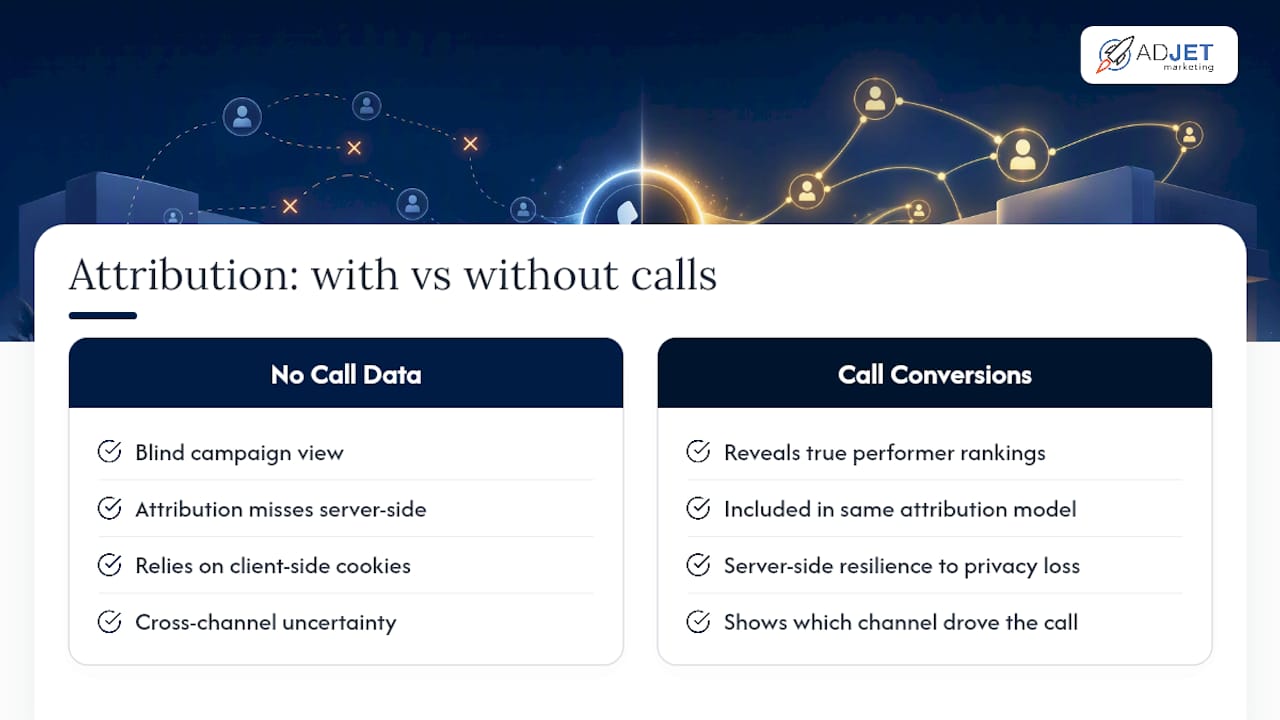
Ignoring phone calls in your attribution model creates a blind spot that skews every decision downstream of it. A campaign that looks weak on form fills alone might actually be your best performer once call conversions are counted, and vice versa.
Once calls are flowing into Google Ads as a conversion action, they sit alongside form fills and purchases in the same attribution model, whether you’re using data-driven, last-click, or a custom model. That matters because browser privacy changes have made server-side signals more reliable than client-side tracking alone, and calls are inherently server-side; they don’t depend on cookies or a browser session surviving to conversion. Scheduled offline imports and CRM syncing effectively future-proof a chunk of your measurement against the kind of tracking loss that’s been eroding form-fill and purchase data for years.
The bigger shift happens once call data feeds cross-channel reporting. If you run both Google Ads and paid social, unified call tracking lets you see which channel actually drove the call, not just which one got last-click credit on a form. Checking how LLM-driven traffic shows up in GA4 is worth doing alongside this, since AI-driven search referrals are starting to show up in analytics in ways that traditional attribution models weren’t built to catch, and calls are one of the few conversion types resilient enough to survive that shift cleanly.
Should You DIY Call Tracking or Hire an Agency?
Basic call-only campaigns or simple DNI setups are reasonable to build yourself with a free afternoon and this guide. Bring in an agency once you need CRM syncing, server-side event passing, or you’re navigating HIPAA-sensitive patient data, where a mistake costs more than the time saved doing it alone.
How AdJet Can Help With Call Tracking Setup
Getting phone call conversion tracking right takes more than following steps once, since Google Ads updates conversion settings and reporting features often enough that a setup done a year ago may already be missing signal. An agency can be the alternative to piecing this together solo: instead of guessing at thresholds or debugging a broken GTM tag on your own, getting audit, implementation, and validation as one connected process, then ongoing optimization once clean call data is available.
Our Google Ads services cover the full setup, from conversion actions and DNI to CRM import scheduling, paired with conversion rate optimization work on the landing pages your calls originate from. The typical engagement runs audit, then implementation, then validation testing, then ongoing optimization once bidding has real call data to learn from. If you want a second set of eyes on a setup that isn’t producing reliable numbers yet, reach out through our Google Ads services page to start with an audit.
Sources
- About phone call conversion tracking
- Upload call conversions – Google Ads API
- 9 AI call tracking platforms for deeper insights
FAQ
How Can I Track a Phone Call Conversion?
Set up a “Calls from ads” conversion action in Google Ads for calls placed directly from ads, and add dynamic number insertion for calls that happen after someone visits your site. For the most accurate picture, import CRM-verified call outcomes so Google Ads counts only calls that turned into real leads.
What Does Conversion Tracking Mean?
Conversion tracking means measuring which specific ad, keyword, or page led to a valuable action, whether that’s a form fill, purchase, or phone call. For phone calls specifically, it means connecting the call back to the marketing touchpoint that generated it, rather than treating calls as a disconnected, unmeasured channel.
Can I Track Phone Call Conversions in Google Ads?
Yes, Google Ads has native support for four call tracking methods: calls from ads, calls to website numbers via dynamic number insertion, click-to-call tracking, and imported offline call conversions. Businesses that need transcription or deeper call scoring often add a third-party AI call tracking platform on top of Google’s tools.
How Do I Know If Call Tracking Is Actually Working?
Run a full test: click your own ad, confirm the phone number swaps to a forwarding number, place a test call, and check that it shows up in Google Ads’ Call Details report within a few hours. Use Tag Assistant during the site visit to confirm the DNI tag is firing correctly rather than assuming it works because the page loads normally.
What Is a Reasonable Minimum Call Duration to Set?
There’s no universal number, since it depends on your industry and typical call pattern, but auditing a few weeks of real call logs before choosing a threshold is far more reliable than guessing. Many businesses land somewhere between 60 and 90 seconds after reviewing where genuine leads cluster versus where spam and wrong numbers drop off.
A Practitioner’s Take on Call Tracking Priorities
Most guides treat call tracking as a checklist to complete once and forget. That’s backwards. The setup steps matter, but the real value comes from what you do with the data six months in, and that’s where most advertisers stop paying attention.
Here’s what gets underestimated: teams spend hours perfecting their DNI implementation and then leave the minimum call duration at whatever Google defaults to, or copy a number from a blog post that has nothing to do with their actual call patterns. The threshold decision has more impact on your bidding accuracy than almost any other setting in this whole process, because it decides which calls Smart Bidding treats as real signal.
The other gap is import discipline. Native tracking tells you a call happened. It doesn’t tell you whether that call turned into a booked appointment or a wrong number that hung up after four rings. Businesses that skip CRM imports are optimizing toward call volume, which sounds productive right up until you realize half those calls never converted to anything. The advertisers who get the most out of this system aren’t the ones with the most technically elaborate setup. They’re the ones who did the unglamorous work of matching calls to actual revenue and let that data, not raw volume, drive their bidding decisions.
— Felix