









Get your Local Services Ads verification live first, then run LSAs for emergency, high-intent calls while you build out Search Ads for planned projects. LSAs charge per lead and convert urgent searches fast; Search Ads give you control over messaging and landing pages for bigger jobs. Feed booked-job data back into Google so bidding learns to chase valuable work, not just clicks.
TL;DR:
- Local Service Ads typically convert emergency searches at a higher rate than standard paid search due to trust signals like the Google Guarantee badge.
- Verification for LSAs often delays setup more than paperwork, requiring accurate licensing, insurance, background checks, and precise service categories.
- Building separate campaigns for emergency, maintenance, and installation services reduces costs and improves ad relevance by matching intent and job complexity.
- Tracking booked jobs and their value, not just leads, is crucial for effective bidding and campaign optimization, with offline conversion import being essential.
- Landing pages must match ad copy, include prominent call buttons, and be tailored to specific services to maximize conversion rates and reduce wasted spend.
Table of Contents
- Home Services Google Ads: LSAs vs Search Ads
- How Do You Set Up Local Services Ads and Pass Verification?
- How Should You Structure Search Ads Campaigns for Home Services?
- What Should You Budget, and How Should You Bid?
- How Do You Track Which Leads Actually Turn Into Jobs?
- Which Landing Page and Call Handling Habits Convert Best?
- Common Mistakes That Waste Home Services Ad Spend
- What We See Across Home Services Accounts
- How We Can Help You Get Started
- Sources
Home Services Google Ads: LSAs vs Search Ads
The two channels solve different problems, and most home service businesses lose money by treating them as interchangeable.
Local Services Ads sit above the paid search results entirely, carry the Google Verified or Google Guaranteed badge, and bill on a pay-per-lead basis rather than per click. That badge matters more than most owners expect. A homeowner with a burst pipe at 11 p.m. isn’t comparing five contractors’ websites. They’re calling whoever shows up first with a green checkmark next to their name.
Search Ads work differently. You control the keywords, the ad copy, the landing page, and the bid. That control is exactly what planned, higher-ticket projects need, since a $15,000 kitchen remodel lead deserves a landing page built around financing options and portfolio photos, not a rushed dispatch call.
- LSAs: best for emergency plumbing, HVAC breakdowns, electrical faults, and anything where trust and speed decide the job.
- Search Ads: best for installations, remodels, roofing replacements, and seasonal maintenance contracts where research time is longer.
- Combined approach: LSAs capture the immediate-need caller while Search Ads scale the planned-project pipeline in parallel, which tends to outperform running either channel alone.
Sequencing matters here. LSAs typically convert emergency searches at a higher lead-to-customer rate than standard PPC because they front-load trust before the customer even clicks. That’s why most home service accounts should get verification moving before touching a Search campaign.
How Do You Set Up Local Services Ads and Pass Verification?
Verification is the bottleneck for almost every new LSA account, and it’s rarely the paperwork itself that slows things down. It’s incomplete license or insurance documentation submitted before the business double-checked state-specific requirements.
- Gather your business license, liability insurance, and any trade-specific certifications before you start the application.
- Confirm background checks are ready for owners and any technician who might be listed on the account.
- Build your profile with exact service categories, since a mismatched category (listing “general contractor” instead of “roofing”) can bury you in irrelevant matches.
- Set your service area and hours precisely. LSAs use these to decide when you’re eligible to show, and inaccurate hours cost you after-hours emergency leads.
- Once live, review every billed lead. Google lets you dispute leads that were spam, wrong service area, or unrelated to your trade, and disputing bad leads regularly keeps your effective cost per lead honest.
- Push for reviews immediately after every job. Response speed and review volume both influence how often you appear.
Pro Tip: Respond to new leads within five minutes if you can manage it. LSA ranking rewards fast response times almost as much as review scores, and a slow callback often means the homeowner has already booked someone else.
How Should You Structure Search Ads Campaigns for Home Services?
Build campaigns around service line and urgency, never a single catch-all “home services” campaign. Separating campaigns by service line and intent typically lowers cost per lead and raises Quality Score compared with lumping everything together, because Google can match ad copy and bids far more precisely.
A workable structure looks like this:
- Emergency campaigns (burst pipe, no heat, electrical outage): tight keyword lists, call-only ad formats, aggressive bids, running 24/7.
- Maintenance campaigns (tune-ups, inspections, seasonal service): moderate bids, standard responsive search ads, landing pages that emphasize convenience and scheduling.
- Installation campaigns (new systems, remodels, replacements): higher bids justified by ticket size, landing pages built around financing, warranties, and before/after photos.
Inside each campaign, group keywords tightly by exact job intent rather than mixing “AC repair” and “AC installation” in the same ad group. Negative keywords deserve real attention here, too. Home service accounts waste a surprising amount of budget on searches like “how to fix,” “DIY,” or “parts,” which signal a homeowner looking for a manual, not a technician.
For emergency traffic, call-only campaigns or prominent call extensions often outperform a click-to-website flow, since a homeowner mid-emergency wants a phone ringing, not a page loading. Route planned-project traffic to dedicated landing pages instead, where a slower decision benefits from more information.
Pro Tip: Write at least three responsive search ad headlines that mention your response time or availability window (“Same-Day Service,” “Available Nights & Weekends”). For emergency searches, speed messaging often outperforms price messaging.
What Should You Budget, and How Should You Bid?
Most home service businesses can start meaningfully around $1,500 to $3,000 a month in smaller markets, scaling into $5,000 to $15,000 or more in competitive metros as budget and structure both affect ROI. Below the lower end, you often can’t gather enough conversion data for Smart Bidding to work well.
- Emergency keywords usually need higher bids than standard service terms, since urgency compresses the buyer’s decision window to minutes rather than days.
- Run emergency campaigns around the clock. A homeowner with no heat at 2 a.m. doesn’t wait for business hours, and neither should your ads.
- Stick with manual or Maximize Clicks bidding until you have a real conversion history, then move to Target CPA once you’ve logged a reasonable volume of actual conversions, not just clicks.
- Assign a real dollar value to each lead type based on average job value and close rate, then let that value guide how you split spend across LSAs, Search, and any Performance Max campaigns you’re testing.
Don’t chase the lowest cost per lead in isolation. A $40 lead that never books a job is worse than a $90 lead that closes at $3,000.
How Do You Track Which Leads Actually Turn Into Jobs?
Cost per lead tells you almost nothing on its own. Cost per booked job, weighted by job value, is the number that actually matters.
Start by installing call tracking with outcome tagging, so every incoming call gets marked as booked, quoted, spam, or lost. Then instrument your booking events, whether that’s a scheduling form, a CRM entry, or a dispatch confirmation.
From there, import offline conversions, meaning the booked jobs and their dollar values, back into Google Ads. This is the step most accounts skip, and it’s the one that changes outcomes most. Feeding real job value back to Google shifts Smart Bidding’s preference toward fewer, higher-value leads instead of maximizing raw lead count, which is usually what you actually want.
- Tag every call by outcome, not just by whether it connected.
- Import job values weekly at minimum, so bidding has fresh signal to learn from.
- Watch cost per booked job, not cost per lead, as your primary health metric.
- Track close rate by campaign, since a low close rate on a “cheap” campaign often means the leads are low quality.
Improving your landing page conversion rate from roughly 7% to 14% can cut cost per lead in half, often more reliably than raising bids ever will.
Which Landing Page and Call Handling Habits Convert Best?
Send every ad to a landing page built for that specific service, never your homepage. Sending paid clicks to a general homepage is one of the most common conversion killers in home services PPC, mostly because the homeowner has to hunt for the exact service they searched for.
- Match the landing page headline to the ad copy word for word where possible.
- Put click-to-call buttons above the fold, since most home services traffic arrives on mobile.
- Ask two or three qualifying questions before a full form, not fifteen.
- Show a rough price range or scope indicator. Transparency reduces bounce from price-shy homeowners.
- Train whoever answers the phone on a short script that qualifies the job type and books a time slot in the same call.
The Adjetmarketing team’s approach to conversion-focused landing pages applies the same logic across industries: match the page to the intent that brought the visitor there. For structured CRO testing ideas, a resource like Baby Love Growth’s conversion rate guide offers a solid framework for running experiments without guessing.
Pro Tip: Test one variable at a time on your landing page, headline, form length, or trust badge placement, and give each test at least two to three weeks before judging results. Home services traffic volume is often too low for faster reads to be reliable.
Common Mistakes That Waste Home Services Ad Spend
Most underperforming accounts share the same handful of problems, and they’re fixable in a predictable order.
- Generic landing pages. Fix this first. It’s usually the fastest, cheapest win available.
- Thin negative keyword lists. Audit search terms monthly and add negatives weekly for the first 90 days.
- Optimizing for lead volume instead of lead value. Pull a sample of 20 to 30 recent calls and tag outcomes honestly, even when it’s uncomfortable.
- No offline conversion import. Without job values flowing back to Google, Smart Bidding is working blind.
A rough 30/60/90 sequence: fix landing pages and negatives in the first 30 days, get call tracking and offline conversions running by day 60, then spend day 90 reviewing cost per booked job by campaign and reallocating budget toward what’s actually closing.
What We See Across Home Services Accounts
Many home service businesses come to us after running ads for months with decent lead volume and disappointing revenue. The pattern is almost always the same: leads were tracked, but job outcomes weren’t. Once we connect call tracking to actual booked-job value, the account usually looks completely different within four to six weeks, not because we changed the ads dramatically, but because Google finally had the right signal to optimize against.
Felix Shaye, who leads strategy on home services accounts, puts it plainly: most owners want more leads when what they actually need is fewer, better ones. Expect real, stable data by month two and a noticeable shift in job value by month three, assuming tracking gets fixed early rather than as an afterthought.
— Felix
How We Can Help You Get Started
There are ways to handle this yourself, and plenty of owners do, piecing together LSA verification, campaign structure, and tracking on nights and weekends between jobs. Some owners prefer to hand that off to an agency experienced in managing this setup daily and familiar with common verification document issues.
A typical starter engagement runs as an audit first, reviewing current LSA status, Search account structure, and call tracking setup, followed by setup and a measurement window before any bidding changes. That order matters more than most owners expect, since fixing tracking before touching bids is the difference between guessing and knowing.
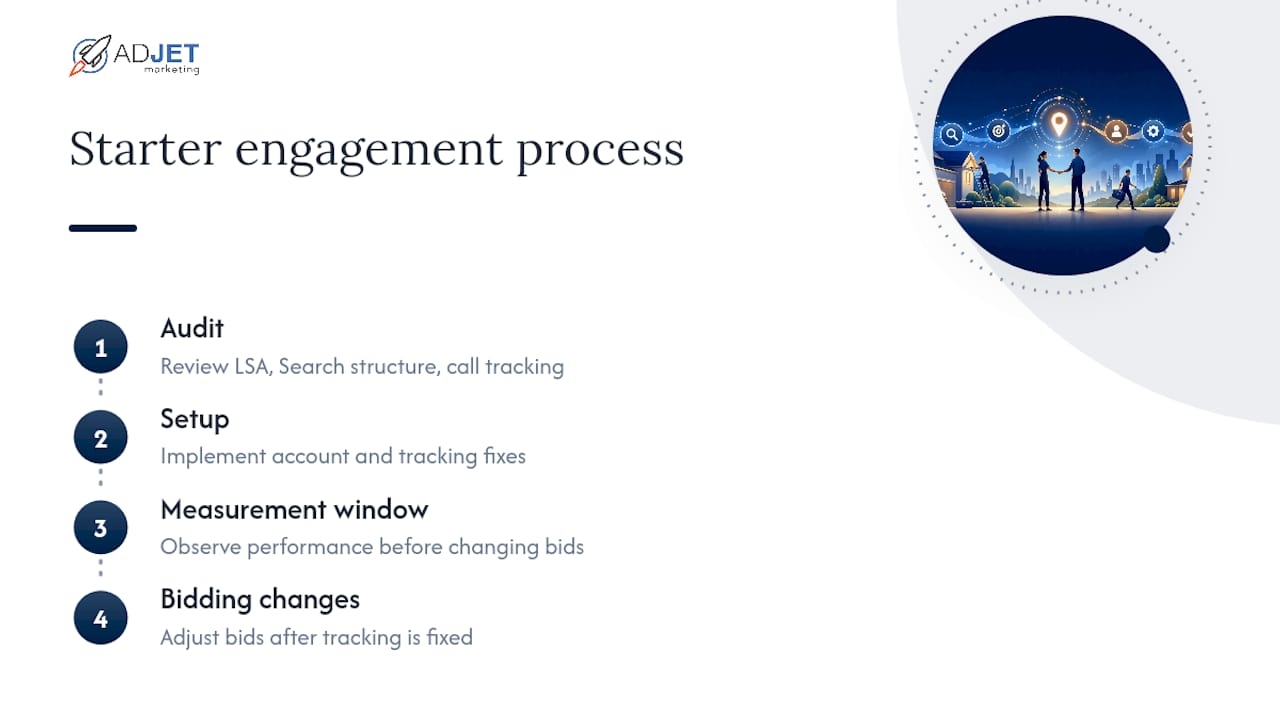
If you’re ready to see what a properly structured account looks like for your trade, our Google Ads management services page walks through what a starter engagement includes, or you can browse additional home services lead generation strategies to pair with paid campaigns.
Sources
- Reach local customers with Local Service Ads – Google Ads
- Benly
- Google Ads for Home Services: The HVAC, Plumbing and Roofing PPC Playbook – Groas
- Google Ads for Home Improvement: Setup Guide | Astra