









Your shortlist should come from three vendor categories: EHR-integrated platforms like NexHealth and Phreesia, standalone HIPAA form builders like FormAssembly, Formstack, and Jotform, and AI-based form converters like HIPAAtizer for practices migrating paper intake. The one requirement that overrides everything else: the vendor signs a comprehensive Business Associate Agreement and can document encryption, access controls, and audit logging. Small clinics generally fit standalone builders; larger practices with existing EHR workflows often do better with direct connectors.
TL;DR:
- A vendor must sign a comprehensive Business Associate Agreement that covers subcontractors, breach notifications, encryption management, and audit logging to be HIPAA compliant.
- Verify that the form builder uses TLS 1.2 or 1.3 for data in transit and AES-256 for data at rest, with clear policies on key management and access controls.
- Prioritize vendors with immutable, exportable audit logs covering all form actions and capabilities for field-level PHI tagging and secure file uploads.
- Using default email transmission of PHI or poorly scoped BAA terms are common security risks that should be eliminated before deployment.
- Implement a phased rollout with mobile-first design, conditional logic, and automatic retention policies to maximize form completion and maintain compliance.
Table of Contents
- What Makes an Online Form HIPAA Compliant?
- Which Technical Features Should You Require From a HIPAA-Capable Form Builder?
- Comparing the Leading HIPAA Form Builders for Clinics
- How Do You Choose the Right Vendor for a Pilot?
- How Do You Roll Out HIPAA-Compliant Forms Without Killing Completion Rates?
- What Mistakes Do Practices Actually Make With These Forms?
- What’s a Realistic Timeline for Rolling This Out?
- Need Help Implementing Secure Forms and EHR Integration?
- Sources
What Makes an Online Form HIPAA Compliant?
A form is not HIPAA compliant because a vendor’s marketing page says so. It’s compliant when the vendor signs a Business Associate Agreement covering how it stores, processes, and transmits protected health information, and when the underlying technical safeguards actually meet the HIPAA Security Rule’s requirements. Those are two different questions, and a lot of practice managers only ask the first one.
Start with the BAA. A vendor that refuses to sign one is disqualified immediately, no matter how polished the interface looks. But signing isn’t the whole story. You need to know what the agreement actually covers: does it include subcontractors and cloud infrastructure providers, or just the vendor itself? Does it specify breach notification timelines? AccountableHQ’s compliance guide lays out the core requirements clearly: a BAA, documented Security Rule controls, and audit trails that hold up under review.
The Security Rule itself breaks into a few practical checkpoints:
- Encryption in transit and at rest, so data can’t be intercepted or read if a server is compromised
- Access control, meaning only authorized staff can view submissions, with permissions tied to specific roles
- Audit controls, which log who accessed what and when, in a form that can’t be edited after the fact
The Privacy Rule adds a separate layer that’s easy to overlook when you’re focused on security specs. It governs what data you’re allowed to collect in the first place. The “minimum necessary” standard means your intake form shouldn’t ask for a patient’s full medical history if you only need their current symptoms and insurance information. Every extra field is extra liability with no clinical upside. Patients also retain rights over their own data, including the ability to request copies or corrections, which your vendor needs to support operationally, not just in theory.
Operational safeguards round out the picture: how long you retain submitted forms, how you delete them securely when retention periods expire, and what your incident response plan looks like if something goes wrong. A vendor might check every box on encryption and still leave you exposed if there’s no clear retention policy. Our own breakdown of what makes a HIPAA-safe intake form goes deeper into how field selection and BAA scope interact.
Which Technical Features Should You Require From a HIPAA-Capable Form Builder?
Once the BAA is signed, the real evaluation work starts. This is where you separate vendors that treat HIPAA compliance as a checkbox feature from ones that built it into the product from the ground up. Here’s what to verify in every demo:
- Encryption specs. Ask specifically for TLS 1.2 or 1.3 for data in transit and AES-256 for data at rest. Vague answers like “we use industry-standard encryption” aren’t good enough. Ask who manages the encryption keys and whether they rotate.
- Access controls. You want unique user IDs for every staff member, role-based access control so a front-desk employee can’t see clinical notes meant for a provider, and single sign-on support through SAML or OIDC if your practice already uses an identity provider. Multi-factor authentication and automatic session timeouts should be standard, not an add-on.
- Audit trails. Logs need to be immutable and exportable, covering every create, read, update, and delete action, plus e-signature events. If you can’t pull a clean audit report during a demo, that’s a problem.
- Field-level PHI tagging and conditional logic. The form should let you flag which fields contain protected health information and hide irrelevant questions dynamically, which keeps you closer to the minimum-necessary standard.
- Secure file uploads. If patients are uploading insurance cards or photos, the platform needs malware scanning and enforced file-type and size limits.
- E-signature support with tamper evidence. Consent forms and intake authorizations need signatures that can’t be altered after the fact, with a clear record of signer intent and timestamp.
- Mobile and offline capability. Pre-visit links and QR codes that let patients fill out forms on their phone before arrival cut waiting-room friction. Offline capture with sync, useful for home health or mobile clinics, matters if your practice operates outside a fixed office.
- Integration options. Direct EHR connectors, FHIR or HL7 support, and secure webhooks determine whether submitted data lands automatically in the right chart or requires manual re-entry.
Pro Tip: Ask every vendor to walk you through what happens to a submitted form in the first 60 seconds after a patient hits “submit.” If they can’t explain the encryption, storage location, and access permissions in plain language, that’s a signal their team doesn’t fully understand their own security architecture.
Comparing the Leading HIPAA Form Builders for Clinics
Some vendors build for enterprise EHR workflows, some for flexible standalone form creation, and a few specialize in converting your existing paper forms into digital ones without a rebuild. Here’s how the major players in the U.S. market stack up on the dimensions that actually matter for a practice manager evaluating a purchase.
Phreesia and NexHealth sit at the top for practices that already run on an established EHR and want intake data flowing straight into the chart without staff re-entering it. Phreesia leans toward larger and specialty practices, and it markets HITRUST and SOC 2 certifications as part of its compliance story, which matters if your practice deals with enterprise-level vendor risk reviews. NexHealth positions itself similarly for clinics wanting tighter EHR-connected scheduling and intake workflows, and its own resource on HIPAA-compliant form builders is worth reading if you’re comparing EHR-native options against standalone tools.
FormAssembly is the standalone option that shows up most often in enterprise procurement conversations, largely because its HIPAA documentation is unusually thorough about BAA scope and admin controls. Formstack covers similar ground with stronger workflow automation, useful if you’re routing forms through multi-step approval chains before they hit a chart.
Jotform’s HIPAA coverage lives behind a specific paid tier, not the base plan, a distinction Paubox’s vendor roundup flags clearly. That’s a pattern across this entire category. Vendors love to advertise “HIPAA-compliant forms” on their homepage, then bury the actual BAA-eligible plan three pricing tiers up. Zoho Forms handles this more transparently, publishing field-level PHI designation and retention controls directly in its HIPAA documentation.
HIPAAtizer occupies a different niche entirely: it’s built for practices that already have paper forms or PDFs they don’t want to redesign from scratch, using AI conversion to turn existing templates into compliant digital forms quickly. GoFormz targets a similar practical need but with a mobile-first, offline-capable angle, useful for home health visits or mobile clinics where connectivity isn’t guaranteed.
A handful of other names round out the category without needing a deep dive. Typeform, Formsite, Logiforms, and 123 Form Builder all offer general-purpose form creation with HIPAA add-ons available on specific plans, worth a look if you want a familiar interface but need to confirm BAA terms directly with sales. Cognito Forms and doForms serve similar general use cases. LuxSci focuses more on secure email and hosting than form design specifically. PandaDoc and DocuSign are document and e-signature platforms rather than dedicated form builders, useful if your primary need is signed consent documents rather than structured intake data. Tellescope and Formsort lean toward healthcare-specific workflow automation and patient engagement rather than simple form creation, and Tellescope’s own comparison of the category is a useful cross-check against this list. Embeddables is a newer entrant aimed at embedding interactive forms into existing patient portals. MedForward and FormDr both target smaller practices specifically, with FormDr built explicitly around medical intake use cases.
Microsoft Forms and Google Forms deserve a direct warning here: neither is HIPAA compliant out of the box, and Google in particular does not offer a BAA for its free Forms product. If a staff member is using either tool to collect patient data because it’s convenient, that’s an active compliance gap, not a minor oversight.
How Do You Choose the Right Vendor for a Pilot?
Narrowing twenty-five options to two or three demos comes down to asking the right questions and knowing what answers should end the conversation immediately.
- Ask about BAA scope directly. Does it cover subcontractors and cloud hosting providers, or only the vendor’s own servers?
- Ask about breach history. Any vendor handling healthcare data long enough has had a security incident somewhere. What matters is how they responded and whether they disclosed it.
- Ask for a recent penetration test report. A vendor confident in its security posture will have one and will share a summary.
- Ask what happens to a submitted form by default. If PHI gets emailed to staff as plain text attachments, that’s a serious red flag regardless of what the sales deck says.
- Ask about encryption key management. Vague answers here usually mean the vendor hasn’t thought carefully about it.
Red flags that should stop a deal outright: no BAA offered at all, evasive answers about which subcontractors touch your data, or a default configuration that emails PHI without encryption. If a sales rep can’t answer a technical question and has to “follow up,” that’s fine once. If it happens on every security question, move on.
Before rolling out to your whole practice, run a pilot with one form type, ideally new patient intake since it’s high volume and low clinical risk. Test the full flow: does the form load correctly on mobile, does the audit log export cleanly, does the e-signature capture properly, and can you actually restrict a front-desk staff account from viewing clinical fields? Our med spa compliance guide covers the operational side of this kind of rollout in more detail.
Pro Tip: Request the vendor’s security questionnaire responses in writing before signing, not just a verbal walkthrough. If they don’t have one already prepared, that tells you how often enterprise healthcare buyers actually vet them.
How Do You Roll Out HIPAA-Compliant Forms Without Killing Completion Rates?
The technical side is only half the job. A form that’s airtight on security but takes twelve minutes to complete in a waiting room will still get abandoned or filled out sloppily. Roll out in phases: pilot one form type with one provider or location, monitor completion data for two to three weeks, then scale once the flow is proven.
On the UX side, use conditional logic aggressively so patients only see questions relevant to them, and design for mobile first since most patients will open the link on a phone. Delivering forms through a QR code at check-in or a text link sent 24 hours before an appointment both outperform paper clipboards for completion speed.
On the technical configuration side, a few settings matter more than people expect:
- Disable default email delivery of PHI. Most platforms have this on by default, and it’s the single easiest compliance gap to close.
- Set retention and auto-purge rules so old submissions don’t sit indefinitely.
- Enable SSO for staff accounts if your practice already runs an identity provider.
- Confirm PHI never appears in URLs or server logs, a subtle mistake in poorly configured integrations.
Practices migrating from paper often see lower drop-off when they use AI conversion tools to mirror the original form’s structure rather than redesigning from scratch, according to FormAssembly’s own guidance on the migration process. Prioritize converting these five templates first: new patient intake, telehealth consent, release of information (ROI), Notice of Privacy Practices (NPP) acknowledgment, and any specialty-specific history form.
Pro Tip: If your intake form asks the same insurance question three different ways because someone copied it from an old paper packet, that’s a completion-rate problem hiding as a compliance problem. Cut duplicate fields before you worry about anything else.
What Mistakes Do Practices Actually Make With These Forms?
The most common mistake we see is practices mirroring their old paper form field-for-field instead of rethinking what’s actually necessary, which violates the minimum-necessary principle and tanks completion rates at the same time. Poor access configuration is close behind: giving every staff account full admin rights because it’s easier than setting up roles properly.
Track these during any pilot:
- Completion rate (started vs. finished)
- Time-to-complete, especially on mobile
- Submission error rate
- How long it takes to pull an audit report on demand
Bring in outside help when the EHR integration gets complicated, your team lacks dedicated IT staff, or you’re seeing high drop-off that needs conversion optimization rather than a compliance fix.
What’s a Realistic Timeline for Rolling This Out?
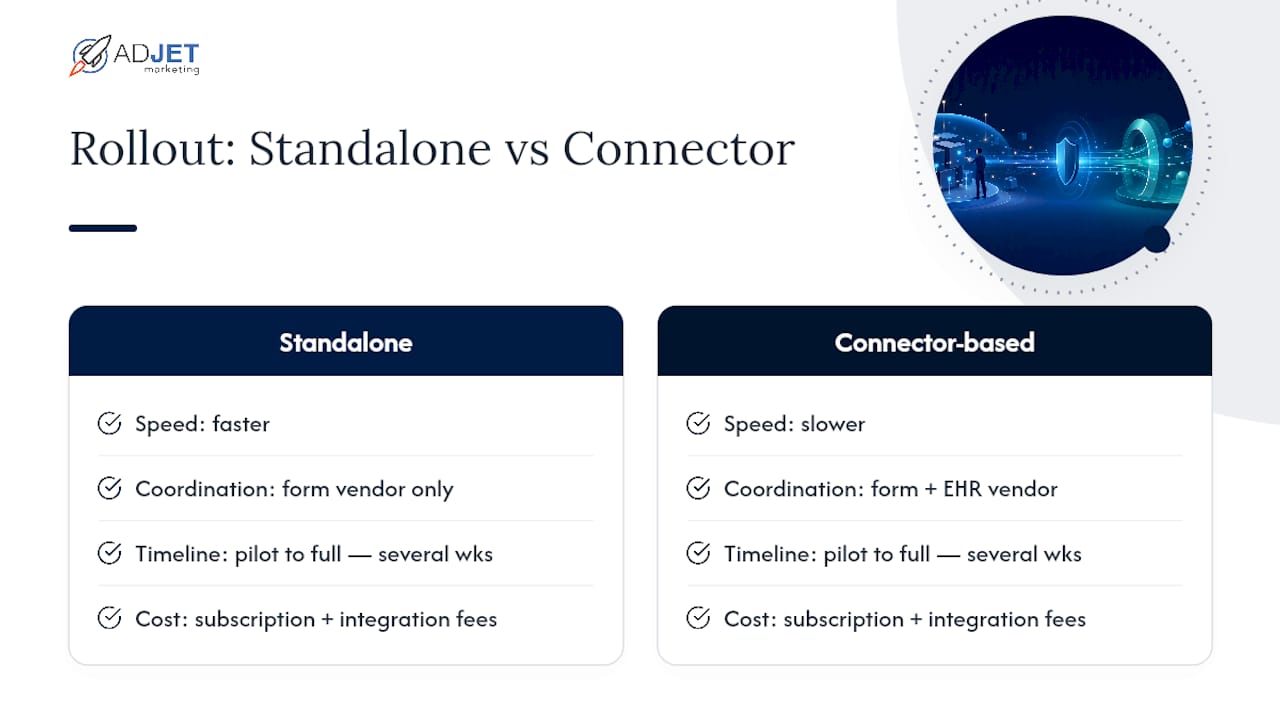
Most practices we work with underestimate how long a proper rollout takes, then get frustrated when week two doesn’t look like week eight. A realistic pilot-to-full-rollout timeline generally spans several weeks, depending mostly on whether you’re integrating with an existing EHR system. Standalone form builders with no integration work can move faster; connector-based setups with Phreesia or NexHealth take longer because you’re coordinating with the EHR vendor too, not just the form provider.
On budget, expect a base subscription cost plus separate integration or customization fees if you need EHR connectors built out. That second line item gets underestimated constantly. When you’re comparing vendors that are close in monthly price, prioritize contract guarantees, like BAA terms and breach notification timelines, and integration stability over shaving a few dollars off the subscription. A cheaper form builder that breaks your EHR sync twice a year costs more in staff time than the savings are worth.
— Felix
Need Help Implementing Secure Forms and EHR Integration?
Choosing the right form builder is only step one. Getting it actually wired into your EHR, styled to match your website, and configured so patients complete it without friction is a different project entirely, and it’s one many practices underestimate. Some agencies specialize in implementation, integration, or conversion optimization work after the vendor is selected, providing hands-on execution when internal staff bandwidth is limited.
Certain service providers build secure landing pages to host intake forms, manage EHR integration projects to ensure submissions route correctly, and conduct conversion audits when completion rates fall short of expectations from form builder demos. If you’re weighing whether to handle this in-house or bring in support, the deciding factor is usually staff capacity, not complexity. Explore how we support healthcare practices on our medical marketing services page and get a clear read on what your rollout actually needs.