









Many healthcare categories are either restricted or require Google certification before an ad can run. Prescription drugs, online pharmacies, clinical trials, and addiction services all sit under special policy rules, and some need third-party accreditation first. Your first move should be checking Google’s healthcare and medicines policy against your exact business model, then fixing your landing page before you touch your bidding strategy.
TL;DR:
- Certification for online pharmacies, telemedicine, and addiction services depends on accreditation from bodies like LegitScript or NABP, and must match your exact business category.
- Restrictions on prescription drug keywords vary by country, requiring both certification and country-specific allowances to target drug names or advertise related products legally.
- Landing pages must clearly display licenses, physical contact information, and non-prescription medication sales; vague or misleading claims often cause disapproval.
- Health data cannot be used for remarketing or creating personal audiences, making contextual targeting the most compliant approach for health campaigns.
- Applying for certification and fixing landing page issues before campaign launch significantly reduces the risk of rejection or suspension, saving time and advertising budget.
Table of Contents
- What Google counts as restricted versus disallowed healthcare content
- Certification and eligibility: what Google and third parties require
- Restricted drug terms and what you can say about prescription drugs
- Targeting and personalization limits for health-related campaigns
- Landing page and destination requirements that commonly cause disapprovals
- How to apply for Google healthcare certification and what to expect
- Fixing disapprovals and appealing decisions without risking suspension
- Compliant alternatives and tactics that still move the needle
- What a compliance-first checklist looks like before you launch
- Why compliance-first campaigns save clinics money in the long run
- How AdJet helps healthcare advertisers stay compliant and keep growing
- Official policy pages and accreditation resources worth bookmarking
- Sources
- FAQ
What Google counts as restricted versus disallowed healthcare content
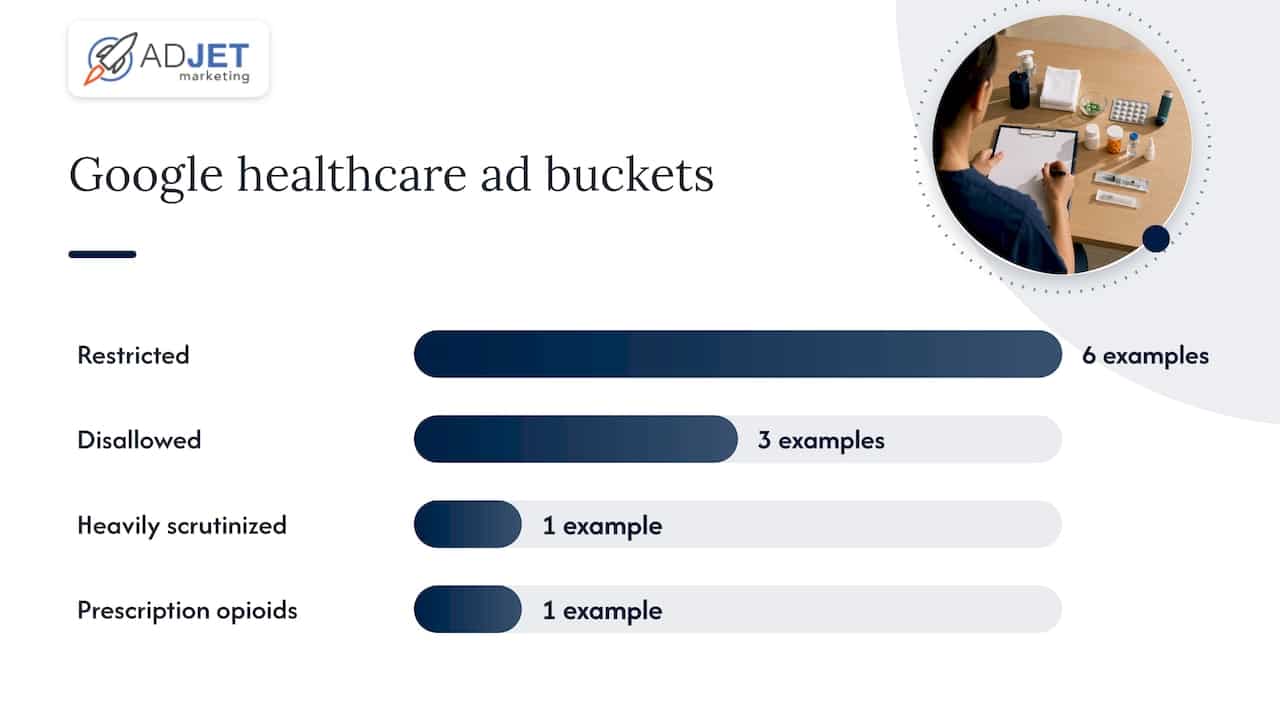
Google splits healthcare advertising into two very different buckets, and mixing them up is where most accounts run into trouble. Restricted content can run, but only with certification, country approval, or specific creative limits. Disallowed content cannot run at all, regardless of how the ad is worded.
Google’s Healthcare and medicines policy lists the categories that fall into each group, and the country you’re targeting often changes the answer. A prescription drug ad that’s fine in one market may be blocked entirely in another.
- Restricted (certification or country-dependent): prescription drug services, pharmaceutical manufacturers, telemedicine, online pharmacies, health insurance, and clinical trial recruitment.
- Disallowed everywhere: unauthorized pharmacies, HIV home test kits in markets where Google prohibits them, and the sale of controlled substances without verified licensing.
- Heavily scrutinized: addiction treatment and rehabilitation services, which require certification and are blocked in some regions regardless of licensing.
Prescription opioids sit in their own category of caution. Even certified advertisers face tighter keyword and creative restrictions here than almost anywhere else in healthcare, largely because of the public health risk tied to the category. If you’re running ads for a pain clinic or a medication-assisted treatment program, assume extra scrutiny before you assume approval.
The practical takeaway: don’t guess which bucket your service falls into. Pull up the policy page, find your category by name, and read the country-specific notes before building a single ad group.
Certification and eligibility: what Google and third parties require
Certification is Google’s way of outsourcing trust. Instead of reviewing every clinic or pharmacy manually, Google leans on accreditation bodies that already vet these businesses, then grants or denies ad eligibility based on that verification.
The most common certifications healthcare advertisers encounter:
- Online pharmacy certification, which typically requires accreditation through LegitScript or the National Association of Boards of Pharmacy (NABP) before Google will even review the application.
- Telemedicine certification, covering providers who prescribe or facilitate care remotely, usually tied to the same LegitScript verification used for pharmacies.
- Pharmaceutical manufacturer certification, for brands advertising their own drugs rather than a pharmacy or clinic.
- Addiction treatment and recovery services certification, which has some of the strictest review standards in the entire policy set.
- Health insurance certification through Google’s G2RS program, which requires a separate ACA-related certificate if you plan to use Affordable Care Act keywords.
According to industry guidance on Google Ads sensitive categories, LegitScript, NABP, and G2 accreditation are common prerequisites, and skipping them is one of the fastest ways to get denied. Applying under the wrong certification category is another frequent, avoidable mistake. A telemedicine provider who applies as a general healthcare advertiser, for example, often gets rejected simply because the category doesn’t match the business model.
Incomplete landing pages cause just as many denials as missing accreditation. Google’s reviewers check whether your site actually demonstrates licensed practice, not just whether you claim to be licensed.
Pro Tip: Apply for certification before you build your campaign structure. A denied certification means paused ads, wasted creative work, and a review queue that can take days to clear.
Restricted drug terms and what you can say about prescription drugs
Google’s Restricted drug terms policy governs how prescription drug names appear in ad copy, keywords, and landing pages. This is separate from the broader healthcare policy, and it applies even to advertisers who are already certified.
Some countries permit keyword targeting on prescription drug names, but many don’t, and running the same keyword list globally is a common mistake. In the United States, certain prescription terms are allowed in ad text, but keyword targeting around them typically still requires the relevant Google certification.
- OTC (over-the-counter) products generally face fewer restrictions than prescription drugs, since the barrier to misuse and misdiagnosis is lower.
- Prescription drug promotion must comply with federal fair-balance rules, which require accurate side-effect information and prohibit misleading claims.
- Opioid-related keywords face some of the tightest restrictions in the policy, though medication-assisted treatment (MAT) programs can qualify for narrow exceptions when properly certified.
Even certified advertisers often can’t target prescription drug names as keywords without an additional country-specific allowance. This two-layer requirement, certification plus country eligibility, is exactly where many campaigns get stuck. Checking both before launch saves a lot of rework later.
Targeting and personalization limits for health-related campaigns
Google treats health data as sensitive by default, which means the personalization tools that work fine for most industries are off-limits here. You can’t build a Customer Match list from patients who filled a prescription. You can’t remarket to people who visited a page about a specific diagnosis. And lookalike audiences built from either of those sources are prohibited too.
This isn’t a minor technicality. It’s one of the most common reasons healthcare campaigns get flagged, often without the advertiser realizing what triggered it.
- Advertiser-curated audiences (Customer Match, remarketing lists, similar audiences) are prohibited for sensitive health topics.
- Predefined Google audiences, the ones Google builds and manages itself, remain compliant because they don’t expose advertiser-side health signals.
- Contextual targeting, where ads match page content rather than user history, is one of the safest tools available for this category.
- Session-based or symptom-level keyword targeting can reach relevant users without relying on personal health history at all.
If you’re already running paid search for a clinic, this is worth revisiting even if your account hasn’t been flagged yet. We’ve written more detail on HIPAA-compliant marketing with Google Ads and on setting up remarketing without PHI risk, both of which walk through compliant alternatives in more depth.
Landing page and destination requirements that commonly cause disapprovals
Google doesn’t just review your ad copy. It crawls your landing page, and that’s where a surprising number of healthy-looking campaigns get rejected. The destination has to match the claims in the ad and demonstrate the legitimacy Google is checking for.
- Show your licensing clearly. A telemedicine or pharmacy site needs visible proof of licensed practice, not a vague “board-certified” claim buried in a footer.
- State your scope plainly. If you treat specific conditions, say so. Vague service descriptions read as evasive to automated review systems.
- Make contact information real and findable. A phone number, physical address, or verifiable support channel matters more than most advertisers expect.
- Avoid facilitating prescriptions directly on the page. Selling prescription medication or writing prescriptions without verified physician involvement is one of the fastest routes to disapproval, and in serious cases, suspension.
- Keep forms functional and privacy notices visible. A broken intake form or a missing privacy policy link is a small technical issue that Google treats as a compliance red flag.
Pro Tip: When a landing page gets disapproved, fix the destination before you touch the ad copy. Reviewers are usually reacting to what’s on the page, not what’s in the headline.
How to apply for Google healthcare certification and what to expect
The application process rewards preparation more than speed. Rushing a submission without the right documentation usually means a denial and a second round of waiting.
- Confirm your exact category. Match your business model to the specific certification type (pharmacy, telemedicine, insurance, addiction services) rather than a general healthcare label.
- Secure third-party accreditation first. LegitScript or NABP verification typically needs to be in place before Google will process the application.
- Audit your landing page against the requirements above. Licensing, contact details, and scope of service should all be visible without digging.
- Submit the application with supporting documentation, including business licenses and, where relevant, proof of clinician credentials.
- Expect a review window of several business days to a few weeks, depending on the certification type and how complete the submission is.
- If denied, read the rejection reason carefully before resubmitting. Most denials point to a specific missing piece, not a blanket rejection of the business.
Healthcare PPC accounts that skip steps two or three almost always come back for a second round. Building the accreditation and landing page work upfront is slower at first but faster overall.
Fixing disapprovals and appealing decisions without risking suspension
A disapproval notice isn’t the end of a campaign, but how you respond determines whether it becomes a pattern. Google’s messages usually point to a specific policy, and starting there beats guessing.
- Read the disapproval reason first and match it against the specific policy page it cites, rather than assuming it’s a generic healthcare flag.
- Fix the root cause (usually the landing page or a restricted keyword) before resubmitting the same ad with minor copy tweaks.
- Use the appeals process inside Google Ads to present evidence: updated licensing, removed restricted content, or corrected certification documentation.
- Keep records of what changed if your site previously linked to disallowed content, even after removal, since appeals often ask for that history.
- Understand that egregious violations, like running ads for unauthorized pharmacies, can lead to account suspension without a warning first.
Reinstatement after a suspension tied to egregious violations is possible only in limited, compelling circumstances, and it’s a slow process even then. That asymmetry, a fast path to suspension and a slow path back, is exactly why prevention matters more in healthcare advertising than in most other categories.
Compliant alternatives and tactics that still move the needle
When direct targeting or specific drug-term keywords are off the table, the solution usually isn’t fewer ads. It’s different inputs.
- Write ad copy around symptoms and outcomes rather than drug names or diagnosis-specific keywords.
- Use contextual targeting to place ads next to relevant content instead of relying on user history.
- Lean on predefined Google audiences, which stay compliant because Google controls the underlying data.
- Shift to cookieless or server-side conversion tracking so you can measure results without passing health-related signals to ad platforms.
Our guide to optimizing Google Ads for healthcare covers more of these tactics in practice, including how clinics structure campaigns around them.
Pro Tip: A well-written, symptom-level landing page often outperforms a diagnosis-targeted one anyway, since it reaches people earlier in their decision, before they’ve settled on a specific treatment search.
What a compliance-first checklist looks like before you launch
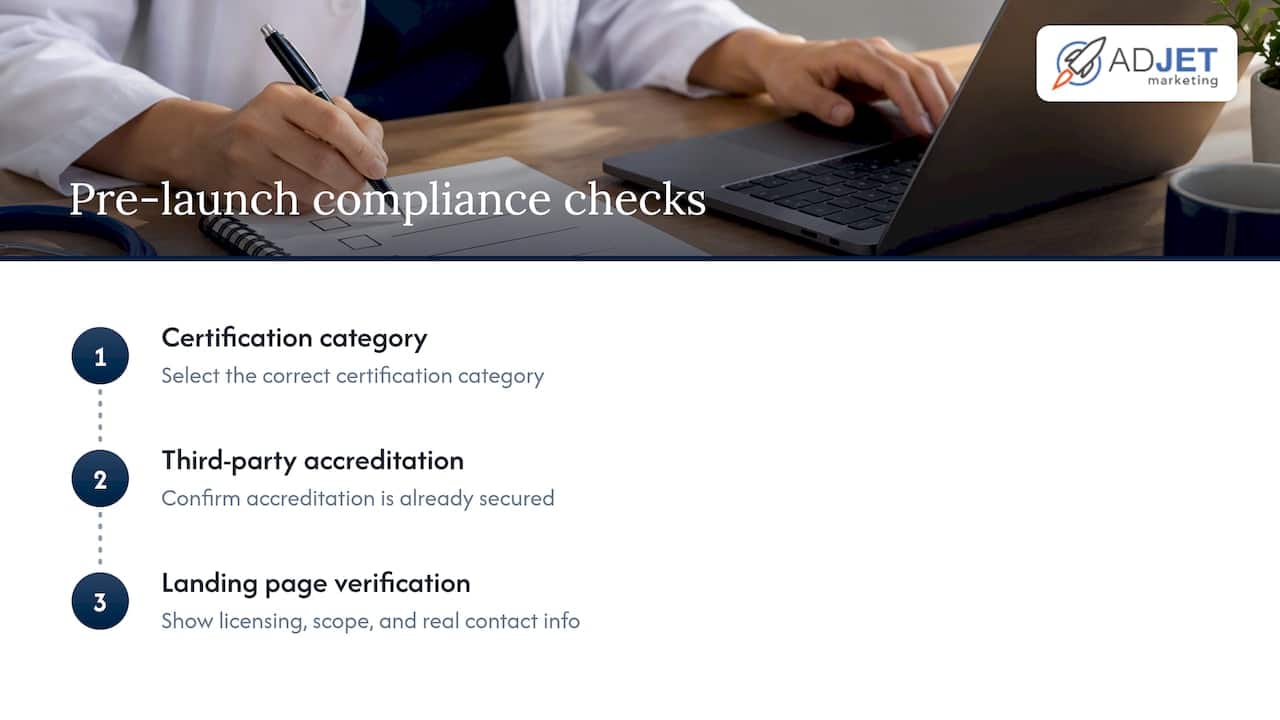
Before we submit a certification application for a client, we run through the same handful of checks every time: correct certification category, third-party accreditation already secured, and a landing page that shows licensing, scope of service, and real contact information without making the reviewer dig.
Most of the copy changes we make aren’t dramatic. We tighten vague service descriptions, add visible licensing details, and remove language that implies a prescription can be obtained directly through the page. Small fixes, but they’re usually the difference between approval and a second rejection.
Realistic timelines run from a few days for simple certifications to several weeks when accreditation has to be obtained first. Budget expectations should account for that lag, since ad spend sitting idle during review isn’t unusual. For more context on what paid search actually delivers once a campaign is live, see our guide on Google Ads for medical clinics.
Why compliance-first campaigns save clinics money in the long run
Many clinics come to us after a campaign gets suspended or a certification gets denied twice, and by then they’ve usually lost more time than they would have spent doing it right from the start. The pattern is almost always the same: a landing page built for conversions without a thought for policy, or a certification application filed under the wrong category because nobody checked the specific wording.
Compliance work feels slower upfront. It almost never is, once you count the cost of a paused account. If you’re unsure whether your current setup would survive a policy review, an outside audit is usually worth the hour it takes.
— Felix
How AdJet helps healthcare advertisers stay compliant and keep growing
Getting certified and staying approved takes ongoing attention, not a one-time fix. That’s the gap we fill for clinics, medspas, and telemedicine providers who’d rather focus on patients than policy pages.
- Google Ads management built around healthcare certification requirements from the first campaign structure decision.
- Certification support that matches your business model to the right category before submitting an application to Google.
- Compliant landing page design that passes destination review the first time, starting at $99 a month for a custom landing page.
If your account has already been flagged, or you just want a second set of eyes before you apply for certification, our Google Ads services page is the place to start that conversation.
Official policy pages and accreditation resources worth bookmarking
Keep these close while preparing an application or an appeal:
- Google’s Healthcare and medicines policy, the primary source for restricted and disallowed categories.
- Restricted drug terms policy, covering keyword and ad text rules for prescription drug names.
- LegitScript, the accreditation body Google references for pharmacy and telemedicine certification.
- Title 21 CFR Part 202, the federal regulation behind prescription drug advertising claims.
This article is general information, not a substitute for advice from a qualified doctor. Consult a qualified healthcare professional about your own circumstances before acting on anything here.
Sources
- Healthcare and medicines – Advertising Policies Help (Google)
- Restricted drug terms – Advertising Policies Help (Google)
- Google Ads sensitive categories and required certifications — WordStream
- Title 21 CFR Part 202 — Prescription drug advertising rules (U.S. federal regulations)
FAQ
What are the restricted categories in Google Ads?
Restricted healthcare categories include prescription drug services, online pharmacies, telemedicine, pharmaceutical manufacturers, health insurance, and clinical trial recruitment, each requiring certification or country approval. Google’s healthcare and medicines policy lists the full set along with country-specific exceptions. Addiction treatment services and HIV home test kits face additional scrutiny beyond standard certification.
What are the new updates for Google Ads in 2026?
Google periodically updates its country allowances and certification requirements within the existing healthcare and restricted drug terms policies, so the structure of the rules hasn’t changed as much as the details within them. The most reliable way to catch updates is checking the restricted drug terms policy directly, since it reflects changes as they’re published. Advertisers should recheck country lists and certification categories periodically rather than assuming last year’s approval still applies.
Are pharmaceutical commercials going to be banned?
There’s no indication that pharmaceutical advertising is being banned outright. Google continues to permit pharmaceutical manufacturer advertising under certification, subject to the restricted drug terms policy and country-specific rules, and federal advertising regulation under Title 21 CFR Part 202 continues to govern content requirements.
Can I use Google Health in personalized advertising?
Health-related data generally cannot be used to build advertiser-curated audiences like Customer Match or remarketing lists for sensitive categories. Compliant alternatives include predefined Google audiences and contextual targeting, which don’t rely on advertiser-side health signals, as outlined in guidance on Google Ads sensitive categories.