









Service area pages work when they give each location something real to say, not just a swapped city name. The highest-impact moves, in order, are: write a genuinely local opening paragraph for each area, add correct areaServed and MedicalClinic schema, align your Google Business Profile service areas with what you publish, and put a booking call to action where visitors can’t miss it.
TL;DR:
- Build pages only for towns with current patient activity, and require at least 300 words of local detail plus two area specific facts before launch.
- Start with three to five priority areas, link each from a service area hub, and judge expansion by bookings after 90 days.
- Keep Google Business Profile service areas within roughly two hours’ drive and use up to 20 cities or postal codes, matching published coverage.
- Mark each page with MedicalClinic schema, areaServed, accurate hours, and relevant specialties; add ReserveAction only when the scheduler supports structured booking links.
- Put a tap to call phone number and scheduling option above the fold, then repeat the booking prompt after area specific FAQs.
Table of Contents
- What service area pages are and when clinics should use them
- Site architecture: the hub-and-spoke pattern for clinics
- What belongs on every clinic service area page
- Schema and Google Business Profile: technical must-haves for clinic area pages
- Content quality: avoid thin pages and create genuinely local value
- Convert visits into bookings: UX and CRO best practices for area pages
- Measure and maintain: KPIs, audit cadence, and scalable editing
- Agency perspective: how we approach service area pages for clinics
- Quick take: when service area pages are the right investment for clinics
- How we can help with your clinic’s service area pages
- FAQ
- Sources
What service area pages are and when clinics should use them
A service area page targets patients in a town or region you treat but don’t have a physical office in, while a location page describes an address patients can walk into. Clinics that run mobile outreach, serve a regional specialty like physical therapy or imaging, or draw patients from a wider referral catchment are the ones that benefit most from building these out.
The decision isn’t automatic. A single-location dermatology practice with a ten-mile draw radius probably doesn’t need area pages at all, while a multi-location urgent care group or a mobile phlebotomy service almost certainly does. Before you build anything, check:
- Does the clinic genuinely see patients from this area now, or is this aspirational?
- Can you write at least 300 words of real local detail, not filler?
- Does your Google Business Profile already list this as a service area, or will it need updating?
- Is there a legitimate referral pattern, insurance network, or outreach program tied to this location?
If you can’t answer yes to most of these, hold off. A page built on hope rather than patient volume tends to sit unindexed or, worse, trigger the kind of scrutiny we cover in the next section. For background on how local search ranking works before you commit resources, our guide on local SEO for healthcare clinics walks through the fundamentals.
Site architecture: the hub-and-spoke pattern for clinics
The structure that holds up best for multi-area clinics is hub-and-spoke. The hub is your main “service areas” or “locations we serve” page, acting as a directory and internal linking anchor. Each spoke is an individual area page with its own URL, content, and local detail.
Keep URLs human-readable and consistent: a pattern like /service-areas/plano-tx/ or /areas-we-serve/round-rock/ reads clearly to both patients and search engines. Avoid stacking multiple variables into one slug (service plus city plus specialty) unless you genuinely offer that combination and can support it with unique content.
A practical rollout:
- Build the hub page first, listing every area with a short description and a link to its spoke.
- Prioritize spokes by patient volume or lead data, not alphabetical order.
- Write each spoke with a CMS template that pulls locality fields (area name, landmarks, parking notes) rather than hand-editing boilerplate.
- Submit new spokes to your XML sitemap as they go live, and avoid canonicalizing them back to the hub, since that tells Google they’re duplicates rather than distinct pages.
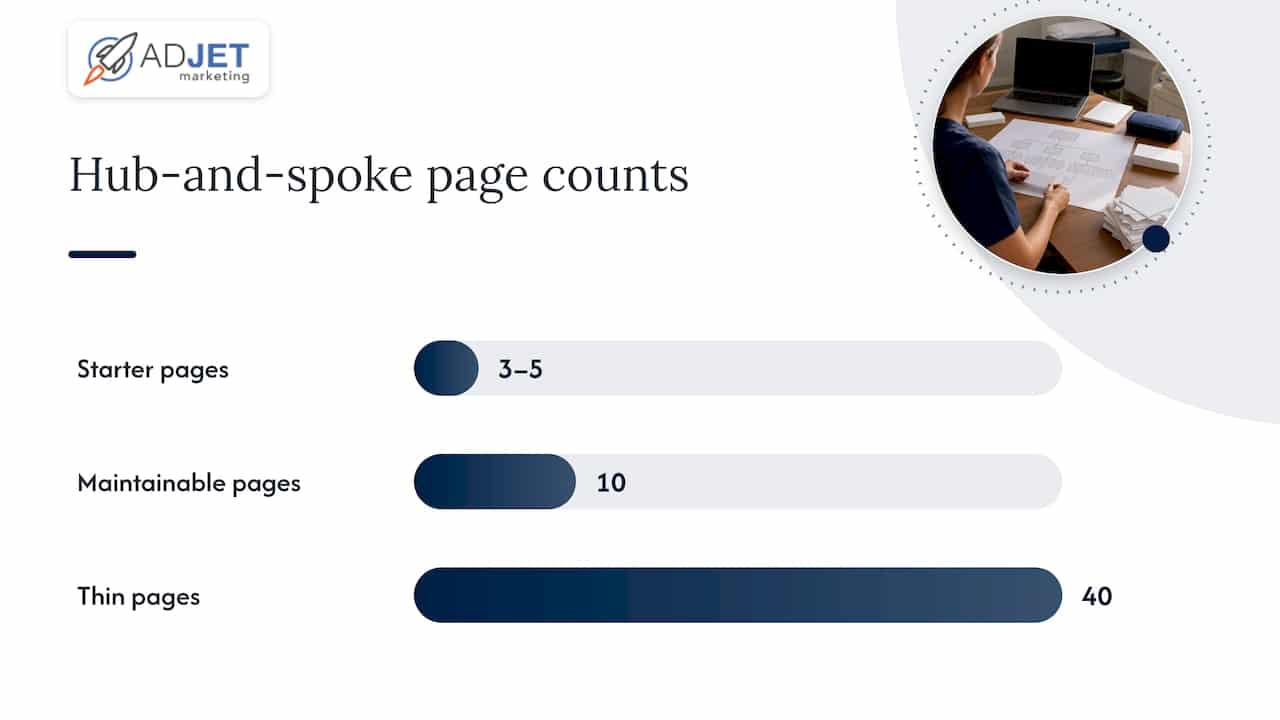
- Cap the program at the number of areas you can genuinely maintain. Ten well-built pages outperform forty thin ones.
Pro Tip: Start with three to five area pages, measure how they perform for 90 days, then scale the ones that convert instead of launching twenty at once.
For clinics managing several physical locations alongside outreach areas, our medical clinic SEO guide has more detail on balancing location pages with service area pages inside one site architecture.
What belongs on every clinic service area page
Each spoke page needs the same core elements, built out with real local specifics rather than copy-paste swaps. Skipping any of these tends to show up later as low rankings or high bounce rates.
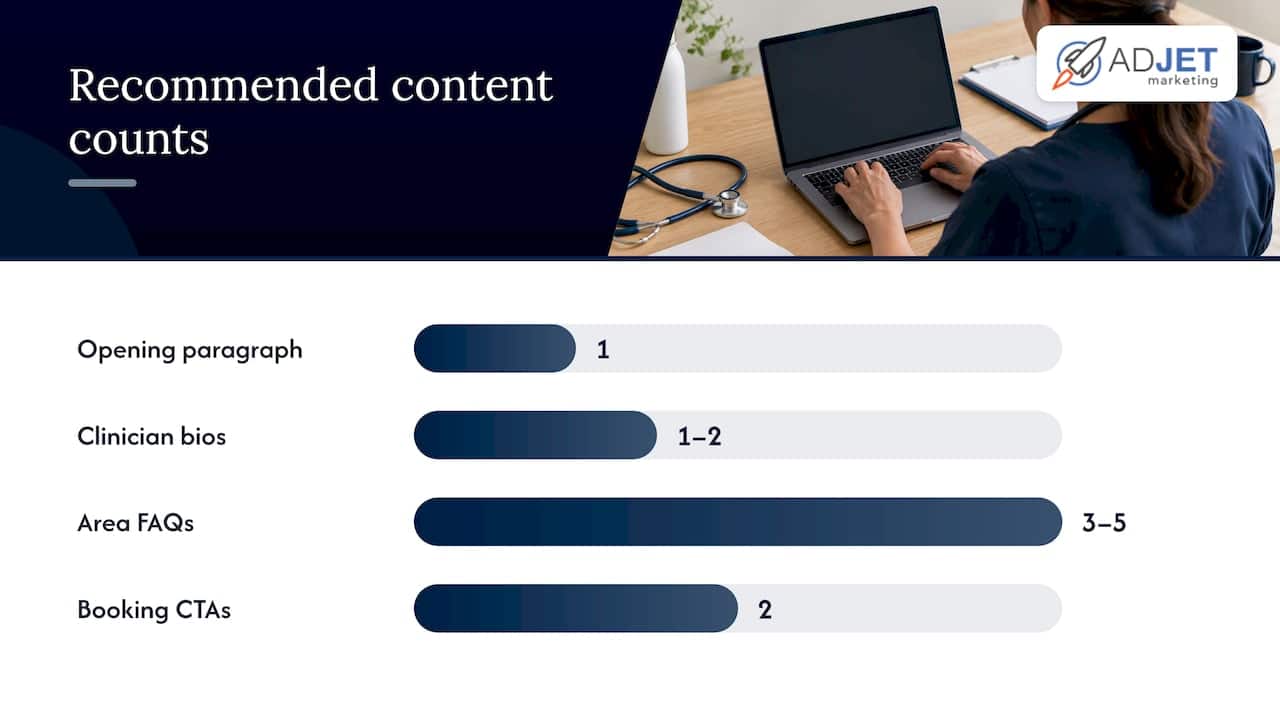
- A localized opening paragraph naming the area, the services most relevant to it, and why your clinic serves that community.
- A short services list linking to your full service pages, with a note on which clinicians cover that area and their general availability.
- Practical logistics: driving directions, parking details, nearby landmarks, and honest wait time or availability expectations.
- A clinician bio or two relevant to that area, especially if a specific provider handles outreach there.
- Three to five area-specific FAQs that reflect what patients in that town actually ask.
- A booking call to action positioned above the fold, repeated once more near the bottom.
A page built around CPS style openings, structured correctly with explicit areaServed markup, tends to perform better for AI citation in local healthcare queries, according to healthcare-specific GEO guidance. That means the first paragraph carries real weight: it should state the service, who it serves, and how to book, not just a geographic keyword.
On mobile, phone numbers should be tap-to-call by default, not an image or a number buried in a footer. If your scheduler supports deep links, point the “Book Now” button on each area page directly to a pre-filtered location or provider, rather than a generic booking homepage. We see clinics lose appointment starts simply because the CTA dumps every visitor into a one-size scheduler with no context carried over.
Schema and Google Business Profile: technical must-haves for clinic area pages
Two technical layers determine whether an area page gets found and acted on: the schema markup on the page itself, and how your Google Business Profile defines service areas.
For markup, use the MedicalClinic schema type or a more specific subtype like Dentist or Physician where it fits, rather than generic LocalBusiness. Include areaServed to name the town or region explicitly, openingHoursSpecification for accurate hours, medicalSpecialty where relevant, and a ReserveAction if your scheduler supports structured booking links.
On the Google Business Profile side, service-area and hybrid businesses can define up to 20 service areas by city or postal code, and Google’s own guidance recommends keeping those boundaries within roughly two hours’ driving time of the business. Listing areas you can’t realistically serve within that range tends to create more profile problems than it solves.
| Schema field | What it does | Patient-facing benefit |
|---|---|---|
| areaServed | Names the specific town or region | Stronger match to local search queries |
| openingHoursSpecification | States exact hours, including exceptions | Reduces no-shows from wrong-hours assumptions |
| medicalSpecialty | Flags the clinical focus (e.g., dermatology) | Helps AI and search systems match intent |
| ReserveAction | Links structured booking data | Enables booking buttons in search features |
Get the schema wrong (or skip it entirely) and the page can still rank, but it loses the structured-result and AI-citation advantages that correctly tagged pages pick up. For a deeper walkthrough of implementation, see our guide on medical schema markup for clinics.
Content quality: avoid thin pages and create genuinely local value
Google’s own spam policy guidance flags doorway pages, meaning pages built mainly to rank for a list of locations with little unique content behind them. A dozen area pages that differ only by city name in the H1 fit that description closely, and the risk isn’t just a missed ranking opportunity. It’s the whole batch getting devalued together.
The fix is straightforward but takes real work: every page needs something a competitor’s templated page doesn’t have. That might be:
- A named community partnership, like a local employer wellness program or school sports physical day.
- A local FAQ that reflects an actual pattern, such as patients asking about parking at a specific plaza.
- A staff coverage note naming which provider sees patients in that area and on what days.
- A brief, de-identified note on the kind of cases most commonly treated from that community.
Pro Tip: If you can’t fill in at least two of these for a given area, you probably don’t have enough real patient activity there yet to justify a dedicated page.
On the writing side, structure the opening 134 to 167 words to answer three questions plainly: what the service is, who it’s for, and how to book or what availability looks like right now. That framing comes from the CPS-style approach used in healthcare GEO guidance, and it does double duty: it helps human visitors decide quickly, and it gives AI-driven search systems a clean block of text to cite when answering local healthcare questions.
Convert visits into bookings: UX and CRO best practices for area pages
Ranking well gets a patient to the page. What happens in the next ten seconds decides whether they book. Above the fold, every area page should show a phone number and a scheduling option, not one or the other. Patients comparing clinics on their phone often call the first result that makes it easy, and burying your number under three scrolls costs you that call.
- Use direct CTA copy tied to the action, like “Call Our Plano Team” or “Check Availability in Round Rock,” rather than a generic “Contact Us.”
- Place the primary CTA above the fold and repeat it after the FAQ section.
- Favor an inline booking widget for high-volume areas, and a dedicated landing page with a single clear offer for newer or lower-traffic areas where you want tighter message control.
- Show trust signals that matter to patients: accepted insurance, typical appointment availability, and any relevant certifications, stated plainly without overclaiming outcomes.
- Avoid absolute claims like “best” or “guaranteed results,” since healthcare advertising rules and plain credibility both favor specific, checkable statements over superlatives.
Our piece on the role of landing pages in healthcare marketing goes deeper into when a standalone landing page outperforms an inline widget for appointment-driven campaigns.
Measure and maintain: KPIs, audit cadence, and scalable editing
Area pages aren’t a one-time build. Without a maintenance rhythm, they drift out of date, lose rankings, and eventually look abandoned next to competitors who keep updating theirs.
- Track organic sessions per area page, phone clicks, scheduler starts, and keyword rank for the specific area query (not just the clinic’s brand name).
- Run a 30-day check after launch to confirm indexing and catch obvious schema or tracking errors.
- Follow with a 90-day review comparing booking data against your other pages to decide whether to expand, consolidate, or retire that area.
- Set a standing quarterly audit for all live area pages: check for outdated hours, stale staff names, and broken booking links.
- Trigger an off-cycle edit any time a provider leaves, a clinic hour changes, or a new insurance network gets added.
Use a CMS template with locality as a structured field rather than free text in the body copy. That keeps every page consistent in structure while still allowing the local details to differ, which is the balance that keeps pages both unique and manageable at scale. For broader context on tying these metrics back to overall clinic growth, see our guide on medical SEO and patient lead generation.
Agency perspective: how we approach service area pages for clinics
Many clinics come to us after building a batch of area pages that never ranked, usually because every page used the same paragraph with the city name swapped in. The fix is rarely more pages. It’s fewer, better ones, with correct schema and a GBP service area list that actually matches what’s published.
A realistic rollout typically covers schema fixes and three to five priority area pages first, since that scope focuses on quick technical corrections. Engagements at higher levels usually expand into a fuller hub-and-spoke build with CRO testing on the booking flow. Some clients run ongoing area expansion alongside paid campaigns, if they have the volume to justify ten or more well-maintained pages plus the content team bandwidth to keep them current.
Timelines matter here: expect initial indexing within a few weeks of a technically sound launch, but meaningful ranking movement for competitive area terms usually takes two to four months, not two to four weeks.
Quick take: when service area pages are the right investment for clinics
Service area pages earn their keep when you have real patient volume from a town, the internal bandwidth (or a partner) to write genuinely local content for each one, and a CMS that won’t tempt you into copy-paste shortcuts. If none of those are true yet, you’re better off strengthening your core location page first.
Here’s where I’d push back on common advice: a lot of clinics treat area pages as a cheap, fast SEO win. They’re not fast. A well-built page takes real research and takes months to rank. If speed to lead matters more than organic growth right now, paid search fills that gap faster, and running both together, PPC for immediate volume while area pages mature organically, tends to outperform choosing one or the other outright.
— Felix
How we can help with your clinic’s service area pages
Building a hub-and-spoke program that actually converts takes more than writing a few paragraphs per town. It means getting the schema right, aligning your Google Business Profile, and designing pages with booking conversion built in from the start, not bolted on after the fact.
We build custom landing pages and branded websites designed around appointment bookings, handle the technical side through our SEO services, and can pair area-page work with Google Ads when you need patient volume sooner than organic rankings will deliver. If you’re not sure whether your current pages are helping or quietly holding you back, a good starting point is a site audit through our landing page design services, where we’ll tell you plainly what’s working and what isn’t.
This article is general information, not a substitute for advice from a qualified doctor. Consult a qualified healthcare professional about your own circumstances before acting on anything here.
FAQ
What is a service area page for a medical clinic?
A service area page is a dedicated page targeting patients in a town or region your clinic treats without having a physical office there. It differs from a location page, which describes an address patients visit directly, and works best when backed by real referral or outreach activity in that area.
How many service area pages should a clinic create?
There’s no fixed number, but Google Business Profile allows up to 20 service areas for service-area and hybrid businesses, generally kept within about two hours’ driving time of the clinic. Most clinics get better results from five to ten well-built, unique pages than from a long list of thin ones.
Do service area pages hurt SEO if they look too similar?
Yes, pages that differ only by city name risk being treated as doorway content under Google’s spam policies, which can suppress rankings across the whole group. Each page needs distinct local details, such as parking notes, clinician coverage, or community-specific FAQs, to avoid that outcome.
What schema markup should clinic area pages use?
Area pages should use the MedicalClinic schema type or a more specific medical subtype, including fields like areaServed, openingHoursSpecification, and medicalSpecialty. Adding a ReserveAction where your scheduler supports it can also help booking actions appear in search features.
How often should clinics update their service area pages?
A new page typically gets a check at 30 days to confirm indexing, followed by a 90-day performance review against booking data. After that, a quarterly audit plus edits triggered by staff or hour changes keeps pages accurate and competitive.
Sources
- Spam policies — Google Search Central
- Manage your service areas for service-area & hybrid businesses — Google Business Profile Help
- Schema
- citedbyai/healthcare-geo-guide — MedicalBusiness JSON-LD and GEO guidance