









The right Google Analytics alternative depends entirely on what you actually need from your data. For privacy-first traffic reporting, Fathom and Plausible are the clearest picks. For product and event analytics, PostHog, Mixpanel, or Amplitude fit better. B2B teams identifying company-level visitors should look at Leadfeeder. Organizations that need full data ownership can self-host Matomo or Piwik PRO. Enterprises with complex attribution requirements often layer in Adobe Analytics or a dedicated measurement platform. By Q2 2026, many website owners are moving away from GA4 because of complex event modeling, consent-driven data gaps, and a steep learning curve — and the market has responded with purpose-built tools for each of those specific jobs.
- Privacy-first traffic reporting: Fathom or Plausible — cookieless, GDPR-ready, no consent banner required
- Product and event analytics: PostHog, Mixpanel, or Amplitude — funnels, cohorts, retention analysis
- B2B company identification: Leadfeeder — maps anonymous visits to named companies and pushes leads into CRM
- Self-hosted / full data ownership: Matomo or Piwik PRO — GA-depth features with your own server
- Enterprise measurement and attribution: Adobe Analytics or a multi-model attribution platform for large ad budgets
Key Takeaways
The most effective approach to choosing a Google Analytics alternative is to match the tool category to your specific job: privacy reporting, product analytics, B2B identification, or enterprise attribution.
| Point | Details |
|---|---|
| Match category to job | Privacy-first tools, product analytics, B2B ID, and enterprise attribution solve different problems — pick the right category first. |
| Hybrid setups work best | A cookieless tracker for daily reporting plus a minimal Google tag for ad conversions preserves accuracy without full GA4 dependency. |
| Validate before cutting over | Run parallel tracking for 30 days and confirm conversion counts match before retiring any GA4 property feeding Google Ads. |
| Self-hosting has real costs | Free open-source licenses (Matomo, PostHog) still require server hosting, security maintenance, and engineering time. |
| Adjetmarketing for migration | Adjetmarketing manages dual-tagging, conversion continuity, and analytics migration for clinics and local businesses running Google Ads. |
Table of Contents
- What are the best Google Analytics alternatives right now?
- Short profiles: what each top alternative actually does
- How to choose the right Google Analytics alternative for your business
- How to trial and migrate from GA4: a practical checklist
- What does analytics pricing actually look like?
- Integrations: what to check before you commit
- How we evaluated these alternatives
- What to do next: your practical shortlist
- The tool category matters more than the specific tool
- Adjetmarketing handles the migration and conversion continuity for you
- Sources
What are the best Google Analytics alternatives right now?
Roundups consistently group alternatives by the job they do: privacy-first traffic reporting, self-hosted data ownership, product analytics, and marketing measurement for attribution. The table below covers the 23 tools this article evaluates across the dimensions that matter most for US-based businesses.
| Tool | Best for | Privacy / cookies | Event analytics | Self-hosting | Setup ease | Pricing model |
|---|---|---|---|---|---|---|
| Fathom | Simple privacy-first traffic | Cookieless, GDPR-ready | Basic | No | Very easy | Per-pageview, paid |
| Plausible | Small-medium sites, GA import | Cookieless, GDPR-ready | Basic | Yes (open-source) | Very easy | Per-pageview, paid/self-host |
| Matomo | Full GA-parity, data ownership | Configurable, GDPR | Full | Yes | Moderate | Free self-host / cloud paid |
| Piwik PRO | Healthcare, govt, compliance | Enterprise consent mgmt | Full | Yes (enterprise) | Moderate | Free tier / enterprise |
| PostHog | Product teams, devs | Configurable | Full + flags | Yes | Moderate | Free tier / usage-based |
| Mixpanel | Product-led, cohort analysis | Configurable | Full | No | Moderate | Free tier / event-based |
| Amplitude | Retention and experimentation | Configurable | Full | No | Moderate | Free tier / enterprise |
| Heap | Auto-capture, fast event access | Configurable | Full (auto) | No | Easy | Paid, custom pricing |
| Leadfeeder | B2B lead identification | Standard | Basic | No | Easy | Free tier / paid |
| Hotjar | UX, heatmaps, recordings | Configurable | Behavioral | No | Easy | Free tier / paid |
| FullStory | Enterprise session replay | Configurable | Experience | No | Moderate | Paid, custom |
| Simple Analytics | Minimal, non-technical teams | Cookieless, GDPR-ready | Basic | No | Very easy | Flat monthly, paid |
| Clicky | Real-time traffic monitoring | Cookie-based | Moderate | No | Easy | Free tier / paid |
| Woopra | Customer journey analytics | Configurable | Full | No | Moderate | Free tier / paid |
| GoSquared | Small business, live chat combo | Configurable | Moderate | No | Easy | Paid |
| Usermaven | Privacy-first product analytics | Cookieless | Full | No | Easy | Paid |
| Semrush Traffic Analytics | Competitive traffic intelligence | Standard | Basic | No | Easy | Add-on to Semrush |
| AI Narratives for GA4 | GA4 users needing plain-language reports | Standard (GA4) | Via GA4 | No | Very easy | Paid add-on |
| Adobe Analytics | Enterprise, complex attribution | Configurable | Full | No | Complex | Enterprise contract |
| Cloudflare Web Analytics | Server-level, zero cookies | Cookieless | Basic | No | Very easy | Free |
| Open Web Analytics | Developers, self-hosted | Configurable | Moderate | Yes | Technical | Free (open-source) |
| Metabase | BI and data visualization | Depends on data source | Via connected DB | Yes | Moderate | Free / paid |
| Looker | Enterprise BI and data modeling | Depends on data source | Via connected DB | No (Google Cloud) | Complex | Enterprise contract |
Best for small sites and simple privacy-first reporting: Fathom, Plausible, Simple Analytics, or Cloudflare Web Analytics. All are cookieless, require no consent banner under most GDPR and CCPA interpretations, and take under 30 minutes to set up.
Best for product and experiment teams: PostHog, Mixpanel, or Amplitude. These platforms support funnels, retention cohorts, A/B testing, and developer-friendly event schemas that GA4 approximates but rarely matches for product-focused workflows.
Short profiles: what each top alternative actually does
Privacy-first and lightweight tools
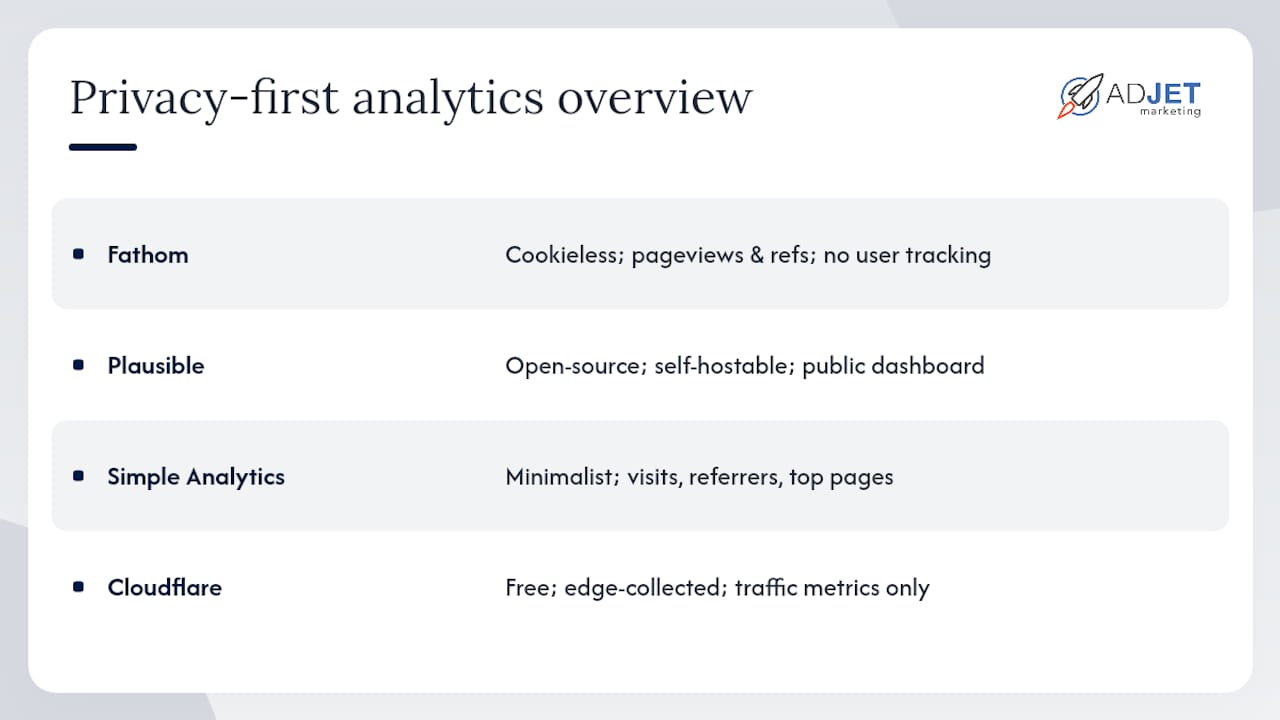
Fathom strips analytics down to what most site owners actually check: pageviews, unique visitors, referral sources, and top pages. There is no cookie banner requirement, setup is a single script tag, and the dashboard loads in seconds. The trade-off is intentional: you get clean, accurate traffic counts but no funnel analysis, no event depth, and no user-level tracking. Pricing models often depend on monthly pageviews.
Plausible covers similar ground with an open-source codebase you can self-host if you want full data ownership. Its hosted plan starts at an accessible entry tier, and it offers an import path for some GA4 histories. Plausible’s public dashboard option is a genuine differentiator for teams that want transparent reporting. Like Fathom, it is cookieless by design.
Simple Analytics takes minimalism further. The dashboard surfaces only what a non-technical stakeholder needs: visits, referrers, and top pages. Capterra user reviews confirm that its appeal is the absence of complexity, not the presence of features. If your team spends more time explaining GA4 than acting on it, Simple Analytics is worth a trial.
Cloudflare Web Analytics is free and collects data at the server edge without any cookies or client-side fingerprinting. It is the most privacy-preserving option on this list, but its reporting is limited to traffic metrics. Best suited for developers already on Cloudflare who want a zero-cost baseline.
Product and event analytics tools
PostHog combines product analytics, session replays, feature flags, and A/B testing in one platform. It is self-hostable, which matters for teams with data residency requirements, and its free cloud tier is generous for early-stage products. The learning curve is real — PostHog rewards teams with a dedicated engineer who can instrument events properly.
Mixpanel is built for behavioral analysis: cohorts, retention curves, and funnel drop-off. Its event-based model means you define what matters and track it precisely, rather than accepting GA4’s session-centric defaults. Strong cohort and retention tooling make it the go-to for product-led growth teams.
Amplitude focuses on retention analysis and experimentation at scale. Its cohorting engine is among the most sophisticated available, and it integrates with most modern data stacks. Teams running frequent product experiments tend to find Amplitude’s workflow more natural than GA4’s.
Heap auto-captures every user interaction from the moment the script loads, which means you can run retroactive analysis on events you never explicitly defined. That is a meaningful advantage for teams that realize they need a metric after the fact. The trade-off is data volume: auto-capture generates a lot of noise.
B2B identification
Leadfeeder solves a problem GA4 does not address at all: identifying which companies are visiting your site. It maps IP data to company profiles, shows which pages those companies viewed, and pushes that data into CRM tools like Salesforce and HubSpot. For B2B sales teams, this turns anonymous traffic into a prospecting list. A free tier exists with limited data retention.
Behavioral and UX analytics
Hotjar pairs heatmaps and session recordings with on-site surveys and feedback widgets. It is not a traffic analytics tool — it is a qualitative research tool. Use it alongside a traffic reporter, not instead of one. The free tier covers basic heatmaps and a limited number of recordings.
FullStory offers high-fidelity session replay at enterprise scale, with search and segmentation across sessions. It is used heavily in enterprise UX and customer experience workflows where understanding exactly what a user did before a support ticket or a churn event is worth the cost.
Real-time and small-business tools
Clicky provides real-time visitor tracking with a straightforward interface. It has been around since the early days of web analytics and still serves site owners who want live visitor counts and basic traffic data without GA4’s complexity.
Woopra focuses on customer journey analytics, stitching together touchpoints across web, email, and product interactions into a unified customer timeline. It suits SaaS and eCommerce teams more than content sites.
GoSquared combines real-time analytics with live chat and CRM features, making it a reasonable all-in-one for small businesses that want fewer tools. Its analytics depth is moderate.
Usermaven positions itself as a privacy-first product analytics tool with cookieless tracking and auto-capture. It targets smaller product teams that want PostHog-style depth without the self-hosting complexity.
Competitive intelligence and GA4 add-ons
Semrush Traffic Analytics estimates traffic for any domain, including competitors. It is not a site analytics tool in the traditional sense — you cannot install it on your site to track visitors. Its value is competitive benchmarking and market research.
AI Narratives for GA4 sits on top of your existing GA4 property and converts raw report data into plain-language summaries. If your team’s main frustration with GA4 is interpreting the data rather than collecting it, this add-on addresses that without requiring a full migration.
Enterprise and BI platforms
Adobe Analytics is the enterprise standard for organizations that need complex attribution models, custom variables, and deep integration with the Adobe Experience Cloud. Setup requires dedicated implementation resources, and pricing reflects that. It is not a GA4 replacement for small businesses.
Metabase and Looker are business intelligence tools, not web analytics platforms. Both connect to your data warehouse and let you build custom dashboards and reports. They belong in a stack where you are already exporting event data from another tool and want flexible visualization. Looker is now part of Google Cloud and suits large data teams with SQL fluency.
Open Web Analytics is a free, open-source self-hosted option for developers who want full control and have the technical capacity to maintain it. It covers basic analytics with some heatmap functionality, but community support is limited compared to Matomo.
Piwik PRO targets regulated industries — healthcare, government, finance — with enterprise hosting options, granular consent management, and data residency controls. For US healthcare organizations navigating HIPAA considerations alongside GDPR, Piwik PRO’s compliance posture is worth the premium over Matomo’s self-hosted option.
How to choose the right Google Analytics alternative for your business
Start with one question: what is the actual problem you are trying to solve?
- You need clean traffic counts without consent friction: choose a cookieless privacy-first tool (Fathom, Plausible, Simple Analytics).
- You need to understand user behavior inside a product: choose a product analytics platform (PostHog, Mixpanel, Amplitude).
- You need to identify which companies are visiting your site: choose a B2B identification tool (Leadfeeder).
- You need full data ownership or compliance controls: self-host Matomo or evaluate Piwik PRO.
- You need complex attribution across large ad budgets: a marketing-measurement platform with multi-model attribution and incrementality testing may be necessary in addition to a web analytics tool.
Privacy-first tools often produce more accurate baseline traffic metrics than cookie-dependent setups, because fewer visitors decline tracking when no consent banner appears. That cleaner capture can change how you read channel performance.
Vendor questions to ask before committing
- Does the tool export raw events to a data warehouse (BigQuery, Snowflake, Redshift)?
- Can it import or forward conversions to Google Ads without breaking your bidding?
- What is the data retention policy, and what does extending it cost?
- Is there a documented integration with your CMS (WordPress, Shopify, Webflow)?
- Does the vendor publish a clear privacy policy and GDPR/CCPA compliance statement?
- Is there a free trial or sandbox environment before you commit?
Red flags to watch for
- No public pricing or opaque enterprise-only quotes with no entry tier
- No documented API or export options
- No clear statement on data residency or third-party data sharing
- Conversion tracking that cannot feed back into Google Ads or Meta Ads
Pro Tip: A hybrid setup often makes the most sense: run a lightweight cookieless tracker (Fathom or Plausible) for daily traffic reporting, and keep a minimal Google tag or GA4 property running solely to feed conversion data into Google Ads. This preserves your ad bidding accuracy while reducing the data exposure from full GA4 consent flows.
How to trial and migrate from GA4: a practical checklist
Run your new tool in parallel with GA4 for at least 30 days before cutting over. Validate conversion counts before you touch any Google Ads settings.
Step-by-step migration checklist
- Audit your current GA4 events. List every event and conversion action GA4 currently tracks. Identify which ones feed Google Ads bidding directly.
- Map events to the new tool. Confirm your chosen alternative can capture equivalent events, or decide which ones you will track differently.
- Implement dual tagging. Install the new analytics script alongside your existing Google tag. The Google tag can be reused across multiple Google Ads and Google Analytics accounts, which supports dual-tagging strategies during migration without duplicating ad conversion counts.
- Verify Google Ads conversion continuity. Google Ads supports three main conversion setup methods: URL-based, code-based, and Google Tag Manager. If your conversions currently import from GA4, confirm whether the new tool can forward conversion signals or whether you need a direct Google tag implementation.
- Run parallel validation for 30 days. Compare sessions, conversion counts, and channel attribution between GA4 and the new tool. Expect some variance — cookieless tools typically report slightly different session counts than cookie-based ones.
- Define rollback triggers. Set a threshold: if conversion counts in the new tool diverge from GA4 by more than 15%, pause the migration and investigate before proceeding.
- Cut over reporting. Once validation passes, shift your primary reporting to the new tool. Keep the Google tag active for ad conversion feeds even if GA4 reporting is retired.
For clinics and local businesses running Google Ads campaigns, maintaining conversion accuracy during this transition is non-negotiable. A drop in conversion signal quality directly affects Smart Bidding performance.
Parallel testing matrix
What does analytics pricing actually look like?
Pricing models vary more than most buyers expect. Here is what you will encounter:
- Per-pageview (Fathom, Plausible): Predictable monthly cost that scales with traffic. Entry tiers start at modest monthly rates for sites under a few hundred thousand pageviews. Costs rise as traffic grows.
- Per-event or per-tracked-user (Mixpanel, Amplitude, PostHog cloud): Can stay low for small products but scales quickly for high-volume apps. Free tiers exist but carry event or data-retention caps.
- Flat monthly (Simple Analytics, GoSquared): Straightforward, no surprises. Suitable for teams that want budget predictability.
- Enterprise contract (Adobe Analytics, FullStory, Looker): Custom pricing, typically five figures annually. Requires procurement and implementation resources.
- Free self-hosted (Matomo, Open Web Analytics, PostHog self-host): Zero license cost, but self-hosting carries real overhead: server costs, security patching, maintenance time, and performance monitoring. For a small clinic or local business, that operational burden often exceeds the cost of a hosted plan.
Piwik PRO offers a free tier with limited data volume, which is a reasonable starting point for healthcare organizations evaluating compliance features before committing to an enterprise contract.
A note on self-hosting costs: The “free” label on self-hosted tools refers to the license only. A properly maintained Matomo instance on a reliable server costs real money in hosting fees and engineering time. Budget for both before choosing self-hosting over a $9/month hosted plan.
Integrations: what to check before you commit
A tool that cannot connect to your existing stack creates more work than it saves. Before finalizing any choice, verify these integration points:
- CMS plugins: WordPress, Shopify, Webflow, and Squarespace all have native or community plugins for the major analytics tools. Confirm the plugin is actively maintained.
- Google Tag Manager: Most tools on this list support GTM deployment, which simplifies installation and reduces developer dependency. Confirm the tag template exists in the GTM gallery.
- CRM sync: Leadfeeder connects directly to HubSpot and Salesforce. PostHog and Mixpanel offer CRM integrations via native connectors or Zapier. If lead data needs to flow into your CRM automatically, verify the sync is bidirectional and not just a one-way export.
- BI and data warehouse exports: For teams that analyze data in Looker, Metabase, or Tableau, confirm whether the tool exports raw events via API, CSV, or a direct BigQuery connector. Batch exports work for most use cases; real-time streaming is only necessary for high-frequency operational dashboards.
- Ad platform conversion feeds: If you run Google Ads or Meta Ads, the tool needs a path to send conversion signals back to those platforms. Server-side forwarding or a maintained Google tag alongside the new tool are the two most common solutions.
For clinics tracking patient lead generation through form fills and phone calls, the CRM sync and ad conversion feed integrations are the ones that directly affect revenue. Get those right first.
How we evaluated these alternatives
Every tool in this article was assessed against the same set of criteria:
- Primary use case fit: Does the tool actually solve the job it claims to solve?
- Privacy stance: Is it cookieless by design, or does it require consent configuration?
- Data ownership: Can you self-host or export raw data?
- Integration depth: Does it connect to the CMS, CRM, and ad platforms most US businesses use?
- Pricing transparency: Is pricing publicly listed, or is it enterprise-only with no entry point?
- Trial availability: Can you test it before committing?
- Documentation quality: Are the integration guides and API docs complete and current?
Sources consulted include industry roundups from Leadfeeder, Builder.io, and SegmentStream, vendor documentation, Google Ads Help Center support pages, and direct evaluation of tool interfaces. Agency experience working with medical clinics, aesthetic practices, and local service businesses informed the practical trade-offs — particularly around conversion tracking continuity and HIPAA-adjacent data handling.
Pro Tip: For clinics and healthcare practices, the compliance question is not just GDPR or CCPA — it is whether the analytics tool processes any data that could be considered protected health information (PHI). Piwik PRO and self-hosted Matomo are the two options most commonly cited in healthcare marketing contexts for their data residency and consent controls. Confirm with your compliance team before deploying any third-party analytics script on a patient-facing page.
What to do next: your practical shortlist
The clearest path forward is to match your primary pain point to a tool category, trial two options in parallel, and validate conversion data before making any permanent change.
- Privacy and simplicity: trial Fathom or Plausible alongside your current setup for 30 days
- Product analytics: PostHog’s free cloud tier is the lowest-friction starting point before evaluating Mixpanel or Amplitude
- B2B lead identification: Leadfeeder’s free tier shows you the concept before you commit to a paid plan
- Self-hosted data ownership: Matomo’s self-hosted version has no licensing cost, but users should budget for hosting and maintenance
- Enterprise attribution: evaluate Adobe Analytics or a dedicated measurement platform only after confirming your ad spend justifies the contract size
Three immediate next steps:
- Audit your current GA4 event list and identify which conversions feed Google Ads bidding directly.
- Trial two shortlisted tools in parallel for 30 days, comparing session counts and conversion totals against GA4.
- Run a parallel conversion test before retiring any GA4 property that feeds ad platform bidding.
If you are managing a clinic or local business with active Google Ads campaigns, consult an agency before cutting GA4 entirely. The conversion continuity risk is real, and a misconfigured migration can degrade Smart Bidding performance within days.
The tool category matters more than the specific tool
Most of the debate around Google Analytics alternatives focuses on feature comparisons between individual tools. That framing misses the more important question: are you even shopping in the right category?
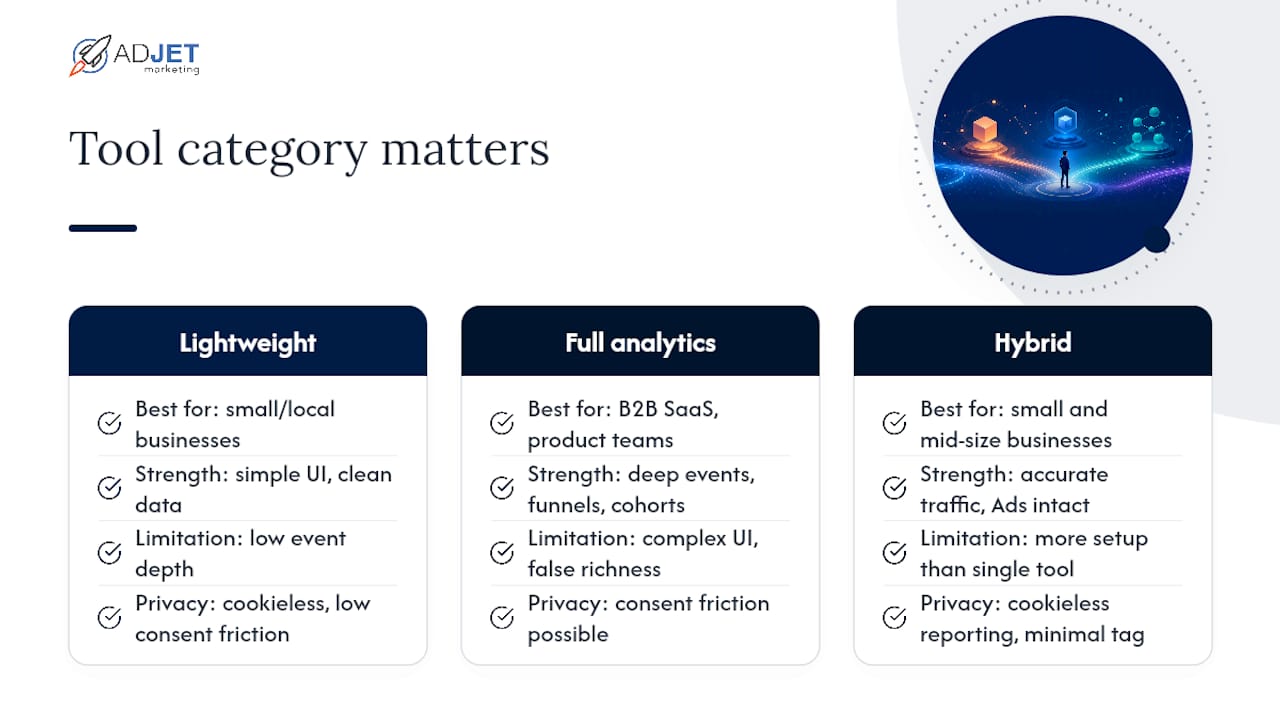
A clinic owner who switches from GA4 to Plausible because they are frustrated with the interface has probably solved the right problem. A B2B SaaS company that switches to Fathom for the same reason has not — they have traded complexity for simplicity, but they have also lost the event depth their product team actually needs. The tool is fine. The category is wrong.
The pattern we see repeatedly with clinics and local service businesses is that GA4’s complexity creates a false sense of data richness. Teams spend time in the interface without acting on what they find. A simpler tool with cleaner data often produces better decisions, not worse ones. But that same simplicity becomes a liability the moment you need to understand funnel drop-off, identify which company visited your pricing page, or run a retention cohort.
The hybrid approach is underused. Running a lightweight cookieless tracker for daily reporting while keeping a minimal Google tag for ad conversion feeds is not a compromise — it is the right architecture for most small and mid-size businesses. You get accurate traffic data without consent friction, and your Google Ads bidding stays intact. The two tools serve different jobs, and that is fine.
One more thing worth saying plainly: optimizing Google Ads for medical clinics without reliable conversion data is guesswork. The analytics migration question and the ad performance question are the same question. Get the conversion feed right first, then optimize the reporting layer.
Adjetmarketing handles the migration and conversion continuity for you
Switching analytics tools while keeping your Google Ads conversions intact is the part most businesses get wrong. Adjetmarketing is a Google Partner agency that manages exactly this for medical clinics, aesthetic practices, home services businesses, and local service providers across the US. We handle the dual-tagging setup, validate conversion continuity, and make sure your ad bidding does not degrade during the transition.
If you are running paid campaigns and considering a move away from GA4, the stakes are higher than they look. A misconfigured migration can quietly erode Smart Bidding performance before you notice the drop in leads. Our team has worked through this with clinics and practices that came to us after exactly that scenario.
Review our digital marketing strategy services to see how we approach analytics, conversion tracking, and paid media as a connected system, or contact us directly to discuss your current setup.
Sources
- 15 Google Analytics Alternatives for 2026
- Best Google Analytics Alternatives for 2026
- Set up your web conversions – Google Ads Help
- Use the Google tag for Google Ads conversion tracking – Google Ads Help
- 13 Best Google Analytics Alternatives & Competitors in 2026 — SegmentStream
- Simple Analytics on Capterra
Recommended
- Google Analytics Service – AdJet Digital Marketing & Google Partner Agency | SEO Development Google Ads Social
- Best TexasSEO.com Alternatives For U.S. Businesses In 2026
- How To Track Cannabis SEO Results Without GA4 – AdJet Digital Marketing & Google Partner Agency | SEO Development Google Ads Social
- Top 6 Marketing Agency Alternatives 2026