









Most contractors are excellent at their trade and genuinely struggle to fill their pipeline with quality leads. Referrals dry up, slow seasons hit hard, and social media rarely delivers the kind of job-ready phone calls you actually need. Google Ads for contractors solves a specific problem: it puts your business in front of people who are actively searching for exactly what you do, right now, in your area. This guide walks you through planning, setup, optimization, and measurement so you can run campaigns that generate real leads without burning through your budget.
Table of Contents
- Key takeaways
- Google Ads for contractors: what to set up first
- How to set up your contractor Google Ads campaign
- Common pitfalls and how to fix them
- Measuring results and refining your campaigns
- My honest take on contractor Google Ads
- How Adjetmarketing helps contractors win with Google Ads
- FAQ
Key takeaways
| Point | Details |
|---|---|
| Budget realistically | Plan for at least $1,000 per month to gather meaningful data and see consistent results. |
| Structure ad groups tightly | Group keywords by specific service themes to improve ad relevance and reduce cost per click. |
| Match ads to landing pages | Your landing page headline must reflect your ad offer exactly to improve Quality Score and conversions. |
| Track calls properly | Set up call tracking early and account for Google forwarding number delays at campaign launch. |
| Measure what matters | Focus on cost per lead and call quality, not just clicks or impressions, to evaluate real ROI. |
Google Ads for contractors: what to set up first
Before you write a single ad, you need a solid foundation. Skipping this step is the most common reason contractors waste money in the first few weeks of a campaign.
Budgeting for your local market
The average cost per click for contractor-related searches ranges from $2 to $10, and most small service businesses need at least $1,000 per month to generate enough data for meaningful optimization. In competitive urban markets, that number often needs to be higher. Starting too low means your ads run out of budget by midday and you never get a complete picture of performance.

Defining your services and service area
Be specific. “General contractor” is too broad to advertise effectively. Break your services into categories: kitchen remodeling, bathroom renovation, roof replacement, drywall installation. Each one attracts a different type of searcher with a different budget and urgency level. Define the ZIP codes or radius you actually serve so your ads stop showing to people you cannot take on as clients.
Choosing the right campaign type
Google offers two primary options that work well for home services:
- Google Search Ads: Text ads that appear when someone searches a relevant keyword. You control bids, keywords, and ad copy. Best for contractors who want precise control over targeting and messaging.
- Local Service Ads (LSAs): Pay-per-lead ads that appear above standard search ads. They display your Google Guaranteed badge and star rating. Lower cost per lead in many markets but less customization.
Most contractors benefit from running both. LSAs capture quick trust-based clicks while Search Ads allow you to target specific services with tailored messaging.
| Requirement | Why it matters |
|---|---|
| Google Ads account | Needed to create and manage campaigns |
| Keyword research tool | Identifies what customers actually search |
| Dedicated landing pages | Required for message match and conversions |
| Call tracking setup | Measures which ads generate phone leads |
| Google Business Profile | Boosts Local Service Ad eligibility and trust |
Pro Tip: Link your Google Analytics 4 account to Google Ads before you launch. This gives you access to on-site behavior data from day one, which becomes critical for optimizing landing pages later.
How to set up your contractor Google Ads campaign
With your foundation in place, here is a step-by-step process for building a campaign that is structured correctly from the start.
-
Conduct targeted keyword research. Focus on high-intent local phrases like “kitchen remodeler in [city],” “roof repair near me,” and “bathroom renovation contractor [ZIP code].” Avoid broad terms like “contractor” or “home improvement” because they attract browsers, not buyers. Tools like Google Keyword Planner show monthly search volume and estimated CPC for your area.
-
Build tightly themed ad groups. One ad group for kitchen remodeling, one for bathroom work, one for roofing. Do not mix services in a single ad group. Tightly grouped keywords by intent improve ad relevance and Quality Score, which directly lowers what you pay per click.
-
Write specific, relevant ad copy. Your headline should mirror what the searcher typed. If someone searches “bathroom tile installation Austin,” your ad headline should reference bathroom tile installation in Austin. Vague headlines like “Quality Contractor Services” lose to specific ones every time.
-
Add ad extensions to every campaign. Ad extensions like sitelinks and callouts increase your ad’s size, improve click-through rate, and raise your Ad Rank without increasing your bid. Use call extensions so searchers can tap to call directly from the search results page.
-
Use Responsive Search Ads (RSAs). Enter 8 to 10 headlines and 4 descriptions. Google’s machine learning tests combinations and serves the best-performing versions. This saves time and typically outperforms static ads within a few weeks.
-
Set your bidding strategy appropriately. For new campaigns, start with Manual CPC or Maximize Clicks to gather conversion data. Once you have at least 30 to 50 conversions recorded, switch to Target CPA or Maximize Conversions to let Google’s algorithm optimize for leads rather than just traffic.
-
Build dedicated landing pages. Do not send all your ad traffic to your homepage. A landing page that delivers exactly what the ad promises dramatically improves conversion rates and Quality Score. Each major service needs its own page with a clear headline, service details, social proof, and a phone number or contact form above the fold. For practical guidance on structure, the principles behind high-converting pages apply regardless of industry.
Pro Tip: Page load speed is not optional. Landing pages that load in under 3 seconds are critical for Quality Score. Run every landing page through Google PageSpeed Insights before launch and fix issues that drop your score below 80.
Common pitfalls and how to fix them
Even well-planned campaigns run into problems. Knowing what to watch for saves you weeks of wasted spend.
Quality Score and why it controls your costs
Quality Score is Google’s 1 to 10 rating of your ad’s relevance, expected click-through rate, and landing page experience. A higher score means you pay less for the same position. Improving Quality Score from 5 to 8 can reduce your cost per click by 20 to 30%, which means more leads from the same monthly budget. The fastest way to improve it is to tighten your ad groups and improve landing page relevance.
It is worth noting that Google does not use static Quality Score in live auctions. Auction-time quality signals such as device, location, time of day, and exact query variation determine your actual placement and cost in each auction. Think of Quality Score as a training indicator, not the final word.
Mistakes that drain your budget
- Generic ad groups: Mixing “kitchen remodel” and “roof repair” in one ad group forces Google to serve one generic ad to very different searchers. Generic mixed ad groups reduce relevance scores and push CPC higher.
- No negative keywords: Without a negative keyword list, your ads appear for irrelevant searches like “contractor jobs,” “DIY bathroom tile,” or “free home renovation.” Build your negative list before launch and review your Search Terms report weekly.
- Slow call tracking setup: Google forwarding numbers for call ads require 20 to 50 clicks before they appear, which can delay proper call attribution at campaign launch. If you use a third-party call tracking platform, set it up before your first ad goes live.
- Sending traffic to your homepage: Your homepage is designed for general visitors. A prospect who clicked an ad about bathroom remodeling needs a page that speaks directly to that project, not a generic welcome page.
Pro Tip: Review your Search Terms report every 7 days for the first two months. Add irrelevant terms as negative keywords immediately. This single habit can reduce wasted spend by 15 to 25% in the early stages of a campaign.
“Message match between your ad and your landing page is not just a Quality Score factor. It is the difference between a visitor who calls and one who bounces.” This principle holds up across every contractor market we have worked in.
Measuring results and refining your campaigns
Getting the campaign live is only half the job. The real work is in understanding what your data tells you and acting on it consistently.
Metrics that actually matter for contractors
- Cost per lead (CPL): Divide your total ad spend by the number of qualified leads. This is your most useful number. A $1,500 monthly budget that generates 15 leads at $100 each is a solid starting point for most local markets.
- Conversion rate: What percentage of visitors take action (call or fill out a form)? Industry benchmarks for contractor landing pages typically range from 5 to 15%. Anything below 3% signals a landing page problem.
- Call quality: Not every call is a qualified lead. Use call recordings or a CRM to track which calls turned into estimates and which were junk.
- Click-through rate (CTR): Low CTR on specific keywords suggests your ad copy does not match what searchers want. Rewrite headlines before adjusting bids.
AI-qualified call conversions in 2026
Google made a significant change in April 2026. The platform now uses AI to qualify phone call leads by analyzing call recordings instead of relying solely on call duration to count a conversion. AI-generated call summaries feed into Google’s Smart Bidding algorithms, which means the signals driving your automated bids are now more accurate. This is particularly useful for contractors who previously saw Smart Bidding underperform because spam calls and wrong numbers were counted as conversions.
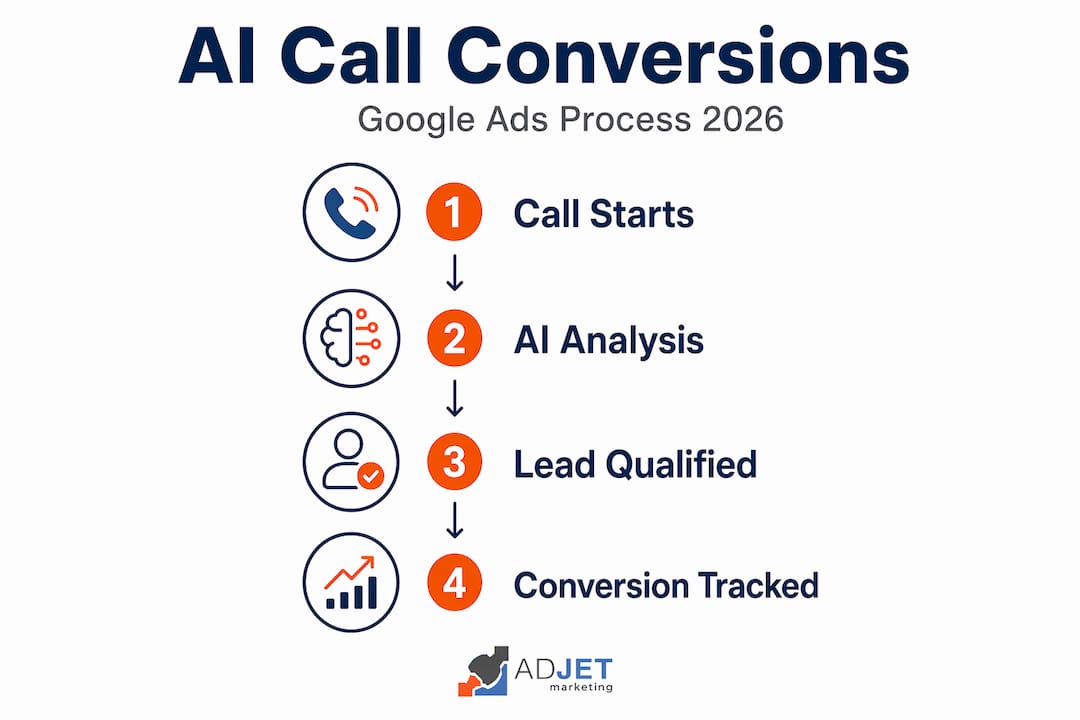
Note that default call recording is on for most advertisers, with exceptions for healthcare and financial sectors. Review your settings to confirm this is active in your account.
Timeline and expectations
Expect the first 30 to 60 days to be a data-gathering phase. You will spend money learning what works. Month three is typically when campaigns start delivering consistent, cost-efficient leads. Sustainable results at a predictable CPL usually take three to six months to establish. Contractors who pause campaigns after 45 days because leads are inconsistent almost always give up right before the data becomes actionable.
Combining your Google Ads effort with AI-powered lead capture tools that respond to inquiries instantly, even outside business hours, prevents paid leads from going cold before you can follow up.
My honest take on contractor Google Ads
In my experience running campaigns for service businesses, the ones that fail share a predictable pattern. They launch with a modest budget, use a single broad ad group, send traffic to their homepage, and then call it quits after six weeks. The campaigns that work share an equally predictable pattern: tight structure, specific landing pages, and patience.
What I have found working with home service businesses specifically is that the single biggest waste of budget is poor ad group structure. I have audited accounts where every service, from roofing to painting to HVAC, lived in one campaign with one ad group. Every click was expensive. Every ad was generic. Every landing page was the homepage. The fix was not more budget. It was reorganization.
The AI call conversion update from April 2026 is genuinely useful for contractors. I have seen accounts where Smart Bidding was effectively training on junk calls, wrong numbers, and competitor checks. Now that AI is filtering those out and feeding cleaner signals into the bidding algorithm, automated strategies work meaningfully better. If you are running Target CPA bidding, check your conversion data post-April 2026 and re-evaluate your targets. Your baseline may have shifted.
One more thing most articles will not tell you: Quality Score is a useful signal, not an optimization target. I have seen accounts with a Quality Score of 6 outperform accounts with a Quality Score of 9 on cost per actual lead because the lower-score account had better campaign structure practices and stronger landing pages for conversion. Optimize for real leads. Use Quality Score to diagnose problems, not to celebrate wins.
— Felix
How Adjetmarketing helps contractors win with Google Ads
At Adjetmarketing, we manage Google Ads campaigns for home service businesses as a certified Google Partner agency. We handle everything from keyword research and ad group structure to landing page creation and conversion tracking setup. Our contractor clients benefit from tightly organized campaigns built around service-specific ad groups, dedicated landing pages, and call tracking that actually tells you which ads are driving real jobs. If you are ready to stop guessing and start generating consistent, qualified leads, explore our Google Ads management services to see how we approach contractor campaigns. We work with businesses at various budget levels and build campaigns designed to scale as your lead volume grows.
FAQ
How much should contractors budget for Google Ads?
Most contractors need at least $1,000 per month to gather meaningful data. In competitive metro markets, $1,500 to $2,500 per month is a more realistic starting point for consistent results.
What keywords work best for contractor Google Ads?
High-intent local keywords perform best, such as “bathroom remodel contractor in [city]” or “roof repair near me.” Avoid broad match terms like “contractor” without additional modifiers since they attract unqualified traffic.
How long before Google Ads generates leads for my contracting business?
Most campaigns begin producing leads in the first two to four weeks, but consistent, cost-efficient results typically take three to six months as the algorithm gathers conversion data and optimizes bidding.
What is a good cost per lead for contractor Google Ads?
Cost per lead varies by service and location, but $75 to $150 per lead is a reasonable benchmark for most local contractor campaigns. High-value projects like full remodels can justify a higher CPL given the contract value.
Do I need separate landing pages for each service I advertise?
Yes. Each major service should have its own dedicated landing page that mirrors the ad’s promise. Sending all traffic to your homepage reduces conversion rates and raises your cost per click by lowering Quality Score.
Recommended
- Why Real Estate Agents Need Google Ads For Quality Leads
- How To Optimize Google Ads For Medical Clinics: Proven Steps
- How Do I Get More Listings As A Realtor? | Strategies That Sellers Trust – AdJet Digital Marketing & Google Partner Agency | SEO Development Google Ads Social
- Google Ads Vs Meta Ads For Medspas: Which Brings Better ROI – AdJet Digital Marketing & Google Partner Agency | SEO Development Google Ads Social