









If you’re a real estate agent spending money on Google Ads without a clear strategy, you’re not alone. The step by step google ads for agents process trips up even experienced professionals because the platform rewards structure and penalizes guesswork. Poor campaign setup, missing conversion tracking, and sending clicks to a generic homepage are the three most common ways agents burn through budgets with little to show for it. This guide walks you through every stage of the process, from account setup to realistic ROI expectations, with compliance built in from the start.
Table of Contents
- Key takeaways
- Step by step Google Ads for agents: prerequisites first
- How to set up your campaign
- Setting up conversion tracking correctly
- Common mistakes that waste budget
- What to expect after launch
- My honest take after watching dozens of agent campaigns
- How Adjetmarketing can help you get this right
- FAQ
Key takeaways
| Point | Details |
|---|---|
| Dedicated landing pages matter | Sending traffic to your homepage cuts conversion rates by 50% or more compared to a focused lead capture page. |
| Budget realistically from day one | Monthly budgets between $900 and $2,000 give Google’s algorithm enough data to optimize effectively. |
| Compliance is non-negotiable | Fair Housing Act rules prohibit demographic targeting by age, gender, or zip code in Google Ads. |
| Track calls, not just forms | Phone calls represent the majority of local service leads and must be tracked alongside form submissions. |
| Give campaigns time to learn | Expect a 30 to 60 day learning phase before performance stabilizes and leads become consistent. |
Step by step Google Ads for agents: prerequisites first
Before you touch the Google Ads interface, you need three things in place. Without them, even a well-built campaign will underperform.
A dedicated landing page. This is not your homepage and not your Zillow profile. Sending traffic to a homepage cuts conversion rates by 50% or more. Your landing page should have one goal: capture a name, phone number, and email. Remove navigation menus, competing links, and anything that distracts from that single action.
A CRM or follow-up system. Leads from Google Ads arrive fast and go cold just as fast. You need a system, whether that’s a simple spreadsheet with reminders or a full CRM like Follow Up Boss, that lets you respond within minutes. Speed matters more than most agents realize.
A realistic budget. Monthly budgets below $500 rarely give Google’s algorithm enough data to optimize. Plan for $900 to $2,000 per month to generate consistent lead flow, especially in competitive metro markets.
Compliance awareness. Google’s housing category policy now enforces Fair Housing Act restrictions directly inside the Ads platform. You cannot target by age, gender, household income, or zip code for housing-related ads. Geographic targeting must use a minimum 15-mile radius. Your ad copy must avoid language that implies preference for or against any protected class.
Here’s a quick reference for what you need before launch:
| Tool or element | Why it matters | Minimum requirement |
|---|---|---|
| Landing page | Captures leads without distraction | Single CTA, no navigation |
| CRM or follow-up system | Responds to leads quickly | Any tool with reminders |
| Google Ads account | Campaign management | Expert Mode, not Smart Campaigns |
| Monthly budget | Feeds algorithm with data | $900 minimum |
| Compliance checklist | Avoids ad disapprovals and legal risk | Fair Housing Act reviewed |
How to set up your campaign
This is the core of any google ads tutorial for real estate. Follow these steps in order.
-
Create your Google Ads account in Expert Mode. When you first sign up, Google tries to push you into Smart Campaigns. Click “Switch to Expert Mode” before proceeding. Smart Campaigns limit your control and often waste budget on low-quality traffic.
-
Choose Search Campaign with a Leads objective. Select “Leads” as your campaign goal and “Search” as the campaign type. Avoid Display, Performance Max, or Discovery campaigns until you have proven Search results.
-
Set tight geographic targeting. Target cities and towns where you actively work. Given Fair Housing requirements, use radius targeting centered on your office location. Avoid zip-code level targeting for housing ads.
-
Build tightly themed ad groups. Each ad group should cover one specific topic, such as “homes for sale in [city]” or “first-time homebuyer agent.” Group keywords with similar intent together. Mixing buyer and seller keywords in one ad group hurts relevance scores.
-
Use phrase and exact match keywords only. Launching with phrase and exact match controls which searches trigger your ads and prevents budget waste during the learning phase. Broad match can work later once you have data.
-
Build a strong negative keyword list from day one. Exclude terms like “rent,” “lease,” “Airbnb,” “cheap,” “jobs,” and “free.” Excluding irrelevant search terms like these immediately improves lead quality and budget efficiency.
-
Write compliant, compelling ad copy. Focus on objective benefits: local expertise, years of experience, number of homes sold. Avoid language like “great neighborhood for families” or “ideal for young couples,” which can trigger Fair Housing violations.
-
Start with Maximize Clicks bidding. Use this strategy for the first 30 conversions. Once you have enough data, switch to Target CPA to let Google’s algorithm optimize for your cost per lead.
Pro Tip: Consider running Google Local Service Ads alongside your Search campaign. Local Service Ads charge per lead and display a “Google Screened” badge that builds immediate trust with searchers.
| Step | Purpose | Key tip |
|---|---|---|
| Expert Mode setup | Full campaign control | Decline Smart Campaign prompt |
| Search + Leads objective | Reach high-intent buyers | Avoid Display at launch |
| Geographic targeting | Reach local prospects | Use radius, not zip codes |
| Phrase and exact match keywords | Control traffic quality | Add broad match only after 30+ conversions |
| Negative keywords | Protect budget | Review and expand list weekly |
| Compliant ad copy | Avoid disapprovals | No demographic language |
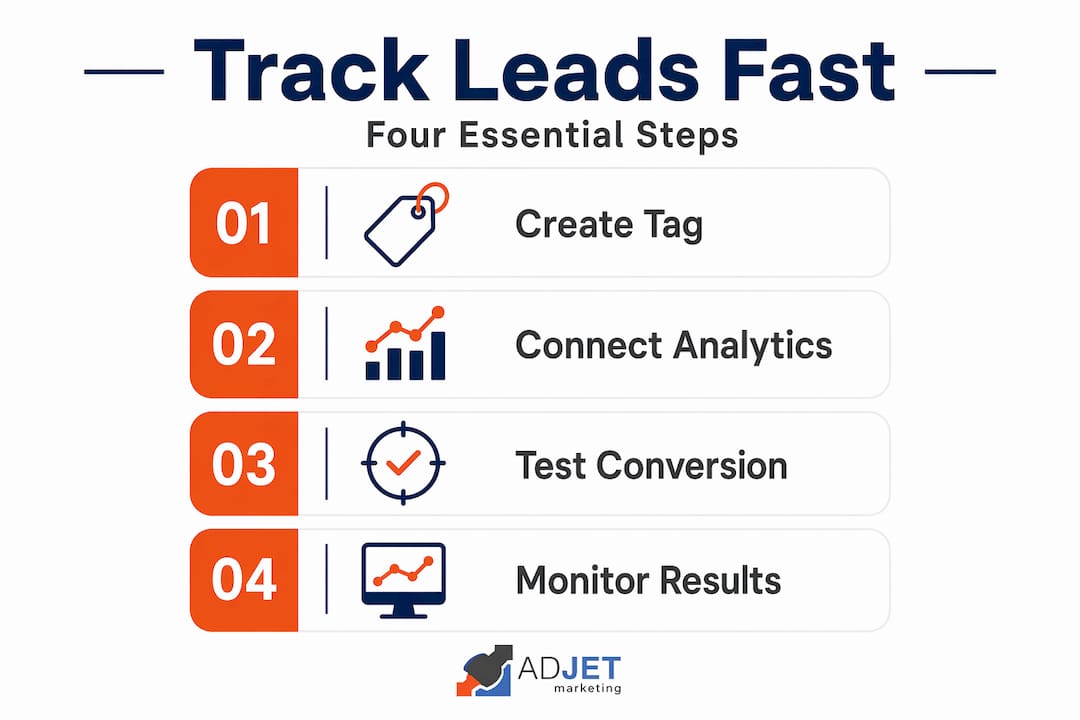
Setting up conversion tracking correctly
Accurate tracking is what separates a google ads guide for agents that actually works from one that just looks good on paper. Without it, you cannot optimize for leads. You’re flying blind.
-
Install Google Tag Manager on your landing page. GTM lets you deploy tracking tags without editing code every time. Add your GTM container snippet to the "
and` of your landing page. -
Create a form submission conversion action in Google Ads. In your Google Ads account, go to Goals > Conversions > New Conversion Action. Select “Website,” enter your landing page URL, and configure the conversion for “Form submit.” Set conversion counting to “One” to prevent the same lead from counting multiple times.
-
Set up phone call tracking. In Google Ads, create a separate conversion action for phone calls using a Google forwarding number. Phone calls typically represent 60% to 75% of local service leads, so ignoring this means your data is incomplete and your bidding decisions will suffer.
-
Add a minimum call duration filter. A 30 to 60 second minimum duration filter excludes junk calls, robocalls, and misdials from your conversion data. This keeps your cost per conversion metrics accurate.
-
Publish tags and test everything. Use GTM’s Preview Mode to verify that your form submission tag fires when a test lead is submitted. Use the Google Ads Call Conversions report to confirm calls are being tracked.
“Tracking phone calls in addition to form submissions is critical. Ignoring this leads to incomplete data and poor bidding decisions.” — Conversion Tracking Essentials for Local Google Ads
Pro Tip: Set up a Google Analytics 4 property alongside your Google Ads tracking. Linking both accounts lets you see full user behavior on your landing page, including scroll depth and time on page, which helps identify whether your page copy needs work.
Common mistakes that waste budget
Even a well-structured campaign can fail if you fall into these traps. This part of the google ads guide for agents is where most agents stumble after the initial launch.
-
Using broad match keywords without a negative list. Monitoring search terms weekly and expanding your negative keyword list is not optional. It’s ongoing work. Broad match without guardrails will serve your ads for searches like “real estate license courses” or “how to become an agent.”
-
Sending traffic to your homepage or a third-party profile. Your Zillow page is not a landing page. It has competing calls-to-action, exit links, and no connection to the specific ad the user just clicked.
-
Pausing campaigns too early. Google’s algorithm needs 30 to 60 days and at least 30 conversions to exit the learning phase. Agents who pause after two weeks because “nothing is happening” are giving up right before results start improving.
-
Ignoring Fair Housing compliance in your targeting and copy. Real estate advertising rules require careful attention to both ad text and audience settings. One disapproval can pause your entire campaign while Google reviews it.
-
Not calling leads back within minutes. Google Ads delivers warm but impatient prospects. If you don’t respond within 5 minutes of a form submission or missed call, conversion rates drop significantly.
Pro Tip: Set a weekly 20-minute calendar block specifically for reviewing your Search Terms report. This single habit, consistently applied, does more to protect your budget than any other ongoing activity.
What to expect after launch
Setting accurate expectations is part of any honest step by step ad setup for agents. Here’s the honest timeline.
Most agents see their first leads within 7 to 14 days of going live. Full optimization, where your cost per lead stabilizes and Smart Bidding is working well, typically takes 60 to 90 days. Real estate sales cycles are long. A lead who clicks your ad in March may not close until September. That’s normal for the industry.
For cost benchmarks, a reasonable cost per lead in most U.S. markets ranges from $25 to $80 depending on city size and competition. At a 2% lead-to-close rate and an average commission of $9,000, you can afford to spend considerably more per lead and still show positive ROI. Calculate your acceptable cost per lead based on your own numbers before you start.
| Metric | Google Ads | Organic SEO |
|---|---|---|
| Time to first lead | 7 to 14 days | 4 to 12 months |
| Monthly cost | $900 to $2,000+ | $500 to $2,000 for SEO services |
| Lead intent level | High (active searchers) | High (organic trust) |
| Optimization timeline | 30 to 90 days | 6 to 18 months |
| Control over volume | Direct via budget | Indirect via rankings |
SEO and Google Ads work well together. Paid ads give you immediate traffic while organic rankings build in the background. Agents who rely on only one channel over the long term leave leads on the table.
My honest take after watching dozens of agent campaigns
I’ve set up and reviewed Google Ads campaigns for real estate agents across many local markets, and the pattern I keep seeing is the same. Agents come in with a healthy budget, launch a campaign, and expect the leads to pour in automatically. When results are slower than expected in week two or three, they start tweaking daily, pausing keywords, or changing bids every few days. That kills the algorithm’s ability to learn.
The uncomfortable truth is that AI tools like Google Ads Advisor are genuinely useful for surfacing optimization suggestions, but they cannot understand your specific market, your commission structure, or the nuance of your local competition. Human strategy still drives results. The agents who win are the ones who set things up correctly, let the campaign breathe, and do their weekly maintenance without overreacting to short-term fluctuations.
What separates successful agents from those who give up after 45 days is almost never the ad platform. It’s the landing page quality, the follow-up speed, and the discipline to stay consistent. I’ve watched agents with modest $1,000 monthly budgets consistently outperform competitors spending three times as much, purely because their infrastructure was better.
If you’re serious about how to use google ads for agents in a way that actually converts, invest in the fundamentals first. A strong landing page and a fast follow-up process will do more for your ROI than any bidding trick.
— Felix
How Adjetmarketing can help you get this right
Building and managing Google Ads campaigns the right way takes time, technical knowledge, and ongoing attention. Most agents are better served spending that time with clients. Adjetmarketing is a certified Google Partner agency with direct experience managing paid search campaigns for agents and local service businesses across competitive markets.
When you work with Adjetmarketing, you get a complete setup that includes dedicated landing page creation, full conversion tracking through Google Tag Manager, Fair Housing-compliant ad copy, and ongoing campaign management with monthly reporting. You don’t have to figure out negative keyword lists or bidding strategies on your own.
If you’re ready to stop guessing and start generating consistent, qualified leads, explore Adjetmarketing’s Google Ads services or reach out directly through our main site to discuss your market, your budget, and what realistic results look like for your area.
FAQ
How much should real estate agents budget for Google Ads?
Most agents need at least $900 per month to generate enough data for Google’s algorithm to optimize. Budgets in the $1,500 to $2,000 range produce more consistent lead flow in competitive markets.
Can I target specific zip codes with Google Ads as a real estate agent?
No. Google’s housing category policy, aligned with the Fair Housing Act, prohibits zip-code level targeting for housing-related ads. You must use a minimum 15-mile radius from a central location.
How do I track leads from Google Ads?
Use Google Tag Manager to deploy form submission and phone call tracking tags. Set conversion counting to “One” per click and apply a minimum 30-second call duration filter to exclude junk calls from your data.
When will I start seeing leads from Google Ads?
Most agents see their first leads within 7 to 14 days of launch. Full campaign optimization typically takes 60 to 90 days, so avoid making major changes or pausing campaigns before that window closes.
What keywords should real estate agents avoid in Google Ads?
Exclude terms like “rent,” “lease,” “Airbnb,” “real estate license,” “how to become an agent,” “cheap,” and “jobs” using negative keywords. Review your Search Terms report weekly to catch additional irrelevant queries and add them to your exclusion list.
Recommended
- Google Ads For Therapists: A Step-by-Step Campaign Creation Guide – AdJet Digital Marketing & Google Partner Agency | SEO Development Google Ads Social
- Why Real Estate Agents Need Google Ads For Quality Leads
- How To Run Google Ads For Your Dental Practice – A Step-by-Step Guide – AdJet Digital Marketing & Google Partner Agency | SEO Development Google Ads Social
- 20 Tips To Optimize Google Ads For Healthcare