









Expect search clicks to run from under $1 to more than $160, with a median near $9.11 and cost per lead that depends heavily on the keywords you pick. The budgeting rule is simple: take the leads you want, multiply by the cost per lead you can realistically expect, and start with enough monthly spend to gather real data. For most agents, the right starting budget depends on their market, keyword mix, and goals.
TL;DR:
- Plan monthly spend by multiplying your target lead count by a realistic cost per lead, then divide by 30.4 for an average daily budget.
- Searches for agents cost $9 to $12 per click; seller terms can reach $115 to $167, so cap tests and begin with agent intent.
- Track calls and form submissions accurately, send clicks to a single offer page, and reply within minutes to reduce wasted spend and improve lead conversion.
- Judge profitability by cost per closing against commission, not lead cost alone; allow several weeks and enough clicks before changing a new campaign.
- Google can spend up to twice your average daily budget on a busy day, but monthly charges cannot exceed 30.4 times that daily budget.
Table of Contents
- What do real estate Google Ads cost per click and per lead?
- How do you set a Google Ads budget for real estate?
- Which keyword intent tiers cost the most, and which should you test first?
- What lowers your cost per lead even when clicks are expensive?
- How do you calculate cost per closing and decide if Google Ads pay off?
- What do low, mid, and high budgets realistically look like?
- What changes did AdJet Marketing see make the biggest difference?
- How do costs differ between urban, suburban, and rural markets?
- How do ad scheduling and device targeting affect what you spend?
- When do real estate Google Ads cost the most, and how should you plan around it?
- Where does the conventional advice on real estate Google Ads fall short?
- How can AdJet Marketing help you run Google Ads and landing pages?
- FAQ
- Sources
What do real estate Google Ads cost per click and per lead?
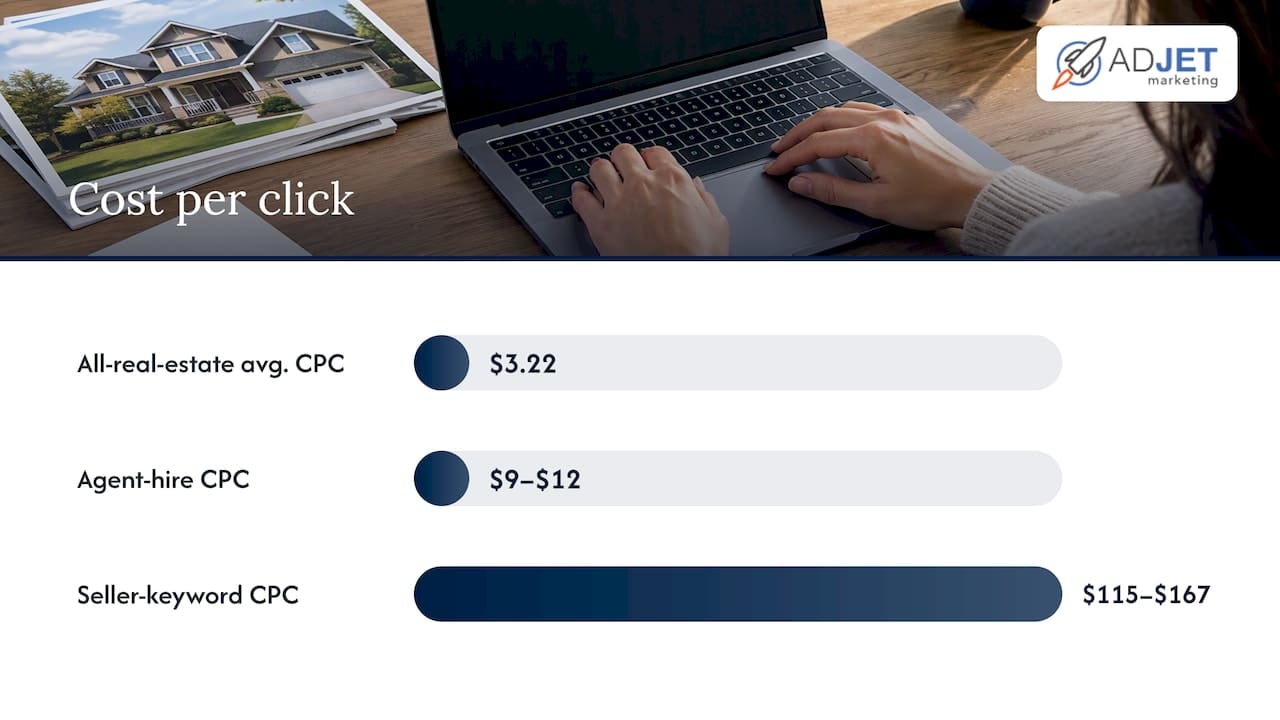
The honest answer starts with a spread, not an average. A U.S. sample of real estate keywords showed clicks ranging from $0.93 to $167.11, with seller-focused keywords landing in the $115 to $167 range and agent-hire terms typically around $9 to $12. That gap is the single most important thing to understand before you set a budget. Two agents can both say they run “real estate Google Ads” and pay wildly different amounts per click because they are bidding on different kinds of searches.
Category averages tell a calmer story. LocaliQ’s 2026 benchmarks, as summarized by DMR Media, put the all-real-estate average cost per click at $3.22 and the average cost per lead at $102.51. For residential real estate agents specifically, the same benchmarks show an average click cost of $3.19 and an average cost per lead of $157.59. Notice that the average click is far below the median in the keyword sample above. That is not a contradiction. Averages across whole accounts include lots of cheap browsing and listing clicks, while a keyword-level sample skews toward the terms agents actively bid on.
Here is how we suggest you hold these numbers in your head:
- Cheap clicks exist, but they are mostly browsing intent. Searches near the low end of the range tend to come from people looking at listings or neighborhoods, not people ready to hire you.
- Agent-hire terms sit in the middle. A range of roughly $9 to $12 per click is common for people searching for an agent, and these clicks are closer to a conversation.
- Seller-intent keywords can cost $100 or more per click. Few agents can afford to bid on these broadly, but a handful of well-targeted terms may be worth it when a listing commission is large.
- Cost per lead and cost per click are different budgets. A lead costs several clicks, so a $3 click becomes a lead costing well over $100 once you account for visitors who never fill out a form.
A median click near $9.11 in a U.S. real estate keyword sample, against an all-real-estate average cost per lead of about $102.51 in LocaliQ’s benchmarks, is the pairing worth memorizing: the first tells you what a serious keyword costs, the second tells you what a typical lead costs once everything is averaged together. (Reallyo, DMR Media)
Why does cost per lead vary so much? Three things drive most of it. First, keyword intent: a seller asking what their home is worth is a different lead than someone browsing a map. Second, your market: crowded metro areas have more agents bidding on the same searches. Third, the quality of what happens after the click, which is where we see the biggest swings. Many agents come to us after paying for plenty of traffic that never turned into inquiries, and the cause is rarely the click price. It is usually a generic page, missing tracking, or a slow reply.
One more point on realism. Budgeting to the median without accounting for keyword tiers can leave a campaign unable to afford the very keywords that close deals. A plan built around the all-real-estate average click cost may fall apart when you add a much more expensive seller keyword. Decide which tier you are buying before you decide how much to spend.
If you want a deeper look at how bidding and relevance affect what you pay, our overview of healthcare PPC concepts explains quality score and bidding in plain language, and the mechanics carry over to real estate.
How do you set a Google Ads budget for real estate?
Start from the result you want, then work backward. Agents who start from “what can I afford?” tend to land on a number that is too small to learn anything. Here is the sequence we use with clients:
- Pick a lead target. Decide how many inquiries you want per month.
- Choose a realistic cost per lead. Use a benchmark as a starting assumption, not a promise. The residential agent figure of about $157.59 per lead is a reasonable planning anchor.
- Multiply to get monthly spend. Multiply your target leads by your expected cost per lead.
- Divide by 30.4 for a daily budget. The reason for using 30.4 is explained below.
- Review after 30 days and adjust. Replace the benchmark with your own cost per lead and rerun the math.
Now the billing rule that surprises many first-time advertisers. Google documents that an average daily budget can overdeliver on a given day, up to twice the daily amount, but your billed monthly charge will not exceed 30.4 times your average daily budget. In practice, daily spend may be higher on a busy day and lower on a quiet one, while the monthly charging limit still applies. The cash-flow implication is worth planning for: your card may show larger charges on some days than the budget suggests, even though the monthly ceiling holds.
Google also explains how to manage and monitor your spend, including the difference between served cost and billed cost. Billed cost will not exceed your daily or monthly limits, and the billing summary shows both figures so you can reconcile them.
On starting size, a very small monthly budget may buy only a few dozen clicks in many markets, which can be too little to tell whether a keyword works or whether your page converts. A larger budget can produce usable data faster, because each keyword has a better chance of getting enough impressions and clicks to show a pattern. That is not a guarantee of results. It is simply the point at which a campaign has enough volume to teach you something.
Think about timelines too. A new campaign usually needs a few weeks to settle, since Google’s system is still learning which searches and audiences respond. Judging a campaign after only a short time and a handful of clicks is one of the more common ways agents talk themselves out of a channel that might have worked.
Pro Tip: Use Google’s Performance Planner to forecast spend against your keyword set, and consider a shared budget across similar campaigns so one underperforming campaign cannot quietly drain a fixed monthly total.
Which keyword intent tiers cost the most, and which should you test first?
Not all searches are equal, and the price of a click mostly reflects how close the searcher is to a decision. We group keywords into four tiers, and each one suits a different agent.
- Seller intent. Searches like “sell my house fast” or “what is my home worth.” These are the most expensive, with seller keywords seen in the $115 to $167 range, and they produce the highest-value leads because a listing commission is at stake.
- Agent-hire intent. Searches like “real estate agent near me” or “best realtor in [city].” These typically run around $9 to $12 per click and attract people already deciding who to work with.
- Listing and search intent. Searches like “homes for sale in [neighborhood].” Clicks are usually cheaper, but visitors are often browsing portals and are less likely to commit to you.
- Rentals. Searches for apartments or houses to rent. Costs and conversion patterns differ again, and these suit agents or teams with a rental book of business.
How do you choose where to begin? Think about commission size and how many leads you can handle. If you represent sellers and a single listing is worth thousands in commission, a small, tightly controlled set of seller keywords may justify the click price. If you focus on buyers, agent-hire terms often give a better balance of cost and intent. If you want volume of conversations at lower cost, listing-oriented terms can work, but only when your page gives browsers a reason to leave their contact details.
For agents testing Google Ads for the first time, we suggest this order:
- Start with agent-hire keywords, because the click price is manageable and the intent is clear.
- Add a small number of seller keywords with strict match types and a daily cap so one expensive click cannot dominate the budget.
- Treat listing and browsing keywords as a later experiment, once your page and follow-up are proven.
A common pattern we see: an agent bids broadly on listing terms, collects plenty of clicks, and concludes that Google Ads “doesn’t work.” The campaign was working exactly as designed. It was buying curiosity. Shifting even a portion of spend toward higher-intent terms usually changes the picture, though the cost per click rises, so budget for fewer, better visits.
If you would like to see how intent shapes lead quality beyond real estate, our guide to benefits of Google Ads for medical clinics explains why search intent is the channel’s core strength.
What lowers your cost per lead even when clicks are expensive?
You cannot control what the auction charges for a click, but you control what happens after it. Most of the improvement we deliver lives here.
- Single-purpose landing pages. A page built around one offer, such as a home valuation or a buyer consultation, converts better than sending traffic to a homepage full of menu options. Message match matters: if the ad promises a valuation, the page headline should say so.
- Accurate conversion tracking. Track calls, form submissions, and, where possible, offline outcomes like signed agreements. Without this, your cost per lead is a guess, and Google cannot learn which clicks are worth buying.
- Fast follow-up. Respond within minutes. A lead who submitted a form while sitting on a couch often contacts two or three agents, and the first to reply tends to win the conversation.
- A CRM that captures every lead. Leads that live in an email inbox get lost. A simple system with automated check-in messages keeps slower leads warm.
- Relevance and quality score. Ads, keywords, and landing pages that match each other earn better quality scores, which can reduce what you pay for the same position.
Why do single-purpose pages matter so much for cost? Because every click that does not convert raises your effective price per lead. If your page converts more visitors, your cost per lead can fall without touching a bid. That is why we usually look at the page before we touch the budget.
Tracking deserves its own emphasis. Many agents come to us with campaigns that report “conversions” from page views or button clicks that do not mean much, so the account optimizes toward the wrong behavior. Setting up call tracking and form tracking correctly is often the first fix, and it changes what the system tries to buy.
For agents who handle seller or investor leads, a structured follow-up routine matters just as much as the ad. A property lead checklist for real estate investors walks through lead qualification and follow-up steps that complement the workflow above.
If you want more optimization ideas, our 20 tips to optimize Google Ads cover ad copy, landing pages, and tracking habits that apply directly to real estate.
Pro Tip: Call yourself from a mobile phone after launch. Submit your own form, time how long the reply takes, and check that the lead appears in your CRM. Testing can catch a broken form before it wastes a month of spend.
How do you calculate cost per closing and decide if Google Ads pay off?
Profitability comes down to a chain of four numbers. Follow them in order:
- Cost per click (CPC): what you pay for each visit.
- Cost per lead (CPL): CPC divided by your click-to-lead conversion rate. A $9 click with a 5% conversion rate gives a CPL of $180.
- Cost per closing: CPL divided by your lead-to-close rate. If 1 in 20 leads closes, multiply the CPL by 20.
- Return: compare your commission per closing, minus the cost per closing, against what you spent.
Here is a worked example with illustrative inputs, not market data. Use your own average commission for the calculation.
Conservative scenario: You spend $2,000 a month, your cost per lead is $180, and you receive about 11 leads. If 1 in 25 leads closes, you close well under one deal a month on average, so you might see one closing every two to three months. Your cost per closing is $180 × 25 = $4,500. Against a $9,000 commission, that leaves $4,500 before your other costs. Profitable on paper, but slow, which is why agents need a cash-flow cushion.
Optimistic scenario: Same $180 cost per lead, but a tighter follow-up process lifts your lead-to-close rate to 1 in 12. Cost per closing falls to $2,160, leaving $6,840 per $9,000 commission. The ad spend is identical; the difference is what happens after the lead arrives.
Notice the lesson: a high CPL is not automatically a bad sign. The average real estate cost per lead in LocaliQ’s benchmarks is about $102.51 across the category, and agents with strong follow-up can run profitably well above that. What matters is cost per closing against commission.
One more factor works in your favor. Marketing spend for U.S. real estate agents is generally deductible as an ordinary and necessary business expense under IRC Section 162, which lowers the after-tax cost of your ads. Talk to your CPA about how this applies to your situation.
Track CPC, click-through rate, conversion rate, CPL, and lead-to-close rate regularly. Consider pausing or reworking a keyword that has spent substantially more than your target CPL without producing a lead, and scale spend gradually on terms that deliver leads at or below your target. Our 90-day testing framework for cost per lead lays out a practical timeline for deciding when you have enough data to act.
What do low, mid, and high budgets realistically look like?
These scenarios use illustrative assumptions so you can copy the math and replace the inputs with your own numbers. They are planning tools, not predictions.
Low budget: a limited monthly budget
- Assume agent-hire keywords at roughly $9 to $12 per click. The number of clicks will depend on your actual spend and click costs.
- Leads will depend on how well your landing page converts visitors.
- During the initial test, measure which keywords produced leads, whether calls or forms dominate, how quickly you replied, and what the landing page conversion rate looks like.
- The goal here is learning, not closings.
Mid budget: a larger monthly budget
- Allocate most spend to proven agent-hire keywords, a smaller share to a few capped seller keywords, and a modest test budget for listing terms.
- Keep a written split and revisit it regularly.
- With more volume, you can compare ad variations and landing page versions with some confidence.
High budget: a substantial monthly spend
- Expensive seller keywords become reasonable when a single listing commission far exceeds your cost per closing.
- Teams with several agents or a dedicated lead-response person can absorb the lead volume that this spend produces.
- Scale in steps rather than doubling overnight, so you can see whether quality holds as spend rises.
Whatever tier you choose, set expectations before launch. Tell yourself what result at 30 days would justify continuing, and what result would justify changing the plan. That single habit prevents emotional decisions after a slow first week.
What changes did AdJet Marketing see make the biggest difference?
We are a Google Partner agency, and our team builds and manages Google Ads campaigns, landing pages, and conversion optimization for local service businesses, including real estate agents. Across the accounts we manage, one pattern repeats: the first gains rarely come from bidding changes. They come from fixing the path between a click and a conversation.
We do not have a published before-and-after figure for a real estate account to share here, and we would rather not invent one. What we can describe is the sequence of fixes that tends to matter most. You can apply all three without hiring anyone:
- Fix tracking first. Confirm that form fills and phone calls are recorded as conversions, and remove any counting of meaningless actions.
- Rebuild the landing page around one offer. Match the headline to the ad, keep the form short, and put a phone number where mobile visitors can tap it.
- Set a response-time rule. Decide that every lead gets a prompt reply during working hours, and automate a first message for the rest.
Pro Tip: Review your search terms report regularly after launch. Adding irrelevant searches as negative keywords is one of the fastest ways to stop paying for clicks that were never going to become clients.
How do costs differ between urban, suburban, and rural markets?
Geography changes the auction. In dense urban markets, more agents compete for the same searches, and home prices (and therefore commissions) are often higher, which tends to push bids up. We typically see the sharpest competition on seller and agent-hire terms in large metro areas, where many agents and brokerages are all willing to pay for the same click.
Suburban markets sit in the middle. Competition is real but usually spread across more neighborhoods and more specific search terms, so a campaign built around named communities or school districts can find cheaper, more focused clicks. Many suburban agents do well by targeting neighborhood-level searches rather than competing on broad city terms.
Rural markets often have lower click prices because fewer advertisers bid, but search volume is also thinner. That creates a different problem: you may exhaust the available searches quickly, which means a small budget can still saturate the market. Agents in rural areas often add broader geographic radii or combine Google Ads with local search visibility to keep lead flow steady.
We do not have a sourced figure that compares these three market types, so treat the patterns above as practical experience rather than benchmarks. The most reliable approach is to check Google’s keyword planner for your own area, estimate the click price for your top ten keywords, and build your budget from that local data instead of from a national average.
How do ad scheduling and device targeting affect what you spend?
Scheduling and device settings do not change the price of a click directly, but they change which clicks you buy, and that changes your cost per lead.
Ad scheduling lets you show ads only during selected hours or days. For real estate, the logic is tied to your follow-up capacity. If your ads run at 2 a.m. and nobody can respond until mid-morning, you may be paying for leads that have already contacted another agent by the time you call back. Many agents we work with tighten their schedule to hours when they or a team member can reply fast, then review the data to see which hours really produce leads, not just clicks. Some will still choose to run evenings, since people often browse homes after work, as long as an automated first reply is in place.
Device targeting matters because phones and computers behave differently. Mobile visitors are often browsing and may call directly, while desktop visitors tend to compare options and fill out longer forms. Check your account data to see which device produces leads at a lower cost, then adjust bids up or down accordingly. If most of your leads come from mobile, make sure your landing page loads quickly and the call button is easy to tap.
A sensible approach is to avoid cutting hours or devices early. Run broadly for the first few weeks, collect enough data to see real differences, and only then narrow the schedule. Restricting too soon can hide good traffic that simply needed more time to show up in your reports.
When do real estate Google Ads cost the most, and how should you plan around it?
Real estate demand follows the calendar, and click prices tend to follow demand. In most U.S. markets, spring and early summer bring more buyers and sellers into the market, which usually means more advertisers competing for the same searches and higher click prices. Slower periods, often late fall and winter in many regions, can bring lower competition but also fewer people searching, so lead volume drops along with cost.
We do not have a sourced figure for how much prices move by month, and the pattern varies by region, so rather than quoting numbers, here is how we suggest you plan:
- Build a seasonal budget instead of a flat one. If your market peaks in spring, consider raising spend then, when more of your clicks come from people ready to act.
- Use slower months to test. Lower competition can make it cheaper to try new landing pages, ad copy, or keyword tiers, so you arrive at the busy season with proven settings.
- Keep some presence year-round. Pausing campaigns entirely can mean losing the data and momentum you built, and restarting later may bring a short period of lower efficiency.
- Watch your own history. As you build account history, your own data becomes a useful guide to seasonality.
Expect cost per lead to rise and fall with the market, and judge performance against the same period in the previous year, not against last month. A strong February and a strong June are not the same achievement.
Where does the conventional advice on real estate Google Ads fall short?
Most advice on this topic fixates on the click price, as if the goal were to find the cheapest clicks. I think that framing gets it backward. A cheap click that never becomes a conversation is the most expensive click you can buy, and an expensive seller click that turns into a listing can be the best money you spend all quarter.
What the research in this article actually supports is that the spread between the cheapest and most expensive real estate keywords is enormous, while the factors you control, such as tracking, the landing page, and response time, move your cost per closing far more than any bid adjustment. Benchmarks are useful for setting expectations, but your own numbers should replace them as you gather campaign data.
If you do only one thing first, set up accurate conversion tracking. Everything else, from budget decisions to keyword choices to pausing weak campaigns, depends on knowing which clicks produce leads. After that, fix the page, then the follow-up, and only then spend your attention on bids. And give the campaign enough budget and time to produce data before you judge it.
— Felix
How can AdJet Marketing help you run Google Ads and landing pages?
If you would rather not build and manage this yourself, we can do it with you. Our Google Ads services cover campaign setup, keyword structure, conversion tracking, and ongoing reporting, so you can see what each lead costs and where it came from. Pricing for Google Ads management is available on request.
Because the page behind the ad matters as much as the ad itself, we also design single-purpose pages built to convert. Our landing page design options include a Starter Plan at $299 per month and a Premium Plan at $1,500 per month, and we also offer conversion rate optimization to keep improving results once traffic is flowing.
A typical engagement starts with tracking and a landing page review, moves into campaign launch with a controlled budget, and continues with regular reporting and adjustments as your own data replaces benchmark assumptions. Timelines depend on your market and budget, and we set expectations around that up front rather than promising specific outcomes.
If you want to talk through your market, your budget, and whether managed Google Ads makes sense for your business, you can start by reviewing the Google Ads services page and requesting a consultation there.
FAQ
Does Google charge for advertising?
Yes. Google Ads is a paid platform, and you are typically charged when someone clicks your ad. You set a daily budget, and Google’s billing rules cap your monthly charge at 30.4 times your average daily budget.
Is $20 a day good for Google Ads?
It can work for testing in a low-cost market, but it is often thin for real estate. At agent-hire click prices, a small daily budget produces few clicks, so it may take a long time to learn what works. Many agents see more useful data when they can invest enough to generate a meaningful volume of clicks and leads.
How much should I pay someone to manage my Google Ads?
Management fees vary widely by agency and scope, and we do not have a sourced industry figure to quote. Ask what is included, such as tracking setup, landing pages, and reporting, and make sure your ad spend is billed to your own account. Our Google Ads management pricing is available on request.
Can I estimate my Google Ads cost before I start?
Yes. Multiply your target leads by an expected cost per lead, then divide by 30.4 for a daily budget. Google’s Performance Planner and keyword planner give local click estimates, and your own results after the first month should replace any benchmark.
Are real estate Google Ads tax deductible?
Generally yes. Marketing expenses for U.S. real estate agents are typically deductible as ordinary and necessary business expenses. Confirm the details for your situation with a CPA.
Sources
- Budgets overview – Google Ads Help
- Real Estate Ads: What They Cost in 2026 (Real CPC Data)
- Marketing Deductions for Real Estate Agents: What You Can Write Off on Advertising and Lead Generation | Blue Cloud CPA