









The best patient reactivation email campaign is a short, automated 3-email sequence that escalates to a phone call for anyone who doesn’t respond. Keep protected health information out of the email itself, and route anything clinical to a secure patient portal or get documented consent first. Realistic expectations matter here too: a cold or lapsed list typically rebooks at around 2% to 4% when email is the first layer and phone follow-up catches the rest.
TL;DR:
- Send the first message immediately, the second after 7 to 10 days, and the final 14 to 21 days later, with one action each.
- Start routine care outreach at six months, but contact patients with incomplete treatment after 60 to 90 days of inactivity.
- Use an email provider with a signed Business Associate Agreement, encryption, and access controls; document consent and honor unsubscribe requests within 10 business days.
Table of Contents
- The 3-Email Reactivation Sequence: Timing, CTAs, and What to Test
- How to Segment Lapsed Patients Before You Send
- Compliance Checklist for Patient Reactivation Emails
- Subject Lines and Short Email Templates You Can Copy and Customize
- How to Measure Success and When to Escalate to Phone Outreach
- Personalization Beyond Basic Segmentation
- Best Timing Strategies Based on Patient Demographics and Visit History
- Fitting Reactivation Emails Into Your Broader Retention Strategy
- Using Incentives to Increase Reactivation Rates
- Automation Tools and Platforms for Medical Practice Email Campaigns
- The Real Limits of Email Reactivation
- How We Help Practices Build Compliant, Converting Reactivation Programs
- FAQ
- Sources
The 3-Email Reactivation Sequence: Timing, CTAs, and What to Test
A reactivation sequence works best when it’s short, predictable, and easy for your front desk to manage. Three emails over two to three weeks give patients enough nudges without feeling like spam, and each one has a distinct job.
- Email 1, sent immediately: a friendly check-in that mentions a health benefit of returning (a cleaning, a follow-up scan, a wellness visit) with a direct link to book.
- Email 2, sent 7 to 10 days later: a value-add message, maybe a seasonal reminder or a limited-time scheduling incentive, with one strong booking call to action.
- Email 3, sent 14 to 21 days after the first: a final nudge that offers a phone option and sets a soft deadline, like “call us this week to grab a spot.”
Each email should carry exactly one call to action. Patients who get three links and two phone numbers in one message usually click nothing.
A few things worth testing before you scale the sequence:
- Subject line framing: benefit-led versus urgency-led.
- CTA wording: “Book Now” versus “Check Available Times.”
- Send time: morning versus early evening, since patient inboxes behave differently depending on the day.
Pro Tip: Run the sequence on a small segment first, fifty to a hundred patients, before pushing it to your full lapsed list. Mistakes are cheaper to fix on a small batch.
How to Segment Lapsed Patients Before You Send
Not every inactive patient deserves the same email. Grouping patients by how long they’ve been gone, and by how valuable they are to your practice, changes both the message and who follows up by phone.
- 6 to 12 months lapsed: usually the easiest wins, these patients just need a reminder and a clear booking link.
- 12 to 24 months lapsed: worth a slightly warmer tone and a reason to return, since they’ve drifted further from routine care.
- 2+ years lapsed: treat this group as a true win-back effort, often requiring a phone call rather than relying on email alone.
- High-value or treatment-incomplete patients: flag these for personalized outreach regardless of lapse length, since a partially completed treatment plan or a history of higher-value visits justifies staff time.
A simple scoring system, even something as basic as “lapse length plus lifetime value,” helps your team decide who gets an automated email only and who gets a phone call after the sequence ends. Segmenting by lapse length and treating each cohort differently tends to improve both response rates and staff efficiency, since your team isn’t calling everyone, just the patients most likely to convert with a human touch.
Compliance Checklist for Patient Reactivation Emails
Reactivation emails live at the intersection of marketing and patient privacy, so a short checklist before you hit send protects both your patients and your practice.
- Keep clinical details out of the email. HIPAA permits electronic communication with patients but requires reasonable safeguards, so limit the email itself to scheduling language and route anything clinical to a secure portal.
- Sign a Business Associate Agreement with your email provider, enable encryption in transit and at rest, and set access controls on who can view patient contact lists.
- Document consent whenever a patient requests unencrypted email or opts into marketing communications, and keep that record in their file.
- Meet CAN-SPAM basics: identify the message as an ad when it’s promotional, include a valid physical postal address, provide a clear unsubscribe link, and honor opt-outs within 10 business days.
- Check state-level rules. Several states now require affirmative opt-in consent for electronic notifications, so recordkeeping on consent and communication preferences matters more than it used to.
A signed BAA, encryption, access controls, and documented consent are the four pillars that make email workflows HIPAA compliant, and secure patient portals handle several of these safeguards automatically.
Subject Lines and Short Email Templates You Can Copy and Customize
Subject lines carry most of the weight in a reactivation email, since a patient decides whether to open within a second or two.
A few formulas that tend to perform well:
- Friendly plus benefit: “It’s been a while, let’s get your smile back on track.”
- Gentle urgency: “A few spots open this week, want one?”
- Direct question: “Still due for your checkup?”
For the body copy, keep each template under 100 words and built around one action.
Email 1, reminder: “Hi [First Name], it’s been a few months since your last visit. Keeping up with routine care helps catch small issues early. Book your next appointment here: [link].”
Email 2, value-add: “Hi [First Name], we’re holding a few extra appointment slots this month for returning patients. If you’ve been meaning to come back in, now’s a good time: [link].”
Email 3, final nudge: “Hi [First Name], we’d love to see you again. If it’s easier, just call us at [phone number] and we’ll find a time that works.”
Use personalization tokens like first name and last visit date where your system supports them, and always send a plain-text fallback version, since some patient email clients strip images and formatting.
Pro Tip: Preview text matters as much as the subject line. “Takes 30 seconds to book” next to a warm subject line often outperforms a generic preview.
How to Measure Success and When to Escalate to Phone Outreach
A reactivation campaign only proves itself through numbers, so track them weekly rather than waiting until the sequence ends.
- Open rate tells you if your subject lines are working.
- Click-to-book rate shows how many people who opened actually clicked toward scheduling.
- Booked-appointment rate is the number that matters most, since it ties directly to revenue.
- Net rebooking percentage across the whole lapsed list, typically 2% to 4% for cold segments, gives you a baseline to compare future campaigns against.
If a segment shows clicks but no bookings after all three emails, that’s your signal to queue a phone call, especially for high-value patients. Most email service providers can tag these patients automatically and hand the list to your front desk or practice management system for weekly follow-up.
Personalization Beyond Basic Segmentation
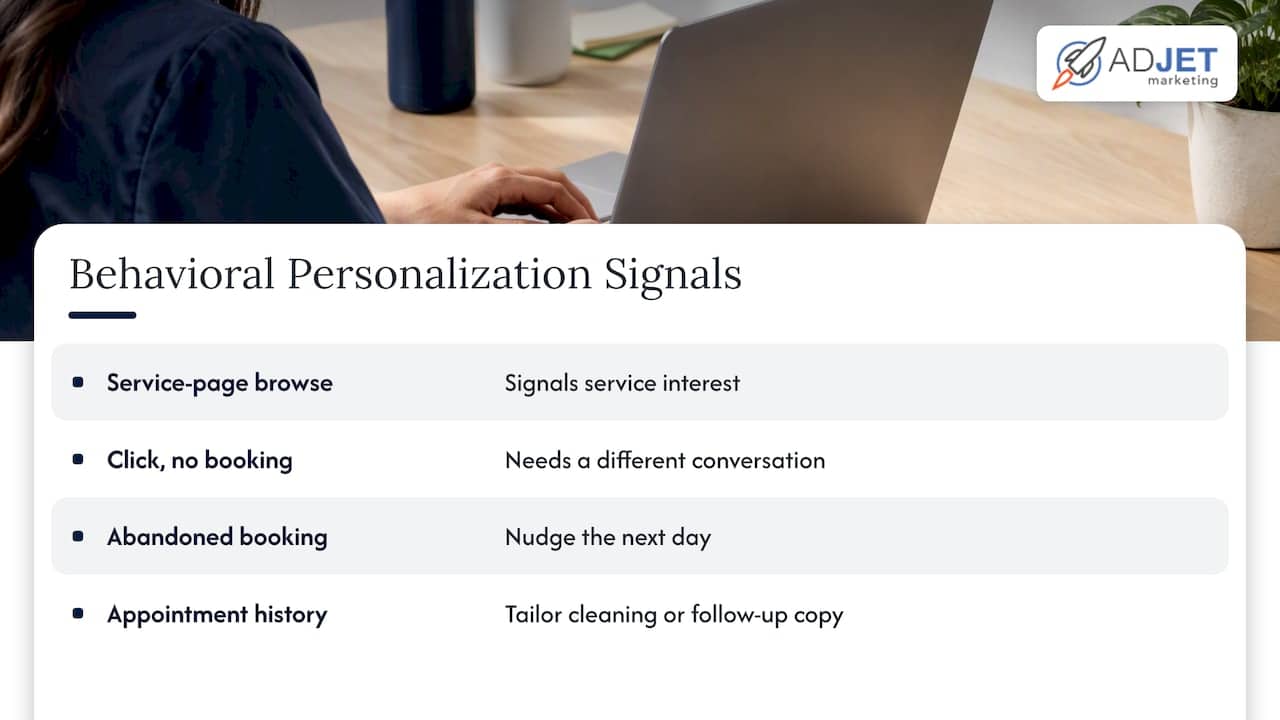
Lapse length and patient value are a solid starting point, but behavioral signals sharpen the message further. A patient who clicked a link but didn’t book is a different conversation than one who never opened the email at all, and your messaging should reflect that.
Behavioral triggers worth building into your sequence include browsing a service page on your website, clicking a previous email without booking, or abandoning an online booking form partway through. Each of these signals a different level of intent, and a patient who abandoned a booking form is often one short nudge away from completing it, maybe a reminder email the next day rather than waiting the full sequence.
Patient preferences matter too. Some patients respond better to a direct, no-frills message, while others want to understand the benefit before clicking anything. If your practice management system captures appointment type history, you can tailor the message: a patient overdue for a cleaning gets different copy than one who skipped a follow-up consultation.
None of this requires complex technology. Most practice management systems and email platforms support merge fields for name, last visit type, and next recommended visit, which covers the bulk of what personalization needs to accomplish. The goal isn’t sophistication for its own sake, it’s matching the message to where the patient actually is in their relationship with your practice.
Best Timing Strategies Based on Patient Demographics and Visit History
Timing a reactivation email well depends on who you’re emailing and why they stopped coming in. A patient who missed a routine cleaning behaves differently than one who dropped off after a more involved treatment plan.
For routine care gaps, six months is often the right trigger point to start the sequence, since that’s typically when a recall reminder would have gone out anyway. For treatment-incomplete patients, a shorter gap, perhaps 60 to 90 days of inactivity, justifies starting outreach sooner, since continuity of care matters more there.
Send time also shifts by audience. Working-age patients tend to check email early morning or evening, while retired patients often engage mid-morning. If your list skews toward one group, test send times accordingly rather than defaulting to a single company-wide schedule.
Seasonality plays a role too. Dental and medical practices often see a dip in bookings around major holidays, so timing a reactivation push for early January or right after summer vacations tends to catch patients when they’re already thinking about catching up on appointments they’ve been putting off.
Fitting Reactivation Emails Into Your Broader Retention Strategy
A reactivation email campaign works best as one piece of a larger retention system, not a standalone fix for patient attrition. If patients keep lapsing at the same rate every quarter, the email sequence is treating a symptom rather than the cause.
Pair reactivation emails with stronger recall processes on the front end, like automated appointment reminders and a clear post-visit follow-up cadence, so fewer patients become “lapsed” in the first place. When reactivation does work and a patient rebooks, that’s the moment to reinforce the relationship: a good first-visit-back experience matters more than the email that got them there. For a closer look at building that full retention loop, our piece on patient retention strategies walks through the recall and follow-up side in more detail, and our guide to patient email marketing covers what’s allowed and what tends to convert.
Reactivation campaigns also generate useful data for the rest of your marketing. Patients who open emails but never book are often good candidates for a retargeting ad or a direct mail piece, two channels that tend to work better together than either does alone.
Using Incentives to Increase Reactivation Rates
A modest incentive can move a patient from “I’ll get to it eventually” to booking this week, but the offer needs to fit the service and feel proportionate, not desperate.
For routine care, a small perk like a complimentary add-on service or a discounted first visit back tends to work better than a steep percentage discount, which can read as a sign that something’s wrong with demand. For higher-value services, a limited-time scheduling incentive, such as priority booking for a popular appointment slot, often performs better than a price cut.
Time-bound offers create urgency without feeling pushy. “Book by the end of the month” gives patients a reason to act now rather than letting the email sit in their inbox for another six weeks. Keep the offer simple enough to state in one sentence, since a complicated incentive buried in paragraph three of an email rarely gets noticed.
One caution: incentives work best in Email 2 of the sequence, not Email 1. Leading with a discount can train patients to wait for one every time, while a value-led first email followed by a time-limited offer in the second message tends to convert better without devaluing your services.
Automation Tools and Platforms for Medical Practice Email Campaigns
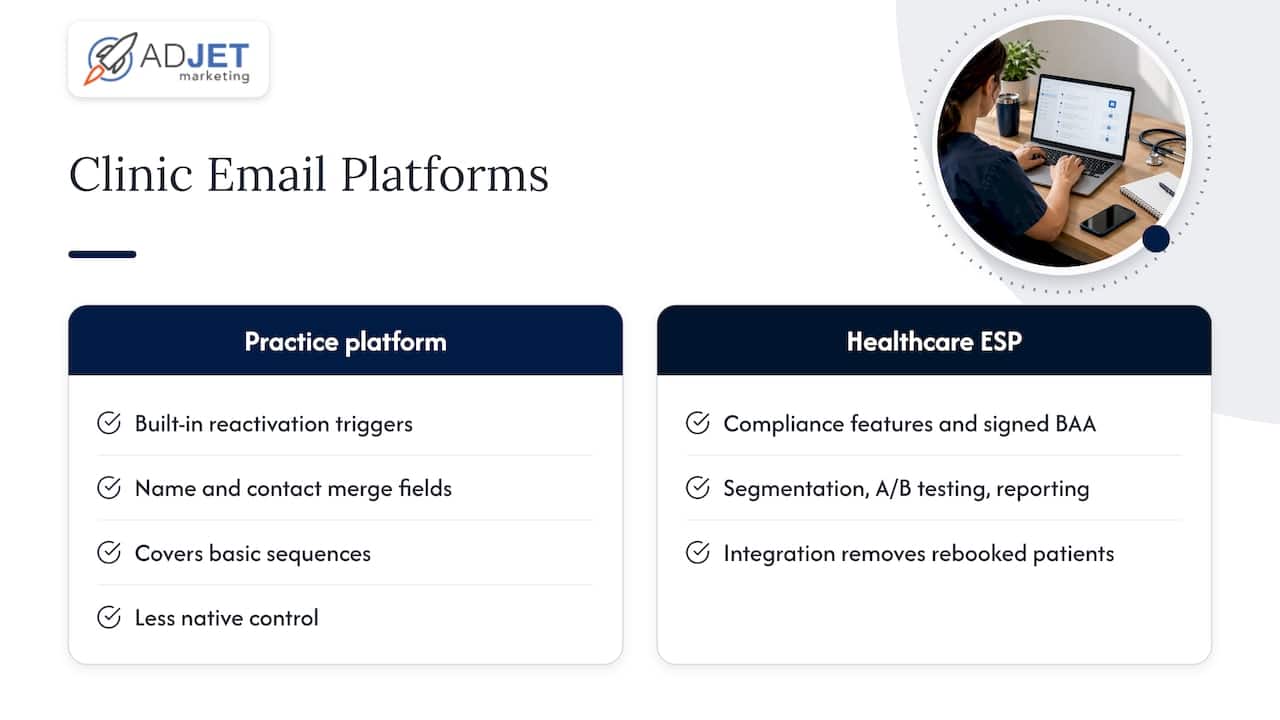
Most practices don’t need a custom-built system to run a reactivation campaign. Many practice management platforms, including systems like Open Dental, include built-in reactivation triggers and merge fields for patient name and clinic contact details, which covers a good chunk of what a basic sequence needs.
For practices that want more flexibility in design and testing, a dedicated email service provider with healthcare-specific compliance features, paired with a signed Business Associate Agreement, gives you more control over segmentation, A/B testing, and reporting than most practice management systems offer natively. The tradeoff is integration work: you’ll need your ESP and your practice management system talking to each other so that a rebooked appointment automatically removes that patient from the lapsed list.
Whichever platform you choose, verify merge fields at scale before a full send. A misaddressed name or a clinical detail that slips into the wrong field is a bigger problem in healthcare email than in most other industries, so an internal test batch across several accounts is worth the extra ten minutes. For practices integrating billing or claims data into their marketing systems, a practice management data workflow that handles code validation separately from patient communications keeps clinical and marketing data appropriately separated.
The Real Limits of Email Reactivation
Email is cheap and scalable, but it rarely closes the loop by itself. The campaigns that actually move the needle pair automated email with staff phone outreach for your highest-value segments, and sometimes a small paid retargeting push for patients who clicked but never booked. Budget your time accordingly: a basic sequence can be built in a day, but the phone follow-up is where the real conversions happen.
— Felix
How We Help Practices Build Compliant, Converting Reactivation Programs
Setting up a reactivation sequence is straightforward in theory, but getting the compliance details right while still writing copy that actually gets opened takes more coordination than most front desks have time for between patients. We build the technical and creative pieces together, so neither one gets neglected.
Here’s what that typically looks like when we work with a clinic:
- Campaign setup and sequencing, built around your patient list and segmented by lapse length and value.
- HIPAA-safe workflows, including secure handling of PHI across your marketing stack.
- Booking-focused landing pages built to convert email clicks into scheduled appointments, not just clicks.
- A simple playbook your front desk can follow for phone follow-up on flagged patients.
If you’re weighing whether to build this in-house or bring in support, a quick audit of your current patient list and email setup is a reasonable starting point. You can also look at a Starter Plan built around $299 per month if a dedicated landing page for your campaign makes sense. Reach out and we’ll walk through what a reactivation campaign would look like for your practice specifically.
This article is general information, not a substitute for advice from a qualified doctor. Consult a qualified healthcare professional about your own circumstances before acting on anything here.
FAQ
What are reactivation emails?
Reactivation emails are messages sent to patients who haven’t booked an appointment in a while, designed to remind them of the benefit of returning care and prompt them to schedule. They typically run as a short automated sequence, often three emails over two to three weeks, rather than a single one-off message.
How do I email a patient?
Email a patient only through a HIPAA-aware workflow: use a provider covered by a signed Business Associate Agreement, encrypt the message, and avoid including clinical details in the email body itself. HIPAA permits provider-patient email communication when reasonable safeguards are in place, and documented consent is recommended if a patient requests unencrypted email.
How is email used in healthcare?
Email in healthcare is commonly used for appointment reminders, recall and reactivation campaigns, and general practice communications, rather than for clinical discussions. Sensitive health information is generally routed to a secure patient portal instead of an email inbox.
Can I email patient information?
You can email limited patient information under HIPAA if your practice has reasonable safeguards in place, such as encryption and a signed Business Associate Agreement with your email provider. Protected health information is better routed through a secure portal whenever the content is clinical rather than purely administrative, like a scheduling reminder.
Sources
- Hhs
- CAN-SPAM Act: A Compliance Guide for Business | Federal Trade Commission
- Is email HIPAA compliant? Rules for client messaging | Practice Better
- HIPAA Compliance for Email – Updated for 2026 | HIPAA Journal