









Google Analytics 4 (GA4) can tell a clinic which channels bring in appointment requests, calls and bookings, as long as it is set up around those actions and kept free of patient information. That means a correctly installed tag, a short list of lead events, a few reports you actually read, and clear rules about what never gets sent to Google. This guide walks through each step in the order we would do it for a clinic.
TL;DR
- GA4 records interactions as events, so a clinic should define which events count as a patient lead (form submit, call click, booking step) before building any reports.
- Install the Google tag or Google Tag Manager, never both, then confirm data in Realtime and DebugView.
- Keep protected health information (PHI) out of GA4. HHS guidance says a privacy policy notice alone does not authorize disclosing PHI to a tracking vendor.
- Read User acquisition, Traffic acquisition and key event paths first. Link Google Ads so ad clicks connect to lead events.
- Review your tags, data retention and redaction settings on a regular schedule, not just at launch.
Table of Contents
- What GA4 measures, and why it suits a clinic website
- Decide what a lead is before you touch settings
- Step-by-step GA4 setup for a clinic website
- HIPAA first: what must never reach GA4
- Which events to track, and how to name them
- The GA4 reports a clinic should read
- Privacy and data settings to check
- Connect Google Ads to GA4 without fooling yourself
- Our perspective
- How we can help
- Common GA4 mistakes we see on clinic sites
- FAQ
- Sources
What GA4 measures, and why it suits a clinic website
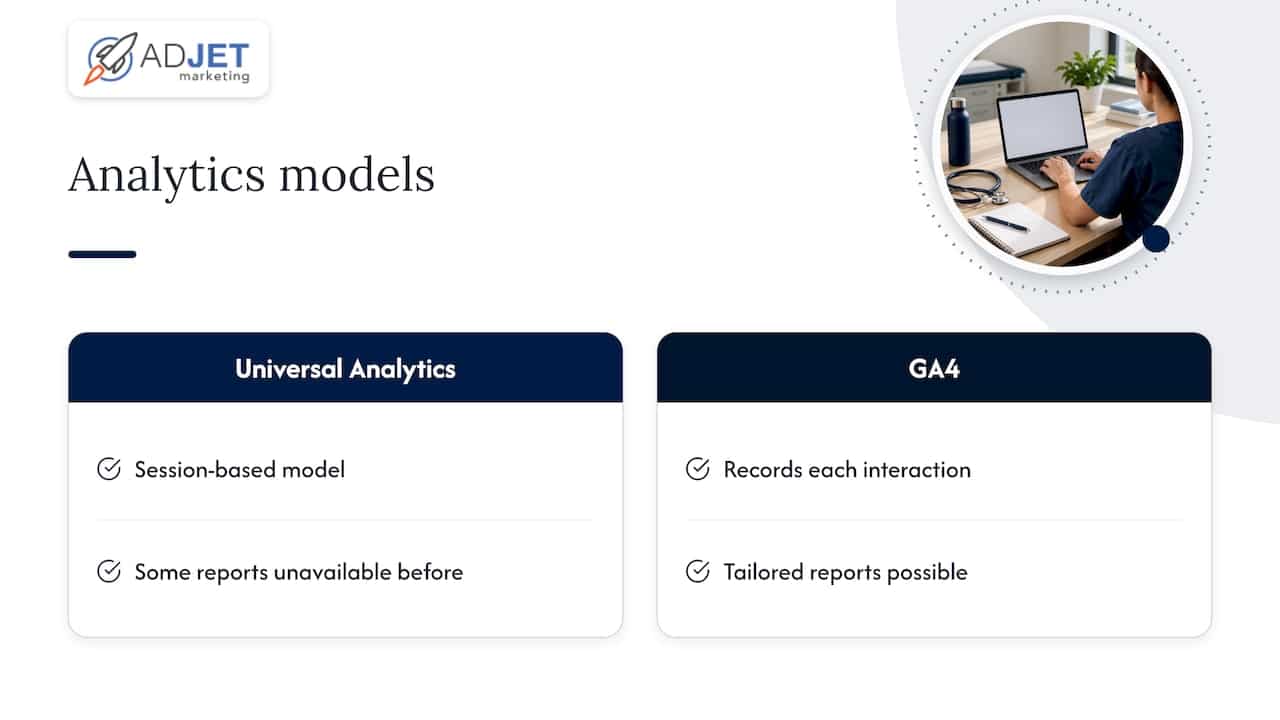
GA4 is built on events. Google describes an event as a specific interaction on a website or app, such as loading a page, clicking a link or completing a purchase (Google Analytics Help, About events). Each interaction is recorded individually. Its predecessor, Universal Analytics, relied on a session-based model, and a dental association journal article on GA4 notes that GA4 instead tracks clicks, downloads, scrolling and similar actions one by one (Virginia Dental Journal, Google Analytics 4: What You Need to Know).
For a clinic, this fits how patients actually behave. Someone reads a service page, scrolls to the pricing or insurance section, taps the phone number, and later submits a form. Those are separate actions, and an event model can record each one. The same article adds that GA4 lets a practice build reports tailored to its needs, including reports that were not possible before, though it takes a deeper understanding of the platform to do so.
That last point matches what we see. Many clinics come to us with GA4 installed but with only page views flowing in. The traffic number looks healthy, yet nobody can say how many appointment requests came from search, from ads or from referrals. The fix is almost never more data. It is defining which actions matter and measuring those.
Decide what a lead is before you touch settings
Write down your lead actions on a single page first. For most clinics the list looks like this:
- Appointment request or contact form submitted.
- Phone number clicked or call started from the site.
- Online booking started and booking completed (if you use a scheduler).
- Click to get directions, if walk-in visits matter to you.
- Insurance or financing inquiry, if you offer it.
Keep the list short. Each property is limited to 30 custom key events (Google Analytics Help, configuration limits), and a long list tends to hide the few actions that pay the bills. Mark only the true business outcomes as key events and keep softer signals, like scroll depth, as ordinary events.
Step-by-step GA4 setup for a clinic website
Google’s own setup guidance gives a clear path (Google Analytics Help, Set up Analytics for a website). Applied to a clinic:
- Create the property. Set the reporting time zone to your clinic’s local zone and the currency to U.S. dollars. Choose a lead-generation goal when prompted.
- Add a Web data stream and keep Enhanced Measurement on, which collects page views and other common events automatically.
- Install the Google tag. Use a supported CMS integration, where you can usually paste the G- Measurement ID, or add the tag manually to every page right after the opening head tag. On a WordPress site, a CMS integration is usually the cleanest route.
- Wait, then verify. Collection can take up to 30 minutes to begin. After that, open Realtime to confirm data is arriving.
One rule saves a lot of cleanup: use either the Google tag or Google Tag Manager, not both. Google warns that installing both can overcount your website data, and that the tag must be on every page whose activity you want measured (Google Analytics Help, Troubleshoot tag setup). Check this on thank-you pages, landing pages and any subdomain used for booking, since those are the pages most often missed.
Confirm the data is real
Realtime has an Event count by Event name card that shows events triggered in the last 30 minutes. DebugView goes further: it shows one user’s events and parameters so you can check that each event fires once, with the right name (Google Analytics Help, About events). Submit your own test form, click your own call button, and watch the events appear. If a form submission shows up twice, fix it before you build any reporting on top.

HIPAA first: what must never reach GA4
This is the part that separates clinic analytics from analytics for a retail store. HHS has published guidance on online tracking technologies used by HIPAA-covered entities. It says disclosures of PHI to tracking vendors must be permitted by the Privacy Rule, and that a business associate agreement (BAA) is required when the vendor qualifies as a business associate (HHS, Use of Online Tracking Technologies by HIPAA Covered Entities and Business Associates). The same guidance states that telling people about tracking in a privacy policy does not by itself amount to a valid HIPAA authorization for disclosing PHI to a tracking vendor.
In practice, the safest approach for a clinic’s GA4 is to keep PHI out of it entirely. Here is how we think about it:
| Safe to measure | Keep out of GA4 |
|---|---|
| That a form was submitted (a generic generate_lead event) | The contents of the form: name, email, phone, symptoms, diagnosis |
| That a visitor clicked the phone number | Caller details or what was discussed |
| That booking was started or completed | Appointment type tied to an identifiable person, provider names combined with user data |
| Traffic source and landing page | Query strings or URLs that carry names, emails or condition details |
The URL row catches many clinics. If your booking or patient portal passes details in the page address, GA4 can record that address. Review your thank-you page URLs, form action URLs and any parameters appended by your scheduler.
HIPAA applicability depends on whether you are a covered entity and which pages a visitor is on, such as an authenticated patient portal versus a public service page. Have your privacy officer or healthcare counsel confirm your setup. We build and manage tracking with HIPAA-compliant processes in mind, but the compliance decision belongs to the clinic and its counsel. For the ad side of this question, see our guide on HIPAA-compliant marketing with Google Ads.
Which events to track, and how to name them
Google publishes recommended event names so your data stays consistent. For lead generation, it recommends generate_lead when a visitor submits a form or information request. It also lists qualify_lead, working_lead, close_convert_lead and close_unconvert_lead for a fuller funnel (Google Analytics Help, Recommended events).
Here is a practical event map for a clinic:
| Patient action | Suggested event | Mark as key event? |
|---|---|---|
| Appointment or contact form submitted | generate_lead | Yes |
| Click on the phone number | A custom event such as click_to_call | Yes |
| Booking calendar opened | A start-of-booking event | Optional |
| Booking completed | A completed-booking event | Yes |
| Lead reviewed by front desk, later booked | qualify_lead, close_convert_lead (imported from your CRM) | Only if you import them |
If you use an online scheduler, check what it already sends. For example, one electronic medical records vendor documents that, when its booking page is connected to GA4, entering the booking calendar sends an InitiateCheckout event and completing a booking sends a Purchase event (OutSmart guide, Tracking Bookings in Google Analytics 4). That is a useful reminder: a booking tool may label events with retail names. Rename or map them in your reporting so a booking is not confused with revenue.
Phone calls deserve their own attention. For many clinics, calls are the highest-value lead type, and a click on a number is only a proxy for a real call. We cover that in detail in our walkthrough on fixing phone call conversion tracking for clinics.
The GA4 reports a clinic should read
You do not need every report. Start with these, and Google’s documentation explains what each answers (Google Analytics Help, attributing credit for key events):
- User acquisition: how completely new users found your site.
- Traffic acquisition: how new and returning users found it. This is where you compare organic search, paid search, direct and referral traffic.
- Key event paths: the common paths people take to a key event, with attribution credit.
- Model comparison: compares attribution models side by side.
GA4 uses data-driven attribution by default, so credit for a lead is spread across the touchpoints that contributed, not handed to the last click. That matters for clinics, where a patient might find you through a search result, return through a branded search a week later, and book by phone.
A monthly review in 30 minutes
- Open Traffic acquisition and filter by key events. Note which channels produced form submissions and call clicks.
- Open the landing page report and sort by key events. Find the pages that bring traffic but no leads.
- Check key event paths for the two or three most common routes to a lead.
- Compare GA4’s lead count with your front desk’s count. They will not match exactly, and the gap is useful: it tells you where tracking is missing, such as calls that never touched the site.
Good habits matter more than complex dashboards. If you want a view of what typical rates look like by clinic type, our clinic conversion rate benchmarks page covers it.
Privacy and data settings to check
Two settings deserve a place on your checklist.
Data retention. GA4 lets you set event data retention up to 14 months (Google Analytics Help, configuration limits). Longer retention helps with year-over-year comparisons of seasonal services. Choose the period that matches your reporting needs and your internal data policy.
Data redaction. Google notes that data redaction can help prevent inadvertent collection of personally identifiable information. It also states that you remain responsible for meeting regulatory requirements and should use DebugView to test what is actually collected (Google Analytics Help, Data redaction). Redaction is a safety net, not a substitute for designing forms and URLs that never carry personal details in the first place.
Add a recurring tag review to your calendar. Whenever your web team adds a plugin, a chat widget, a new scheduler or a new ad pixel, re-test with DebugView and review what leaves the site. Most tracking problems we see in clinics start with a change someone made months after launch.
Connect Google Ads to GA4 without fooling yourself
Linking Google Ads to GA4 lets you follow the customer cycle from first interaction with your marketing to the goal being reached (Google for Developers, Analytics for marketers). A single property supports up to 400 Google Ads links, which is far more than a clinic group will need (Google Analytics Help, configuration limits). Google also recommends using audience segmentation to align marketing with specific user groups, which is where HIPAA caution applies again: build audiences from non-sensitive behavior, never from condition-specific pages without compliance review.
A few habits keep ad reporting honest:
- Pick one primary conversion per campaign goal. If form submits, call clicks and page views all count as conversions, Google Ads will optimize toward the easiest one.
- Compare platforms, expect differences. Google Ads and GA4 use different attribution logic and time windows, so their lead counts rarely match. Use each for what it does well.
- Judge by booked patients, not clicks. Reconcile with your scheduling system monthly. Lead quality, not lead volume, is usually the real problem.
- Give campaigns time. Data-driven attribution and bidding both need enough conversion volume to be meaningful, so avoid changing tracking or targeting every week.
For campaign structure once tracking is sound, see how to optimize Google Ads for medical clinics and our 20 tips for healthcare Google Ads.
Paid ads and SEO in the same report
GA4 is also where you compare channels fairly. Paid search can produce leads quickly once tracking and landing pages are in place. SEO tends to build over a longer period, and its leads show up under organic search in Traffic acquisition. Neither replaces the other for every clinic. A balanced view of both, using the same lead events, helps you decide where the next budget dollar goes.
Our perspective
Most clinics we work with do not have a data shortage. They have a definition shortage. Nobody agreed on what counts as a lead, so the numbers argue with each other.
Our approach is to start with the front desk, not the dashboard. We ask how patients actually reach you, then build a small set of events around those actions, keep PHI out of the measurement layer, and test it in DebugView before anyone reads a report. It is slower than switching on defaults, and it is the reason the reporting is trusted months later.
We also avoid promising what analytics cannot deliver. GA4 will not give you perfect attribution, and no agency can honestly say otherwise. What it gives you is a consistent, privacy-conscious record you can compare month to month, which is what good decisions about ads, SEO and landing pages need. As a Google Partner agency with HIPAA-compliant processes, we set that up and report on it transparently.
Felix
How we can help
If you would rather not configure tracking yourself, we set up GA4 event tracking as part of our Google Ads management and conversion rate optimization work. Tracking is only useful if the pages behind it convert, so we also build and improve landing pages for clinics. Our published Starter Plan is $299 per month, and other plans and services are described on that page. Tell us what your front desk sees today and we will map it to events you can trust.
Common GA4 mistakes we see on clinic sites
These patterns repeat across clinics of every size:
- Two installs of the same tag. A theme plugin adds the tag and someone adds Google Tag Manager as well. Page views double and conversion rates look strangely low.
- Form data in URLs. A thank-you page address carrying a name or email lands in analytics. Fix the form, not just the filter.
- Counting every button as a conversion. When everything is a key event, nothing is. Keep the list short.
- Ignoring call leads. Many high-intent patients phone rather than fill in forms, so site-only tracking undercounts the channel that matters.
- Never testing after changes. A redesign or new scheduler can silently break events. Re-check in DebugView after every site change.
- Reading one metric alone. Traffic without lead events says little. Always pair visits with the actions that matter.
A landing page that is clear about the service, the next step and how to reach you also makes every one of these metrics easier to read. Our overview of medical landing page elements that convert explains what we build into them.
FAQ
Is GA4 HIPAA compliant for clinics?
HHS does not certify analytics tools. Its guidance says PHI disclosures to tracking vendors must be permitted by the Privacy Rule, and a BAA is required when the vendor is a business associate. The safest practice is keeping PHI out of GA4 and having your privacy officer or healthcare counsel review your setup.
How long does it take for GA4 data to appear?
Google says collection can take up to 30 minutes to begin after you install the tag. After that, Realtime shows events from the last 30 minutes, and DebugView lets you inspect your own test events. Standard reports can take longer to fill in, so use Realtime for setup checks.
Can I use Google Tag Manager and the Google tag together?
Google advises using one or the other. Installing both can overcount your data. Choose one method, install it on every page you want measured, and verify with DebugView.
What should a clinic track as a lead in GA4?
Start with form submissions (the recommended generate_lead event), phone number clicks and completed bookings. Mark only those true outcomes as key events, and send no names, symptoms or other patient details with them.
How long should I keep GA4 data?
GA4 allows event data retention of up to 14 months. Pick the period that supports your reporting, such as comparing a service’s seasonal demand with the prior year, and that fits your organization’s data policy.
Sources
- Google Analytics Help: About events
- Google Analytics Help: About events (Realtime and DebugView)
- Virginia Dental Journal: Google Analytics 4, What You Need to Know
- Google Analytics Help: Configuration limits
- Google Analytics Help: Set up Analytics for a website
- Google Analytics Help: Troubleshoot tag setup
- HHS: Use of Online Tracking Technologies by HIPAA Covered Entities and Business Associates
- Google Analytics Help: Recommended events
- OutSmart guide: Tracking Bookings in Google Analytics 4
- Google Analytics Help: How to attribute credit for key events
- Google Analytics Help: Data redaction
- Google for Developers: Analytics for marketers