








Configure three gallery defaults today: turn on an image sitemap, load first-row images eagerly instead of lazy-loading them, and set explicit width and height on every image. Then run a five-point audit using PageSpeed Insights and Google Search Console. These two moves fix the problems that most often keep before-and-after gallery SEO from working, and they typically show up fast in Google Images indexing and page speed scores.
TL;DR:
- Ensuring image sitemaps include up to 1,000 images and verifying indexation in Search Console can significantly improve gallery visibility in Google Images.
- Eagerly load the first image row and add high fetch priority to the hero image to address most largest contentful paint issues and speed up page loads.
- Providing explicit width and height attributes on images prevents layout shifts and improves user experience, especially on mobile devices.
- Drafting alt text and captions in bulk before review reduces editing time and enhances image relevance for SEO and accessibility purposes.
- Implementing these fixes usually takes one to two weeks for routine issues and four to eight weeks for comprehensive gallery overhauls, with external developer help often necessary.
Table of Contents
- Why before-and-after galleries matter for SEO and leads
- Gallery-scale checklist: nine levers, and which ones you set once
- High-impact technical fixes and how to verify each one
- Alt text, captions, and consent: content and compliance basics
- Practical tooling and team workflow for large galleries
- A quick five-point audit and how to track progress
- Agency perspective: realistic timelines and where help pays off
- FAQ
- Sources
- Agency help with gallery SEO and consent workflows
Why before-and-after galleries matter for SEO and leads
A before-and-after gallery is often the single page that turns a browsing visitor into a booked consultation. It also happens to be one of the most technically demanding pages on a clinic website, because every photo is both an SEO opportunity and a performance liability. Visual search traffic from Google Images carries strong intent: someone searching “rhinoplasty before and after” has already decided the procedure interests them, they are comparing providers. When a gallery loads slowly or images never get indexed, that intent goes to a competitor’s site instead.
We see this pattern constantly with clinic sites that come to us after their galleries have quietly stopped contributing leads:
- Large galleries with dozens of unoptimized images slow down the whole page, not just the gallery section.
- Images never appear in Google Images because nothing tells Google they exist.
- Visitors bounce before the gallery finishes loading, so the proof that would have convinced them never gets seen.
Each of those is measurable: indexed image count in Search Console, Largest Contentful Paint time, and the ratio of gallery visits to consult requests.
Gallery-scale checklist: nine levers, and which ones you set once
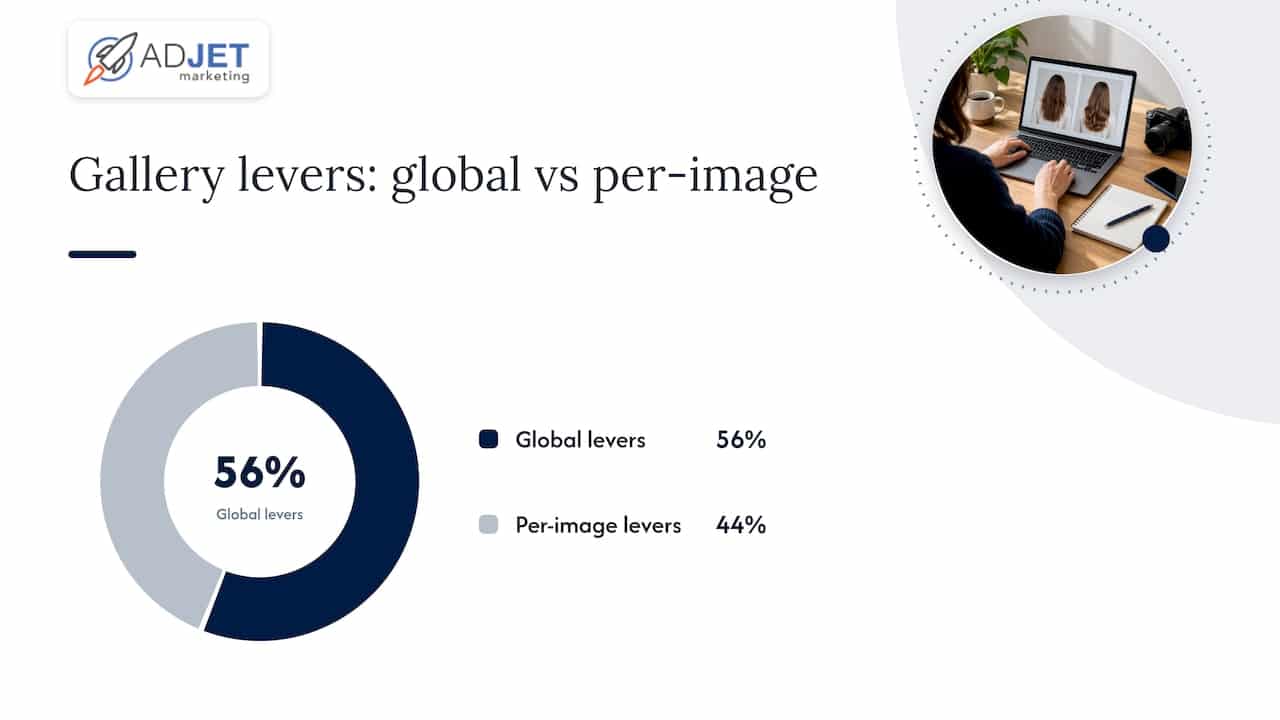
Treat a gallery as image SEO at scale rather than a one-off design task. A practical framework divides the work into levers you set globally, once, across the whole gallery template, and levers you handle per image. Mixing these up is the most common reason gallery SEO projects stall: teams try to hand-edit settings that should be automatic, and never get to the photo-level work that actually needs a human.
Global levers, set once in your theme or gallery plugin:
- Image format and compression policy (serve WebP or AVIF with a fallback).
- Image sitemap generation, so new photos get discovered automatically.
- Loading rules: eager loading for the first row, lazy loading below the fold.
- Responsive markup (srcset and sizes attributes) generated automatically at upload.
- Schema markup for the gallery or image objects, applied at the template level.
Per-image levers, handled during upload or editorial review:
- File name, written descriptively before upload.
- Alt text, specific to what the photo shows.
- Caption, giving context a search engine and a visitor both need.
- Consent and compliance tagging, confirming the photo is cleared for marketing use.
Run the global pass first. Once formats, loading rules, srcset generation, and schema are handled at the template level, every new photo you upload inherits them automatically, and your team’s remaining work is the per-image content: alt text, captions, and filenames. A workable approach noted in applied gallery SEO guidance is to draft alt text and captions in bulk using an AI assistant, then have a staff member review and correct each entry by hand. That turns a tedious writing task into a faster editing task, and captions can often reuse the corrected alt text with small changes for tone.
Pro Tip: Draft alt text for an entire gallery in one sitting, then review it the next day with fresh eyes. You will catch generic or wrong descriptions faster when you are not also trying to write them.
High-impact technical fixes and how to verify each one
Four fixes account for most of the measurable improvement in gallery pages, and each one has a quick way to confirm it worked.
- Image sitemaps. A single sitemap can list up to 1,000 images and helps Google find photos that might otherwise be missed, especially when a gallery loads images through JavaScript or pagination. Confirm success in Search Console’s sitemap report, checking that the submitted image count roughly matches what is on the page.
- Lazy-loading the wrong images. The most common and costly mistake on gallery pages is lazy-loading the first row, which usually contains the Largest Contentful Paint element. Load the first row eagerly and add a
fetchpriority="high"attribute to the hero image. Verify by running PageSpeed Insights and checking which element it flags as the LCP. - Missing width and height. Without explicit dimensions or an aspect-ratio value, the browser reserves no space for the image, and the page jumps as photos load in. Check for Cumulative Layout Shift warnings in PageSpeed Insights.
- Responsive images and modern formats. Serve WebP or AVIF with a fallback, and use srcset with a sizes attribute so mobile devices do not download desktop-sized files. Confirm by viewing page source and checking that img tags include a srcset attribute, not just a single src.
One widely cited benchmark: image sitemaps support up to 1,000 images per file, which matters directly for clinics running large before-and-after libraries that need to split across multiple sitemap files.
Alt text, captions, and consent: content and compliance basics
Good alt text describes what the photo actually shows, specifically. “Before and after jawline filler, side profile, two weeks post-treatment” helps both a screen reader user and Google Images understand the photo, while “before and after photo” helps neither. Captions can add context the alt text skips, like the treatment plan or timeline, which also gives search engines more relevant text near the image.
Before any patient photo goes live, written authorization has to be in place. HHS guidance is direct on this point: covered health care providers need valid written authorization before any use that exposes a patient’s protected health information, and masking or blurring a photo after the fact does not substitute for that authorization. Your consent process should cover:
- A specific description of the marketing use, not a general treatment consent form.
- The exact channels where the image may appear (website, social media, ads).
- A documented right for the patient to revoke consent later.
Keep a tracking sheet linking each published photo to its signed consent, so you can act quickly if a patient asks for removal. Our practitioner playbook on before-and-after rules walks through this process in more detail for med spas specifically.
Practical tooling and team workflow for large galleries
Pick a gallery plugin or CMS feature that handles the global levers automatically: sitemap generation, srcset creation, and loading rules, so your team is not manually configuring every new upload. Use bulk AI drafting for alt text on large batches, then manually review a sample, say every fifth entry, to catch systemic errors before they multiply across hundreds of photos.
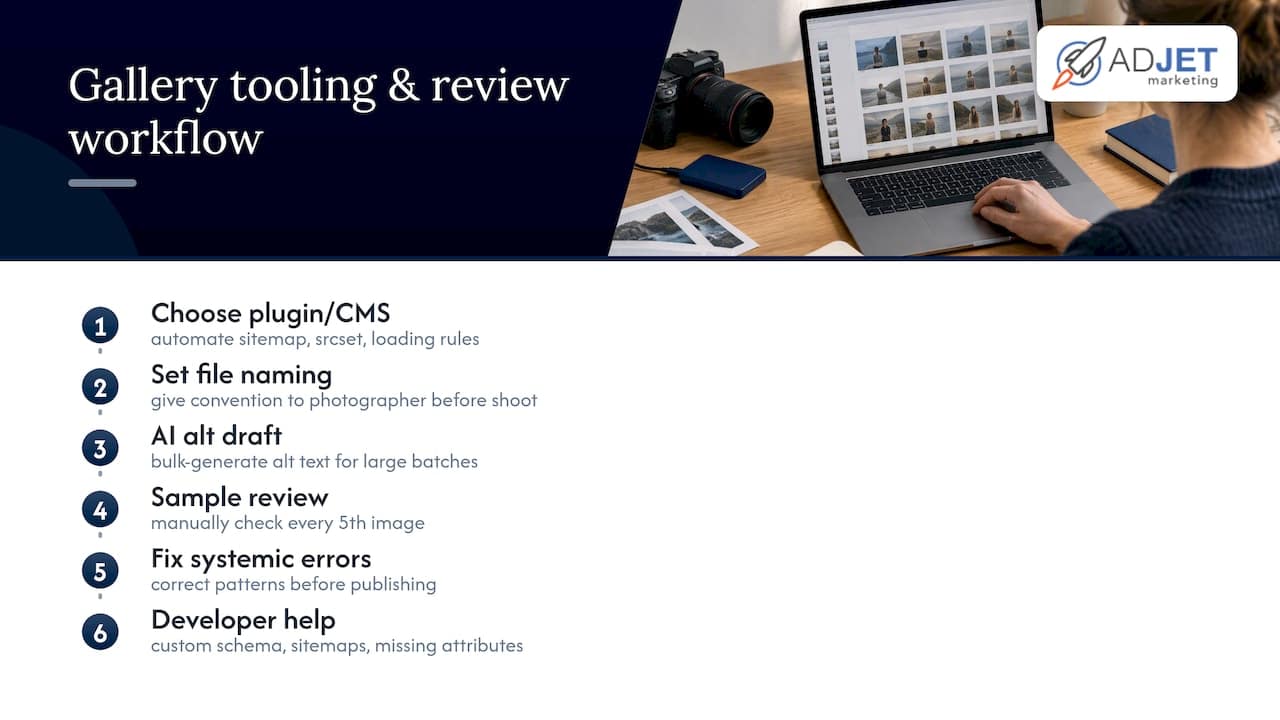
Set a file naming convention before your photographer starts shooting, something like procedure-view-timeframe.jpg, and give them a short ingestion checklist: correct naming, correct orientation, consent form signed and filed. Bring in developer help for anything beyond plugin settings: custom schema markup, sitemap generation for galleries over a few thousand images, or adding fetchpriority attributes your theme does not support natively.
Pro Tip: Give your photographer the file naming convention in writing before the shoot. Renaming hundreds of images after upload costs far more time than naming them correctly once.
A quick five-point audit and how to track progress
Run this five-point check on any gallery page in under fifteen minutes:
- Open PageSpeed Insights and check whether the flagged LCP element is a lazy-loaded gallery image.
- View page source and confirm images render as real
imgtags with srcset, not script-generated placeholders. - Check Search Console’s sitemap report for how many gallery images are actually indexed.
- Confirm srcset and sizes attributes exist on at least the first few images.
- Spot-check five alt text entries for accuracy and specificity.
Set a 90-day measurement window using Search Console’s image coverage report, Lighthouse lab scores alongside real-world Core Web Vitals, and consult bookings as the conversion metric that actually matters to the practice.
Agency perspective: realistic timelines and where help pays off
Most clinic galleries we review share the same three faults: no image sitemap, a lazy-loaded hero image, and alt text that says “before and after” on every photo. A quick audit and the highest-impact fixes usually take one to two weeks. A full gallery overhaul, including consent workflows and schema markup, runs four to eight weeks depending on gallery size. Where agencies add the most value is the parts clinics rarely have in-house: developer time for schema and sitemap work, and a documented consent process that holds up under scrutiny. Our SEO services are built around exactly this kind of technical and compliance work for healthcare clients.
— Felix
FAQ
Is SEO dead now with AI?
No, SEO is not dead. AI-driven search features have changed how results get surfaced, but Google still needs to crawl, index, and rank pages, including images, which means technical fundamentals like sitemaps and page speed matter as much as ever.
What is the 80/20 rule in SEO?
The principle in SEO generally refers to focusing effort on the small set of changes that drive most of the results, rather than treating every task as equally urgent. For gallery pages, that usually means fixing the lazy-loaded LCP image and submitting an image sitemap before worrying about smaller per-image details.
What is the best app for making before-and-after pictures?
There is no single standard app; many clinics use dedicated before-and-after comparison tools or simple side-by-side editing within their existing photo software. The more important factor for SEO is not the app you use to create the image, but whether the published photo has proper dimensions, a descriptive filename, and accurate alt text.
What are the four main types of SEO?
SEO is commonly broken into technical SEO, on-page SEO, off-page SEO, and local SEO. Gallery optimization touches mostly technical SEO (sitemaps, page speed, structured data) and on-page SEO (alt text, captions, filenames).
Do before-and-after galleries need HIPAA consent even if faces are blurred?
Yes. HHS guidance states that written authorization is required before PHI becomes accessible through media, and blurring or masking a photo afterward does not replace that authorization.
Sources
- How image galleries affect page speed (and the fixes that actually work) – FotoGrids
- Image sitemaps – Google Developers
- Guidance on Covered Health Care Providers and Restrictions on Media Access to PHI – HHS
Agency help with gallery SEO and consent workflows
Fixing a gallery’s technical SEO and building a defensible consent process both take time most clinic marketing managers do not have alongside everything else on their plate. We build these fixes directly into the websites and landing pages we create for aesthetic and medical practices, including image sitemaps, loading rules, and consent tracking set up from the start.
Our SEO services cover exactly this kind of gallery audit and fix work, paired with ongoing measurement so you can see indexed image counts and consult bookings move over the following months. If you are also weighing paid traffic to a new or updated gallery page, our Google Ads services and conversion rate optimization work pair naturally with a technically sound gallery, since a fast, well-indexed page converts better regardless of where the traffic comes from.
If your gallery has never had a technical audit, that is the place to start. Reach out to discuss a gallery and site audit and we will walk you through what we find and what fixing it would involve.