









A healthcare Google Ads audit is a structured review of your account that answers four questions: is your tracking accurate and compliant, is your budget reaching people who actually book, are your ads and landing pages approved and persuasive, and is the return measured in appointments rather than clicks. Run it in that order. Tracking and compliance come first because every other number in the account depends on them.
This guide walks through the audit the way we run it for clinics, with what to check, why it matters, and what a realistic fix looks like.
TL;DR
- Audit tracking and privacy first. If conversions count form fills instead of booked appointments, every other metric is misleading.
- Check that no tag, pixel or integration sends protected health information (PHI) to an ad platform. Test it, do not assume it.
- Read the search terms report weekly. Symptom queries, job seekers and out-of-area clicks are the most common source of waste.
- Judge campaigns by cost per booked appointment and patient value, not cost per click or cost per lead.
- Review a running account monthly, and do a full audit at least twice a year or after any site, call-tracking or booking-system change.
Table of Contents
- What a healthcare Google Ads audit covers
- Step 1: Audit conversion tracking first
- Step 2: Check policy and compliance exposure
- Step 3: Audit campaign structure and targeting
- Step 4: Review keywords and search terms
- Step 5: Evaluate ads and landing pages
- Step 6: Measure wasted spend and true return
- How often to audit
- Our perspective on healthcare audits
- Paid ads or SEO: what an audit tells you
- When to bring in help
- FAQ
- Sources
What a healthcare Google Ads audit covers
An audit is not a list of settings to tick. It is a diagnosis. You are trying to find where money leaves the account without producing patients, and whether the account puts you at regulatory risk.
For a medical, aesthetic, mental health or pain practice, five areas matter:
- Conversion tracking and data privacy
- Policy and compliance exposure
- Campaign structure, targeting and keywords
- Ads and landing pages
- Budget, bidding and true return
Many clinics come to us after a stretch of poor lead quality: plenty of form submissions, few booked consultations, and an agency report full of impressions and click-through rates. In nearly every case the cause sits in area one or area three. The platform was told to find more of the wrong conversion, or the keywords were broad enough to attract people who were never going to book.
Step 1: Audit conversion tracking first
Google Ads bidding learns from the conversions you give it. If you tell it that every contact form submission is equally valuable, it will chase the cheapest submissions, which are often spam, job inquiries, existing patients looking for the front desk, or people asking a price question with no intent to book.
What to look at
- Which actions are set as primary conversions. Page views, button clicks and scroll events should not be primary. Calls over a meaningful duration, form submissions and booking confirmations can be.
- Whether a booked appointment is a conversion at all. If your scheduling system or CRM knows who booked, that outcome should flow back to Google Ads. Google documents importing offline conversions for sales that happen by phone or through a sales rep, and recommends pairing it with enhanced conversions, which use hashed user data.
- Duplicate counting. A thank-you page tag plus a form-submit tag plus an imported conversion can triple count one lead and make cost per lead look far better than it is.
- Conversion values. A consultation for a high-value procedure and a routine visit are not worth the same. Even rough values per service line help bidding.
The privacy side of tracking
Tracking audits in healthcare have a second job: confirming you are not leaking PHI. HHS’s Office for Civil Rights has stated that regulated entities may not use tracking technologies in a way that results in impermissible disclosures of PHI to tracking technology vendors or otherwise violates HIPAA, and that they must address tracking technologies in their risk analysis and risk management processes.
The legal picture has moved since that bulletin. A federal court in Texas ruled in June 2024 that part of the guidance, the portion on certain public-facing pages, exceeded HHS’s authority, and HHS dropped its appeal. That does not make tracking on appointment pages, patient portals or symptom checkers safe. Pages where a visitor reveals a condition, a treatment interest tied to an identity, or an appointment request are where the risk concentrates. Ask your privacy officer or healthcare counsel where your line sits, and have your marketer implement it.
How to test, not guess
A practical check is to load your booking and inquiry pages with a debugging tool and submit a test entry with fake patient details. Compliance practitioners describe using Google’s Tag Assistant with mock patient information to confirm that protected data does not reach Google’s servers, and using server-side tracking to filter PHI before transmission. Whatever method you use, document it. An audit trail showing you tested and fixed issues is worth more than a policy no one checked.
If you also run Meta campaigns, the same logic applies to pixels. We cover that in our guide to the Meta Pixel and HIPAA.
Step 2: Check policy and compliance exposure
Google limits what healthcare advertisers can say, target and promote. Disapprovals cost you more than the rejected ad: weeks of idle campaigns, restricted accounts and lost momentum. During the audit, review:
- Disapproved and limited ads. Open the policy manager and look at the history, not only the current status. Repeated issues on the same landing page point to a structural problem.
- Remarketing and audience lists. Google’s personalized advertising rules restrict targeting people based on sensitive health conditions. Lists built from visits to condition-specific pages deserve a second look. Google’s own Ads policy help pages are the authority here, and they change, so check the current text rather than a summary from last year.
- Ad claims. Guarantees of results, before-and-after promises and unsubstantiated superlatives cause problems with both Google and state medical boards.
- Prescription and regulated products. Treatments involving prescription drugs or certain devices carry certification or country restrictions.
- Landing page match. The page must deliver what the ad promises, with clear business information, a privacy policy and no misleading urgency.
We keep a longer breakdown in our Google Ads compliance checklist for clinics, which is a good companion to this step.
Step 3: Audit campaign structure and targeting
Structure determines whether you can read your own results. A single campaign titled “Clinic Services” with one ad group and twenty mixed keywords tells you nothing about which service pays for itself.
Structure by service and patient value
We prefer campaigns organized around a service line and its value: for example, a pain practice separating spinal injections from physical therapy, or a med spa separating injectables from body contouring. This lets you set budgets by profitability, not by whichever service gets the most clicks. Brand terms, competitor-adjacent terms and non-brand service terms should be separated too, since brand searches convert at very different rates and can hide weak performance elsewhere.
Location settings
Check the setting that controls whether people “in or regularly in” versus “interested in” your target location can see ads. For a local clinic, the narrower option is usually right. Then compare against the geographic report. If clicks come from a county two hours away that you do not serve, you have found easy savings.
Devices, schedule and budgets
- Compare mobile and desktop conversion rates. Mobile often drives calls; desktop may drive longer forms.
- Match ad schedules to when your front desk answers the phone. A click at 11 p.m. is fine if the form works. A call at 11 p.m. that rings out is wasted.
- Look for campaigns limited by budget while others underspend. Reallocate toward the ones producing booked appointments.
Step 4: Review keywords and search terms
The search terms report is where most audits find the most waste. It shows what people actually typed before clicking.
What to flag
- Symptom and information queries. Someone searching why their knee hurts is early in research, not ready to book. Sometimes this traffic is worth having at the right price; usually it should be excluded from a campaign built for booking.
- Job and training queries. Terms like “jobs”, “salary”, “certification” or “course” are common for aesthetic and mental health practices.
- Free and low-cost intent. “Free clinic”, “cheap” and insurance-specific terms you do not accept.
- Wrong service or specialty. A pain practice that does not offer a procedure may still match to it through loose matching.
Match types and negatives
Broad match can work when conversion data is strong and the account is well constrained, since it relies on Google’s interpretation of intent. In a new or poorly tracked healthcare account it tends to spend before it learns. Check each ad group’s match types against its conversion volume, and make sure your negative keyword lists are shared across campaigns so you fix a leak once.
A useful habit: export the last 90 days of search terms, sort by spend, and mark every term as relevant, borderline or irrelevant. If the irrelevant bucket is more than a small share of spend, your structure or match types need work.
Step 5: Evaluate ads and landing pages
Traffic quality means little if the page loses the visitor. Review each ad group’s ads and the page they point to.
- Message match. If the ad says “same-week injections consultation”, the page headline should say the same thing, not a general homepage.
- Responsive search ad assets. Check that headlines are varied and not pinned in ways that block testing. Look at asset ratings with caution; they are a hint, not a verdict.
- Page speed on mobile. Most local healthcare searches happen on phones. Slow pages lose people before the form loads.
- Trust elements. Provider credentials, real reviews, clear location and hours, insurance or payment information, and an obvious next step.
- Friction in the form. Ask for the minimum. Every extra field lowers completion, and unnecessary health questions on a form increase your privacy exposure.
- Call path. If calls matter, confirm that the number is clickable, call tracking is installed correctly and staff know how to answer new-patient calls.
A dedicated landing page per service usually outperforms sending ad traffic to a general services page, because the page can speak to one decision. If that is a gap in your account, see our landing page design options, which include published monthly and one-off pricing.
Step 6: Measure wasted spend and true return
This is where you turn findings into a number. For each campaign, calculate:
| Metric | How to calculate | Why it matters |
|---|---|---|
| Cost per lead | Spend divided by form fills and qualified calls | A starting point, easily distorted by spam and low intent |
| Cost per booked appointment | Spend divided by appointments in your scheduling system | The first number that reflects real demand |
| Show rate | Appointments kept divided by appointments booked | Reveals front-desk or reminder problems |
| Cost per new patient | Spend divided by patients who completed a first visit | Closer to the truth for budgeting |
| Return on ad spend | Revenue attributed to new patients divided by spend | Needs patient value assumptions, stated openly |
You will not get perfect attribution. Phone calls, word of mouth and a prior website visit blur the picture. What you can do is use consistent definitions and compare campaigns against each other.
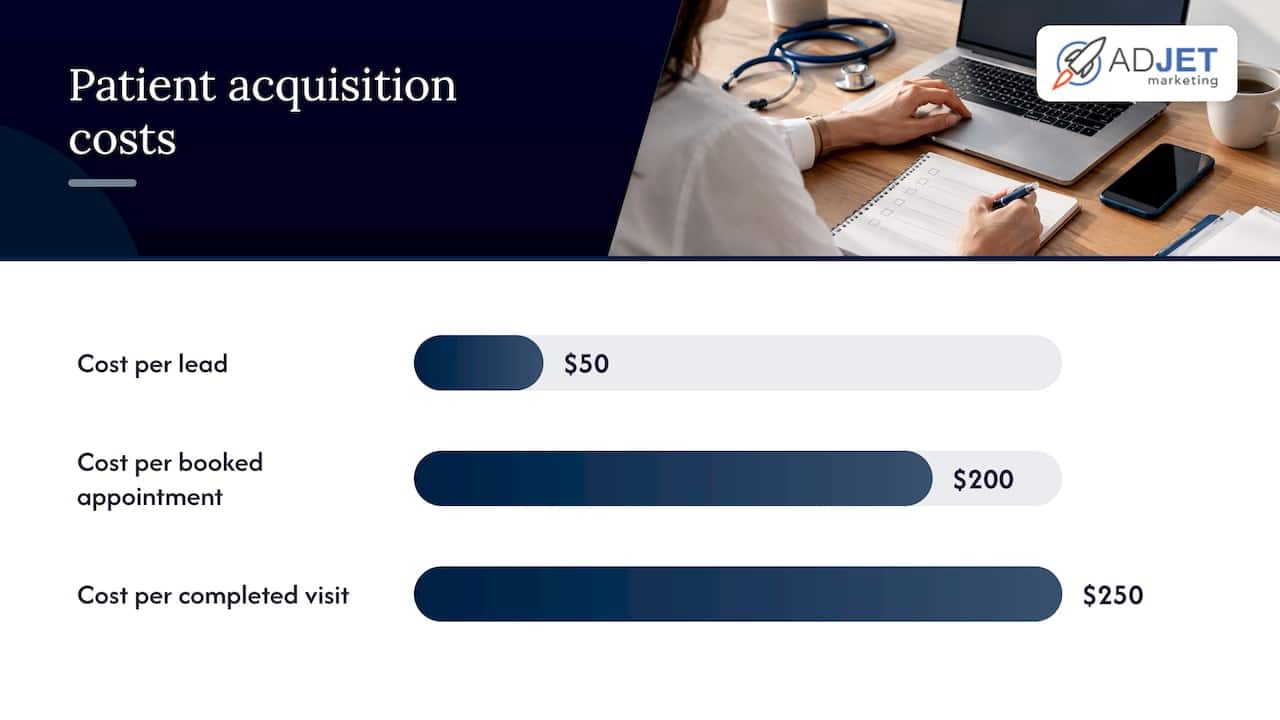
Here is a worked example with invented round numbers, only to show the logic. Suppose a practice spends $6,000 in a month and records 120 leads, a $50 cost per lead. Front-desk records show 30 of those leads booked and 24 showed up, so cost per booked appointment is $200 and cost per completed first visit is $250. If the average first-year value of a new patient is $1,200, the return is real but far thinner than the $50 figure suggested. Now suppose the search terms report shows $1,200 of that spend went to symptom queries that produced two booked visits in total. Cutting or isolating that spend has a measurable effect.
One agency publication estimates that practices spending around $6,000 a month can lose roughly $900 to $2,000 to low-intent queries, broad campaigns and tracking that cannot distinguish form fills from booked appointments. Treat that as a rough range from one source, not a benchmark. Your own account will tell you more.
How often to audit
There is no official schedule, so this is our practice, not a rule:
- Weekly (about 20 minutes): search terms, spend pacing, disapprovals, call and form volume.
- Monthly: cost per booked appointment by campaign, landing page conversion rate, budget shifts.
- Twice a year: the full audit in this article, including a privacy test of every tracking tag.
- Event-driven: after a website redesign, a new booking or patient portal, a change of call-tracking vendor, a new service line or any change in privacy counsel’s guidance.
If you are reviewing for the first time, start with tracking and search terms. Those two checks produce the clearest findings fastest.
Our perspective on healthcare audits
We are a Google Partner agency based in Texas, and we work almost exclusively with clinics, aesthetic practices, therapists and other local service businesses. The audits that matter most are rarely about a clever bid strategy. They are about whether the account was built to produce patients or to produce reports.
Three patterns repeat. First, conversion tracking counts everything and distinguishes nothing, so the system optimizes for volume. Second, the account was set up quickly for broad reach and never tightened with negative keywords and location refinements. Third, nobody looked at privacy risk until a compliance question forced it.
We also push back on two kinds of promises. An audit should not claim that fixing the account will double your leads, because results depend on your market, budget, competition and how your front desk handles inquiries. And a compliance review is not legal advice. We implement tracking so that it respects the boundaries your counsel or privacy officer sets, and we flag where a decision belongs with them.
One more point on timing: Google Ads can show movement within weeks, but bidding systems need conversion data to learn, and a restructure often dips performance briefly before it improves. Plan for a couple of months of observation after major changes, not days.
— Felix
Paid ads or SEO: what an audit tells you
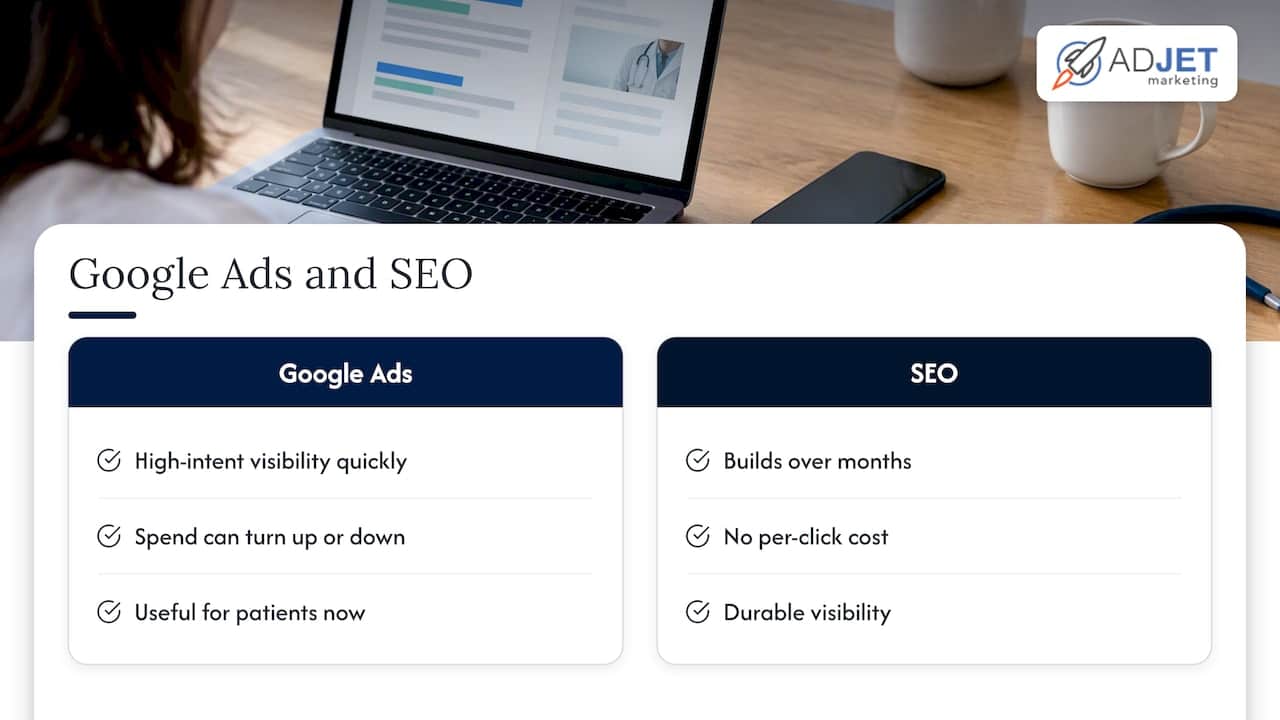
An audit often raises the question of whether to keep spending on ads. A balanced view: Google Ads gives you speed and control. You can appear for high-intent searches quickly and turn spend up or down. SEO builds more slowly, usually over months, and carries no per-click cost, but it is less predictable and harder to attribute. Most practices do best with both, using ads for service lines that need patients now and SEO for durable visibility. If your audit shows that a campaign only works at a cost per patient you cannot sustain, that is a prompt to invest in search engine optimization for that service, not necessarily to cut it.
For budgeting context, our page on Google Ads management cost for healthcare explains how to think about management fees against ad spend.
When to bring in help
You can do much of this yourself with the checklists above, especially the search terms review and the booked-appointment math. Outside help earns its fee when tracking needs server-side changes, when you need conversions imported from a scheduling system, or when you want someone accountable for fixing what the audit finds.
Our Google Ads services begin with this kind of account review: tracking, compliance exposure, structure and landing pages, followed by a plan ranked by likely impact. We do not publish a flat price for Google Ads management because it depends on account size and scope, and we would rather quote after seeing the account. For related reading, see our 20 tips for optimizing Google Ads for healthcare.
FAQ
What is a Google Ads audit for a healthcare practice?
It is a systematic review of your account’s tracking, compliance, structure, keywords, ads, landing pages and return. In healthcare, it also checks whether tags or integrations could expose patient information to an ad platform. The result should be a prioritized list of fixes, not just a score.
How often should I audit my Google Ads account?
Check search terms and spend weekly, review booked-appointment metrics monthly, and run a full audit about twice a year. Also audit after any website, booking system or call-tracking change. Those changes break tracking more often than anything inside Google Ads.
Can I audit tracking without exposing patient data?
Yes. Use test entries with fake information on your inquiry and booking pages, and inspect what each tag sends using a tag debugging tool. Document the results and have your privacy officer or counsel review anything that touches appointment or condition details.
What should I review first?
Start with conversion actions, then the search terms report. Tracking tells you whether your data can be trusted, and search terms usually reveal the most immediate waste. After that, move to location settings, ads and landing pages.
Is a free audit from an agency worth it?
It can be, if it examines your actual account data and explains findings plainly. Be cautious of audits that are only automated scores or that promise specific lead increases. Ask what they will check for privacy risk and whether they measure booked appointments.
Sources
- HHS: Use of Online Tracking Technologies by HIPAA Covered Entities and Business Associates
- AHA: HHS will not appeal court victory in online tracking case
- Google Ads API: Manage offline conversions
- Google Consent Mode on healthcare sites: V2 setup